Join us at FabCon Atlanta from March 16 - 20, 2026, for the ultimate Fabric, Power BI, AI and SQL community-led event. Save $200 with code FABCOMM.
Register now!The Power BI Data Visualization World Championships is back! Get ahead of the game and start preparing now! Learn more
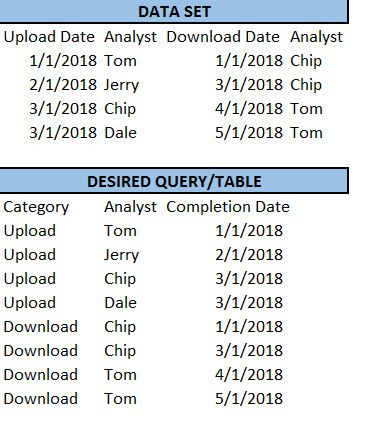
I'm able to achieve the following in SQL with a union all and where clause, but would like to be able to do this in PowerBI
Solved! Go to Solution.
You may use SELECTCOLUMNS Function (DAX) and UNION Function to add a calculated table.
After hours of trial and error with union and selectcolumns function, I was able to find a solution using your suggestion. Thanks for putting me on the right track.
@v-chuncz-msft wrote:
You may use SELECTCOLUMNS Function (DAX) and UNION Function to add a calculated table.
Hi Sam,
This puts me in the right direction, but after spending some time googling, I'm stilll having trouble getting the desired results. Could you elaborate a little more? Any help is greatly appreciated. Thanks
The Power BI Data Visualization World Championships is back! Get ahead of the game and start preparing now!
| User | Count |
|---|---|
| 61 | |
| 43 | |
| 40 | |
| 38 | |
| 22 |
| User | Count |
|---|---|
| 178 | |
| 125 | |
| 116 | |
| 77 | |
| 54 |