Join us at FabCon Atlanta from March 16 - 20, 2026, for the ultimate Fabric, Power BI, AI and SQL community-led event. Save $200 with code FABCOMM.
Register now!The Power BI Data Visualization World Championships is back! It's time to submit your entry. Live now!
Hi Guys,
I have a table with the following information:
ID; A; B; C
1; A; B; C
2; A; B; C
3; A; B; C
I want to turn these into the following table:
1; A
1; B
1; C
2; A
2; B
2; C
After googeling for a couple of hours, i can't seem to find the solution. Is there a easy solution to this?
Thank you in advance!
With kind regards,
Jeroni Jamboni
Solved! Go to Solution.
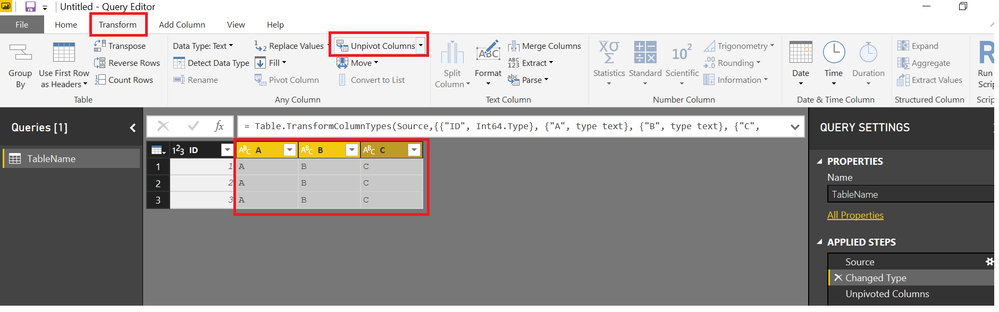
In the Query Editor,, Select the Letter Columns>>>Go to Transform Tab>>> Unpivot
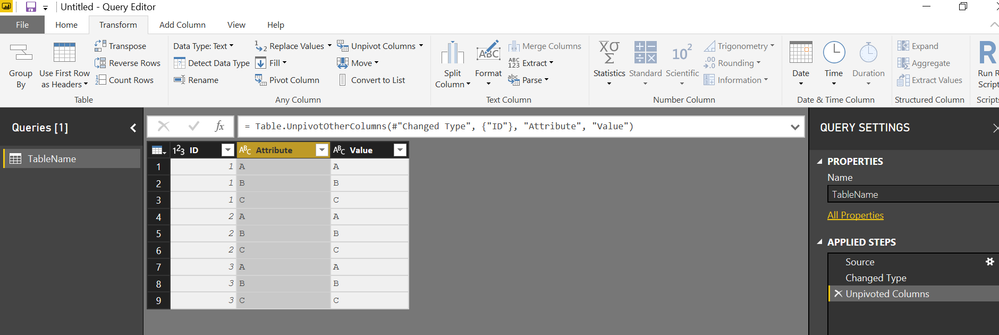
You will get below. Delete extraneous columns and rename as necessary
In the Query Editor,, Select the Letter Columns>>>Go to Transform Tab>>> Unpivot
Awesome! Works like a charm!
Thank you!
You will get below. Delete extraneous columns and rename as necessary
| User | Count |
|---|---|
| 56 | |
| 41 | |
| 38 | |
| 21 | |
| 21 |
| User | Count |
|---|---|
| 140 | |
| 102 | |
| 64 | |
| 36 | |
| 35 |