Get Fabric or SQL Certified for Free.
Get certified for free when you join Fabric Data Days 2026 and dive into Fabric, Power BI, SQL, AI, and other essential data skills.
Join now- Power BI forums
- Get Help with Power BI
- Desktop
- Service
- Report Server
- Power Query
- Mobile Apps
- Developer
- DAX Commands and Tips
- Custom Visuals Development Discussion
- Health and Life Sciences
- Power BI Spanish forums
- Translated Spanish Desktop
- Training and Consulting
- Instructor Led Training
- Dashboard in a Day for Women, by Women
- Galleries
- Data Stories Gallery
- Themes Gallery
- Contests Gallery
- QuickViz Gallery
- Quick Measures Gallery
- Visual Calculations Gallery
- Notebook Gallery
- Translytical Task Flow Gallery
- TMDL Gallery
- R Script Showcase
- Webinars and Video Gallery
- Ideas
- Custom Visuals Ideas (read-only)
- Issues
- Issues
- Events
- Upcoming Events
Data Days is here! Join us now for 60+ days of learning, challenges, and connection. Learn more
- Power BI forums
- Forums
- Get Help with Power BI
- Desktop
- Re: Combine Rows
- Subscribe to RSS Feed
- Mark Topic as New
- Mark Topic as Read
- Float this Topic for Current User
- Bookmark
- Subscribe
- Printer Friendly Page

- Mark as New
- Bookmark
- Subscribe
- Mute
- Subscribe to RSS Feed
- Permalink
- Report Inappropriate Content
Combine Rows
Hi - I am trying to combine rows for "PVColumnName" for each ProcessOrderNbr. I would like each PrcocessOrderNbr to have "Fail" and the failed comment in the same column. I tried the method where you group by table and I am getting an error when I try and do it that way. Any Ideas?
I want my table to look like this but with the Fail and Failed coment combined.
Thank you in Advanced! - Rachel



Solved! Go to Solution.
- Mark as New
- Bookmark
- Subscribe
- Mute
- Subscribe to RSS Feed
- Permalink
- Report Inappropriate Content
Hi @Anonymous ,
According to my understanding, you want to combine values of each category, right?
I did it in two ways, you could take a look at the pbix file here.
1. Use the following formula to creata a new table:
Table 2 =
VAR _t =
    SUMMARIZECOLUMNS ( 'Table'[ProcessOrderNbr], 'Table'[PVColumnName] )
VAR _t1 =
    DISTINCT (
        SELECTCOLUMNS (
            ADDCOLUMNS (
                _t,
                "a",
                    CONCATENATEX (
                        FILTER (
                            _t,
                            [PVColumnName] <> "Fail"
                                && [ProcessOrderNbr] = EARLIER ( [ProcessOrderNbr] )
                        ),
                        [PVColumnName],
                        ""
                    )
            ),
            "Pro", [ProcessOrderNbr],
            "PVC", [a]
        )
    )
VAR _t2 =
    DISTINCT ( SELECTCOLUMNS ( _t, "Pro", [ProcessOrderNbr], "PVC", "Fail" ) )
RETURN
    UNION ( _t1, _t2 )
2. In Power Query:
- New Table1: Duplicate the original table-->Select columns-->Filter PVC="Fail"-->Remove duplicate:
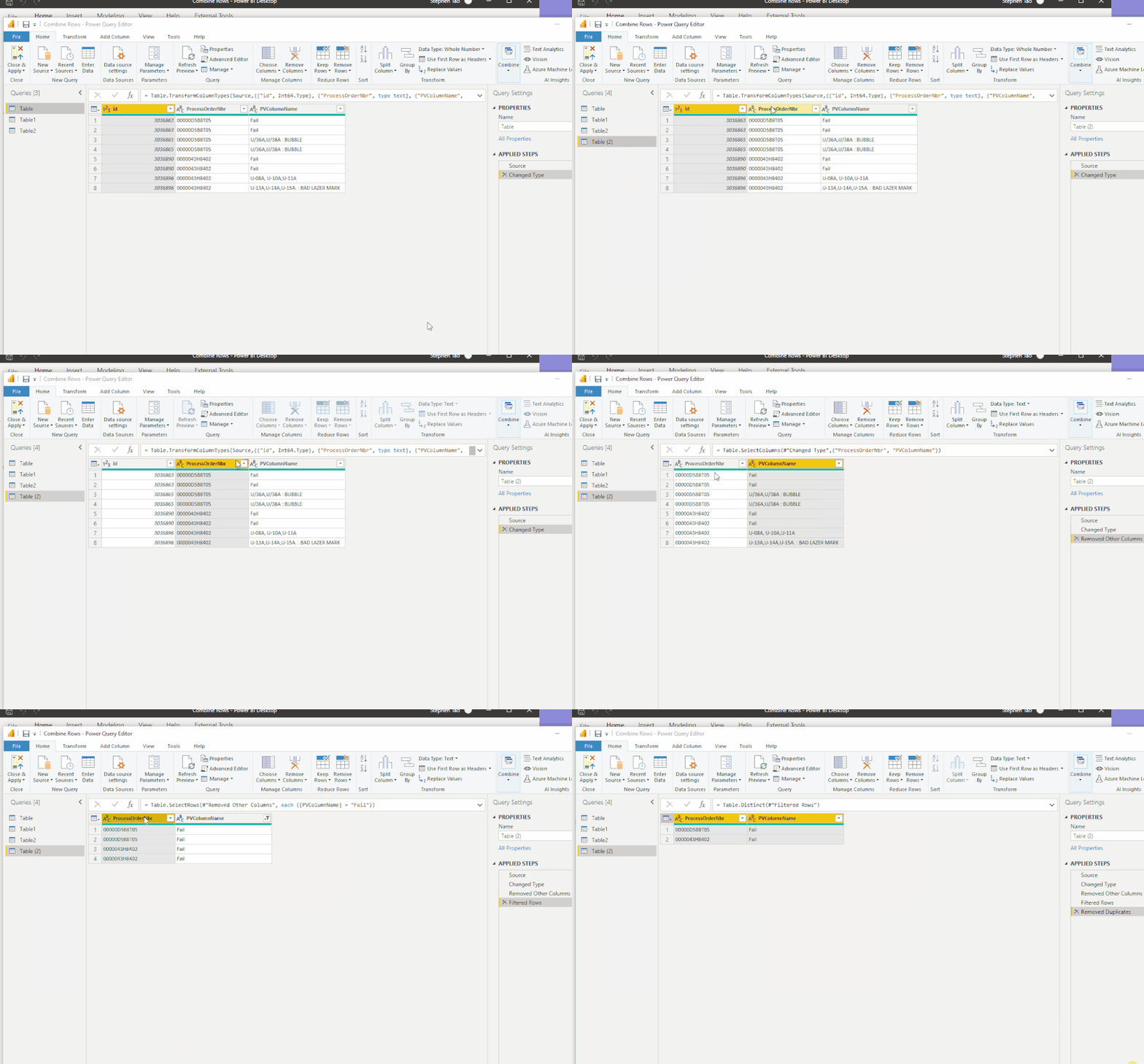
let
    Source = Table.FromRows(Json.Document(Binary.Decompress(Binary.FromText("i45WMjYwNrMwM1bSUTIAARdTJ4sQA1Mg1y0xM0cpVod4FaaYKkL1jc0cdYCkhaOClYJTqJOTjyslOiwNYDpMjD0sTAyMMFxBhAozTBWhugYWjjoKobqGBkDLdQ0NHQmpNzQGKzQBk6aOeiDHOroo+DhGuQYp+DoGeSvFxgIA", BinaryEncoding.Base64), Compression.Deflate)), let _t = ((type nullable text) meta [Serialized.Text = true]) in type table [id = _t, ProcessOrderNbr = _t, PVColumnName = _t]),
    #"Changed Type" = Table.TransformColumnTypes(Source,{{"id", Int64.Type}, {"ProcessOrderNbr", type text}, {"PVColumnName", type text}}),
    #"Removed Other Columns" = Table.SelectColumns(#"Changed Type",{"ProcessOrderNbr", "PVColumnName"}),
    #"Filtered Rows" = Table.SelectRows(#"Removed Other Columns", each ([PVColumnName] = "Fail")),
    #"Removed Duplicates" = Table.Distinct(#"Filtered Rows")
in
    #"Removed Duplicates"
- New Table2: Duplicate the original table-->Select columns-->Filter PVC<>"Fail"-->Then as @Ashish_Mathur suggested, use Text.Combine() to group rows.
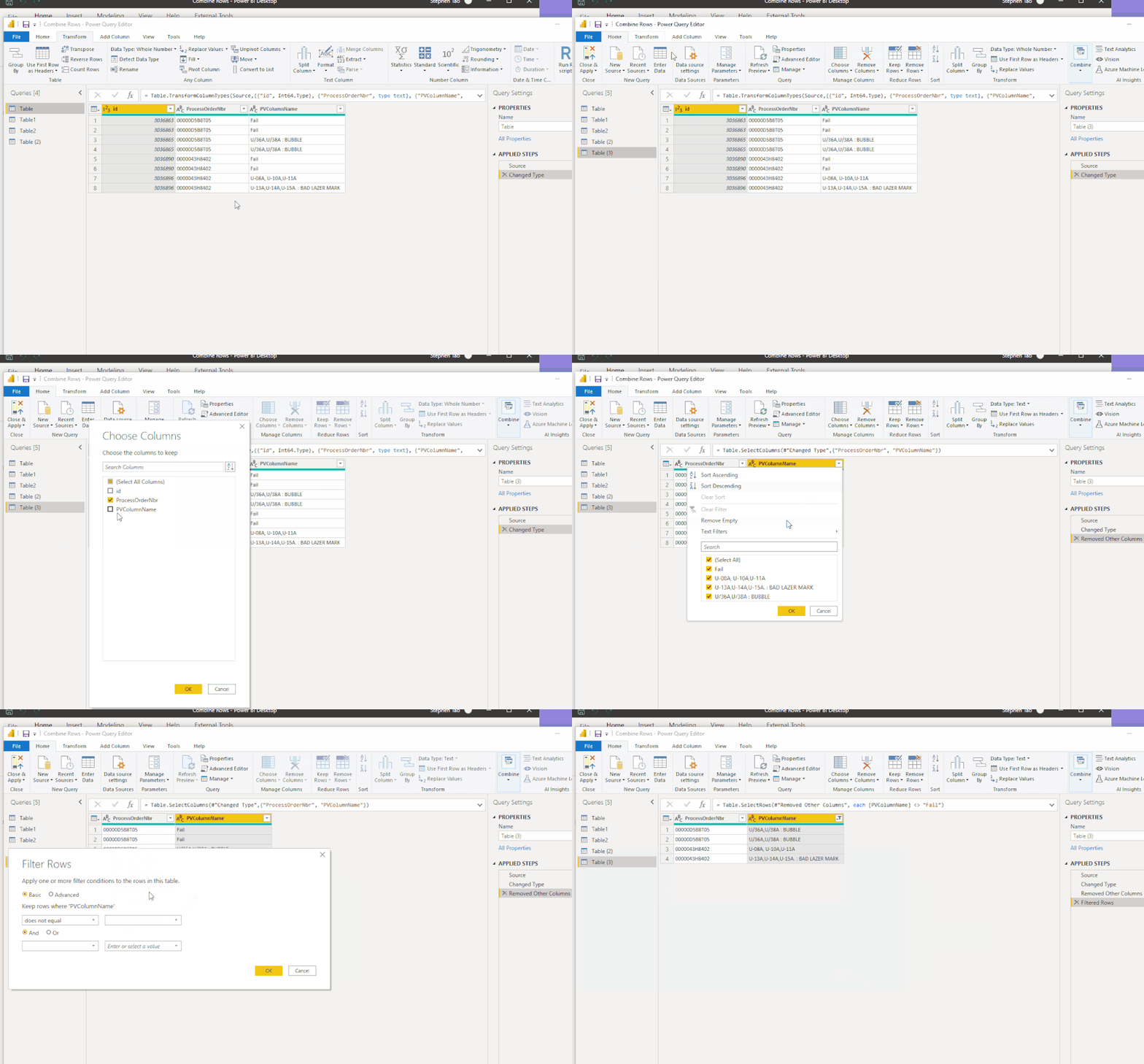
let
    Source = Table.FromRows(Json.Document(Binary.Decompress(Binary.FromText("i45WMjYwNrMwM1bSUTIAARdTJ4sQA1Mg1y0xM0cpVod4FaaYKkL1jc0cdYCkhaOClYJTqJOTjyslOiwNYDpMjD0sTAyMMFxBhAozTBWhugYWjjoKobqGBkDLdQ0NHQmpNzQGKzQBk6aOeiDHOroo+DhGuQYp+DoGeSvFxgIA", BinaryEncoding.Base64), Compression.Deflate)), let _t = ((type nullable text) meta [Serialized.Text = true]) in type table [id = _t, ProcessOrderNbr = _t, PVColumnName = _t]),
    #"Changed Type" = Table.TransformColumnTypes(Source,{{"id", Int64.Type}, {"ProcessOrderNbr", type text}, {"PVColumnName", type text}}),
    #"Removed Other Columns" = Table.SelectColumns(#"Changed Type",{"ProcessOrderNbr", "PVColumnName"}),
    #"Filtered Rows" = Table.SelectRows(#"Removed Other Columns", each [PVColumnName] <> "Fail"),
    #"Grouped Rows" = Table.Group( #"Filtered Rows", {"ProcessOrderNbr"}, {{"PVColumnName", each Text.Combine(List.Distinct([PVColumnName]), ", "), type text}})
in
    #"Grouped Rows"
- At last, append these two new tables.
The final output is shown below:
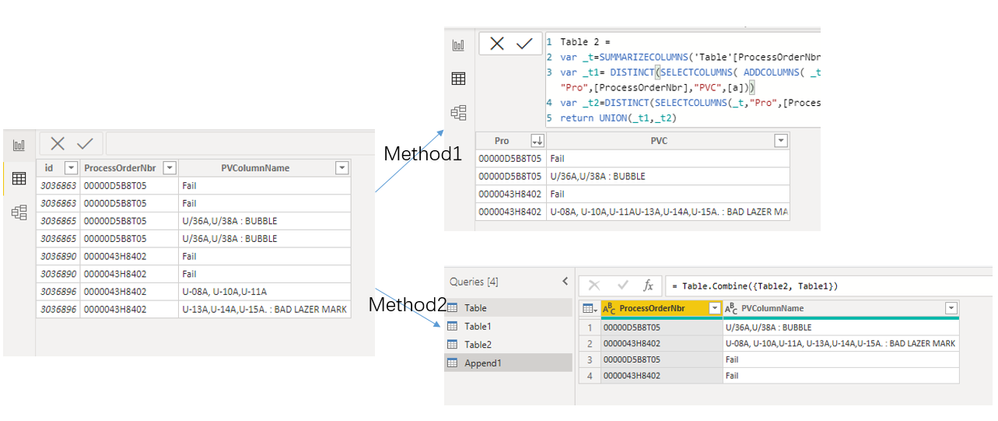
Best Regards,
Eyelyn Qin
If this post helps, then please consider Accept it as the solution to help the other members find it more quickly.
- Mark as New
- Bookmark
- Subscribe
- Mute
- Subscribe to RSS Feed
- Permalink
- Report Inappropriate Content
Hi @Anonymous ,
According to my understanding, you want to combine values of each category, right?
I did it in two ways, you could take a look at the pbix file here.
1. Use the following formula to creata a new table:
Table 2 =
VAR _t =
    SUMMARIZECOLUMNS ( 'Table'[ProcessOrderNbr], 'Table'[PVColumnName] )
VAR _t1 =
    DISTINCT (
        SELECTCOLUMNS (
            ADDCOLUMNS (
                _t,
                "a",
                    CONCATENATEX (
                        FILTER (
                            _t,
                            [PVColumnName] <> "Fail"
                                && [ProcessOrderNbr] = EARLIER ( [ProcessOrderNbr] )
                        ),
                        [PVColumnName],
                        ""
                    )
            ),
            "Pro", [ProcessOrderNbr],
            "PVC", [a]
        )
    )
VAR _t2 =
    DISTINCT ( SELECTCOLUMNS ( _t, "Pro", [ProcessOrderNbr], "PVC", "Fail" ) )
RETURN
    UNION ( _t1, _t2 )
2. In Power Query:
- New Table1: Duplicate the original table-->Select columns-->Filter PVC="Fail"-->Remove duplicate:
let
    Source = Table.FromRows(Json.Document(Binary.Decompress(Binary.FromText("i45WMjYwNrMwM1bSUTIAARdTJ4sQA1Mg1y0xM0cpVod4FaaYKkL1jc0cdYCkhaOClYJTqJOTjyslOiwNYDpMjD0sTAyMMFxBhAozTBWhugYWjjoKobqGBkDLdQ0NHQmpNzQGKzQBk6aOeiDHOroo+DhGuQYp+DoGeSvFxgIA", BinaryEncoding.Base64), Compression.Deflate)), let _t = ((type nullable text) meta [Serialized.Text = true]) in type table [id = _t, ProcessOrderNbr = _t, PVColumnName = _t]),
    #"Changed Type" = Table.TransformColumnTypes(Source,{{"id", Int64.Type}, {"ProcessOrderNbr", type text}, {"PVColumnName", type text}}),
    #"Removed Other Columns" = Table.SelectColumns(#"Changed Type",{"ProcessOrderNbr", "PVColumnName"}),
    #"Filtered Rows" = Table.SelectRows(#"Removed Other Columns", each ([PVColumnName] = "Fail")),
    #"Removed Duplicates" = Table.Distinct(#"Filtered Rows")
in
    #"Removed Duplicates"
- New Table2: Duplicate the original table-->Select columns-->Filter PVC<>"Fail"-->Then as @Ashish_Mathur suggested, use Text.Combine() to group rows.
let
    Source = Table.FromRows(Json.Document(Binary.Decompress(Binary.FromText("i45WMjYwNrMwM1bSUTIAARdTJ4sQA1Mg1y0xM0cpVod4FaaYKkL1jc0cdYCkhaOClYJTqJOTjyslOiwNYDpMjD0sTAyMMFxBhAozTBWhugYWjjoKobqGBkDLdQ0NHQmpNzQGKzQBk6aOeiDHOroo+DhGuQYp+DoGeSvFxgIA", BinaryEncoding.Base64), Compression.Deflate)), let _t = ((type nullable text) meta [Serialized.Text = true]) in type table [id = _t, ProcessOrderNbr = _t, PVColumnName = _t]),
    #"Changed Type" = Table.TransformColumnTypes(Source,{{"id", Int64.Type}, {"ProcessOrderNbr", type text}, {"PVColumnName", type text}}),
    #"Removed Other Columns" = Table.SelectColumns(#"Changed Type",{"ProcessOrderNbr", "PVColumnName"}),
    #"Filtered Rows" = Table.SelectRows(#"Removed Other Columns", each [PVColumnName] <> "Fail"),
    #"Grouped Rows" = Table.Group( #"Filtered Rows", {"ProcessOrderNbr"}, {{"PVColumnName", each Text.Combine(List.Distinct([PVColumnName]), ", "), type text}})
in
    #"Grouped Rows"
- At last, append these two new tables.
The final output is shown below:
Best Regards,
Eyelyn Qin
If this post helps, then please consider Accept it as the solution to help the other members find it more quickly.

- Mark as New
- Bookmark
- Subscribe
- Mute
- Subscribe to RSS Feed
- Permalink
- Report Inappropriate Content

I want to create a new column with row 1 value "Glasgow" which combines the values of Glasgow North and Glasgow South and renames row one as Glasgow. In row 1, I get an error when adding the values together because it is expecting a number, not a text. Is there a way to add the numerical values and rename the text fields?


- Mark as New
- Bookmark
- Subscribe
- Mute
- Subscribe to RSS Feed
- Permalink
- Report Inappropriate Content
Hi,
Do you want to see only 2 rows - one for each ProcessOrderNbr? Share the link from where i can download your PBI file.
Regards,
Ashish Mathur
http://www.ashishmathur.com
https://www.linkedin.com/in/excelenthusiasts/
- Mark as New
- Bookmark
- Subscribe
- Mute
- Subscribe to RSS Feed
- Permalink
- Report Inappropriate Content
No I only want to see one row for each process number. The row should have Fail and the comment in the same cell. I can't share the file because it is confidential information.
- Mark as New
- Bookmark
- Subscribe
- Mute
- Subscribe to RSS Feed
- Permalink
- Report Inappropriate Content
Hi,
This M code works
let
    Source = Excel.CurrentWorkbook(){[Name="Data"]}[Content],
    #"Grouped Rows" = Table.Group(Source, {"Process OrderNbr"}, {{"All names", each Text.Combine(List.Distinct([PVColumnName]), ", "), type text}}),
    Joined = Table.Join(Source, "Process OrderNbr", #"Grouped Rows", "Process OrderNbr"),
    #"Removed Columns" = Table.RemoveColumns(Joined,{"PVColumnName"}),
    #"Removed Duplicates" = Table.Distinct(#"Removed Columns")
in
    #"Removed Duplicates"
Hope this helps.
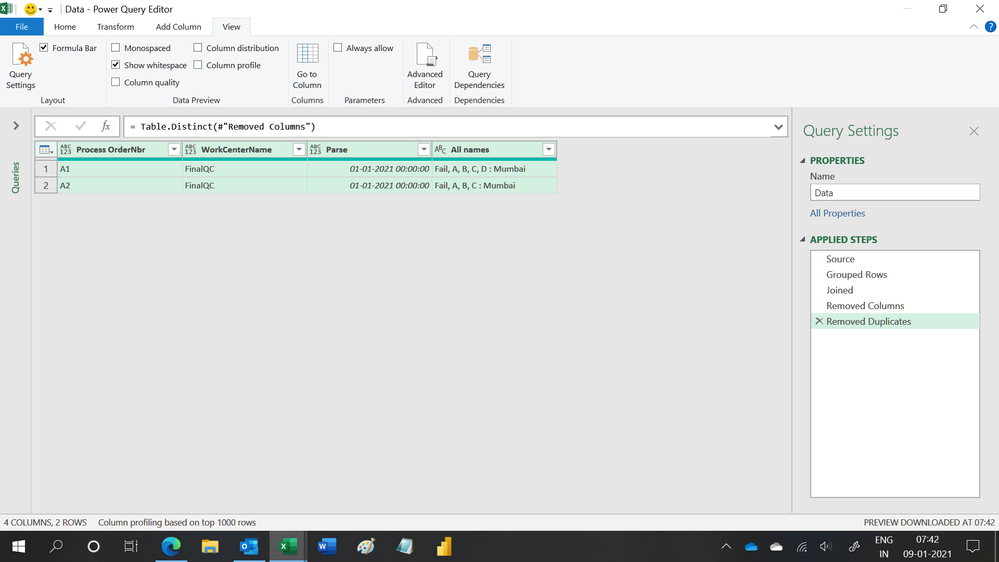
Regards,
Ashish Mathur
http://www.ashishmathur.com
https://www.linkedin.com/in/excelenthusiasts/
Helpful resources

Fabric Data Days 2026
Don't miss out on Data Days, June 15 through August 7. Learn Fabric, Power BI, SQL, AI and more.

Power BI Monthly Update - May 2026
Check out the May 2026 Power BI update to learn about new features.

Power BI DataViz World Championships - June 2026
A new Power BI DataViz World Championship is coming this June! Don't miss out on submitting your entry.

| User | Count |
|---|---|
| 23 | |
| 21 | |
| 20 | |
| 18 | |
| 13 |


| User | Count |
|---|---|
| 58 | |
| 51 | |
| 38 | |
| 31 | |
| 26 |


