Join us at FabCon Atlanta from March 16 - 20, 2026, for the ultimate Fabric, Power BI, AI and SQL community-led event. Save $200 with code FABCOMM.
Register now!Learn from the best! Meet the four finalists headed to the FINALS of the Power BI Dataviz World Championships! Register now
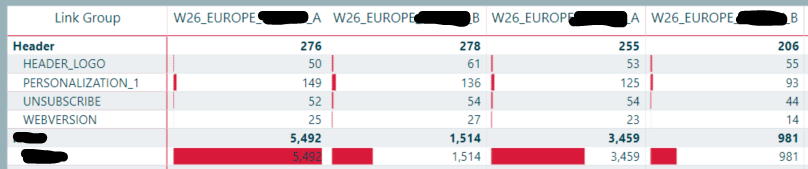
I'm using the Matrix view to display where recipients click in our emails. Some times we have emails that share the same name but are sent on different dates (As can be seen in the screenshot below, A and B versions). Currently, if I manually change the date in the data source to be the same for all A/B version emails they fall under the same column. But i would like them to do that without having to manually manipulate the data
What am I missing here..?
Thanks in advance.
I'm not sure I am following this but perhaps concatenate the name and date into a unique key?
@Greg_Deckler wrote:I'm not sure I am following this but perhaps concatenate the name and date into a unique key?
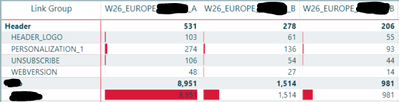
Hi Greg. Using a unique key sounds like the oppososite of what I'm after though. In the example below I manually changed the date (in the source data file: 1_Overlay_Links) for the A version to be the same for both sendouts. The B version still has two different send dates and is therefore in two different columns. I want them to be displayed in one column according to name without having to change the send dates.
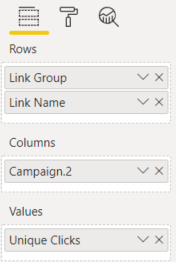
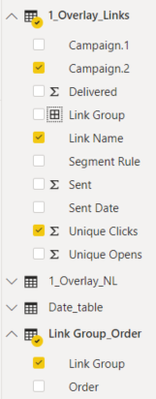
I don't know why it splits on send date as I have not included any date filters in the visual.
Share feedback directly with Fabric product managers, participate in targeted research studies and influence the Fabric roadmap.
Check out the February 2026 Power BI update to learn about new features.
| User | Count |
|---|---|
| 66 | |
| 60 | |
| 45 | |
| 19 | |
| 15 |
| User | Count |
|---|---|
| 108 | |
| 107 | |
| 41 | |
| 30 | |
| 27 |