cancel
Showing results for 
Search instead for 
Did you mean: 

Get Fabric Certified for FREE during Fabric Data Days. Don't miss your chance! Request now

Reply
Anonymous
Not applicable

Columns association in query editor

Hi all,


I'm facing an issue in the query editor.

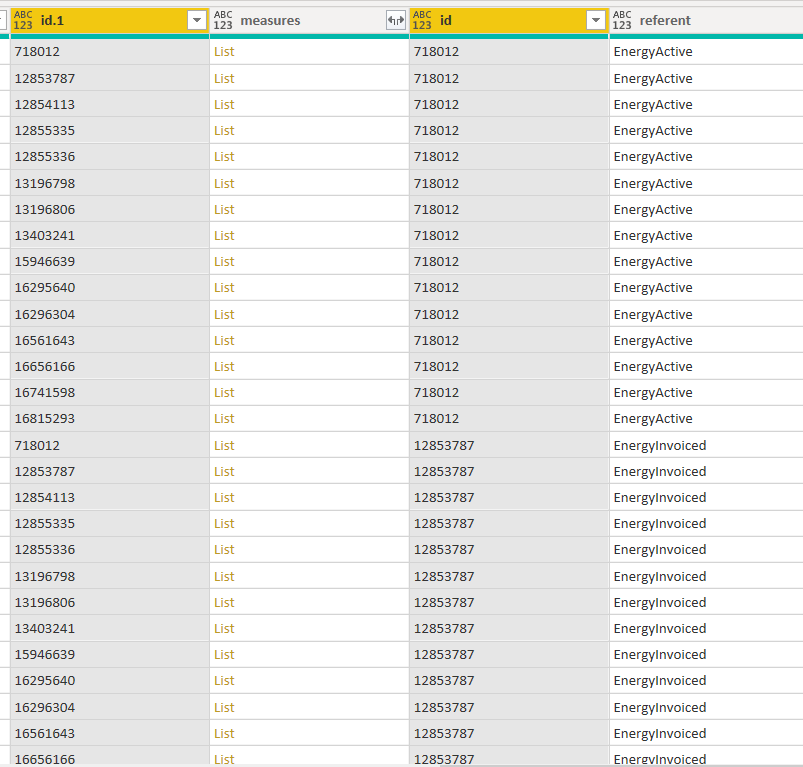
Cado_0-1623742674419.png


On the above screenshot, the referents in the referent column are associated with the IDs of the id column. And the measurements of the measures column are associated with the IDs of the id.1 column.

IDs from both id columns are the same but not in the same order.

My wish is to have the referents associated with the ids of the id.1 column, without using separate tables and then merge tables (because I'm restricted by API limitations).


How would you do that ?


Thanks in advance,

Cado

1 ACCEPTED SOLUTION
Cado_one
Resolver III
Resolver III

After some work on it, a solution was to add a custom column taking for value 1 if id.1=id else 0 and then filter on it to keep only the 1.

View solution in original post

3 REPLIES 3
Cado_one
Resolver III
Resolver III

After some work on it, a solution was to add a custom column taking for value 1 if id.1=id else 0 and then filter on it to keep only the 1.

amitchandak
Super User
Super User

@Anonymous , Copy this table, remove the first two-column, Remove duplicates for the remaining two-column  this will be table2


From Table1 , remove columns 3,4, if needed remove duplicates.


Merge these two tables now by matching id1. and id

https://radacad.com/append-vs-merge-in-power-bi-and-power-query

Share with Power BI Enthusiasts: Full Power BI Video (20 Hours) YouTube
Microsoft Fabric Series 60+ Videos YouTube
Microsoft Fabric Hindi End to End YouTube
Anonymous
Not applicable

Hi @amitchandak 


As I said in the first message I can't duplicate the table because it will do extra queries and the API limitations don't allow this.

I can't reference neither because their are subsequent steps that delete the IDs columns and more over, references are forbiden for the automatic refresh in the Power BI Service.

Is there an other way to proceed ?

Helpful resources

Announcements
November Power BI Update Carousel

Power BI Monthly Update - November 2025

Check out the November 2025 Power BI update to learn about new features.

Fabric Data Days Carousel

Fabric Data Days

Advance your Data & AI career with 50 days of live learning, contests, hands-on challenges, study groups & certifications and more!

FabCon Atlanta 2026 carousel

FabCon Atlanta 2026

Join us at FabCon Atlanta, March 16-20, for the ultimate Fabric, Power BI, AI and SQL community-led event. Save $200 with code FABCOMM.

Top Solution Authors
Top Kudoed Authors