This time we’re going bigger than ever. Fabric, Power BI, SQL, AI and more. We're covering it all. You won't want to miss it.
Learn moreLevel up your Power BI skills this month - build one visual each week and tell better stories with data! Get started
Dear all,
I would need your support if possible..
Currently within my dataset there is a table "SUM" like below, where columns "Jan" and "Feb" contains both decimal and whole numbers data types.
Is it possible to convert some of the whole number to currency and some other to decimal with 2 decimal places ?
I think that in Power BI a column has only one data type.
Is there any way to achieve the desired output?
Sincerely ,
Mary
Solved! Go to Solution.
Hi @cs141005 ,
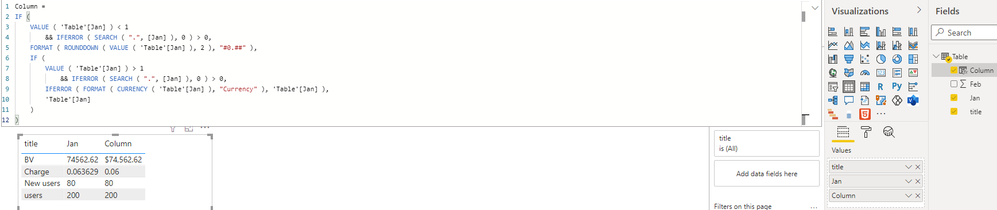
First of all, all values of one field can only have one data type. If the data type of the field Jan and Feb is Numeric type and later the values in these two fields need to participate in the calculation, it will not be possible to achieve the result you want. If their data type is Text type, you can use FORMAT function to change their data form just as shown in the below screenshot. Please find the details in the attachment.
Use custom format strings in Power BI Desktop
Best Regards
Hi @cs141005 ,
First of all, all values of one field can only have one data type. If the data type of the field Jan and Feb is Numeric type and later the values in these two fields need to participate in the calculation, it will not be possible to achieve the result you want. If their data type is Text type, you can use FORMAT function to change their data form just as shown in the below screenshot. Please find the details in the attachment.
Use custom format strings in Power BI Desktop
Best Regards
You can do that using IF and FORMAT Function but you may lose control on calculations
Proud to be a Super User!
Check out the April 2026 Power BI update to learn about new features.
Sign up to receive a private message when registration opens and key events begin.
If you have recently started exploring Fabric, we'd love to hear how it's going. Your feedback can help with product improvements.
| User | Count |
|---|---|
| 34 | |
| 26 | |
| 25 | |
| 22 | |
| 18 |
| User | Count |
|---|---|
| 65 | |
| 35 | |
| 32 | |
| 25 | |
| 23 |