cancel
Showing results for 
Search instead for 
Did you mean: 

The Power BI Data Visualization World Championships is back! Get ahead of the game and start preparing now! Learn more

Reply
BekahLoSurdo
Resolver IV
Resolver IV

Column v. Measure

Hi experts,

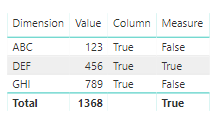
I need help wrapping my head around Column v. Measure. It was always my understanding that a Column calculation was limited (for the most part, without special functions) to the current row while a Measure depended on the evaluation of a cell within the current context (including column selection, filters, slicers, etc.). What I am seeing with the CONTAINS function seems to be the opposite:

Column = CONTAINS( 'Table', 'Table'[Dimension], "DEF", 'Table'[Value], 456 )

Measure = CONTAINS( 'Table', 'Table'[Dimension], "DEF", 'Table'[Value], 456 )
Column v. Measure.PNG

The column seems to be evaluating the table as a whole and saying that my combination exists somewhere whereas the measure seems to be iterating row by row so what am I missing here?


I know this is more of a conceptual question but I'm hoping one of the experts can speak to the behind-the-scenes aspect as understanding these things is just as important as making a report just "work right" (and this has real world implications for a report of mine as well).


Thanks!


1 ACCEPTED SOLUTION
Anonymous
Not applicable

@BekahLoSurdo  - It's a characteristic of the 1-Many relationship. The problem is that you can't assume that the "many" side will provide a single value - it can, but usually won't.

I hope this helps. If it does, please Mark as a solution.
I also appreciate Kudos.
Nathan Peterson

View solution in original post

3 REPLIES 3
Anonymous
Not applicable

@BekahLoSurdo - Your observation is correct:

1. The Calculated Column evaluates the entire table. The function evaluates a table, and the column does not add a filter context.

2. Measures are always evaluated within a filter context. Each row of the table visual is filtered by the Dimension column. Therefore, the table is reduced to only those rows associated with the value for the dimension.


I hope this helps. If it does, please Mark as a solution.
I also appreciate Kudos.
Nathan Peterson


Thank you @Anonymous, this really helps. The only thing I'm still fuzzy on is why the Calculated Column is evaluating the table as a whole rather than giving the row level results. Is this just a characteristic of this particular function?

Anonymous
Not applicable

@BekahLoSurdo  - It's a characteristic of the 1-Many relationship. The problem is that you can't assume that the "many" side will provide a single value - it can, but usually won't.

I hope this helps. If it does, please Mark as a solution.
I also appreciate Kudos.
Nathan Peterson

Helpful resources

Announcements
Power BI DataViz World Championships

Power BI Dataviz World Championships

The Power BI Data Visualization World Championships is back! Get ahead of the game and start preparing now!

December 2025 Power BI Update Carousel

Power BI Monthly Update - December 2025

Check out the December 2025 Power BI Holiday Recap!

FabCon Atlanta 2026 carousel

FabCon Atlanta 2026

Join us at FabCon Atlanta, March 16-20, for the ultimate Fabric, Power BI, AI and SQL community-led event. Save $200 with code FABCOMM.