This time we’re going bigger than ever. Fabric, Power BI, SQL, AI and more. We're covering it all. You won't want to miss it.
Learn moreLevel up your Power BI skills this month - build one visual each week and tell better stories with data! Get started
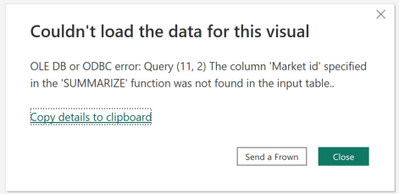
I have recieved the following error in my pbi file, nothing within the file has changed since the last update. The measures using the SUMMARIZE function work when i open the file in the September version but not the November version. The column 'Market id' is in the input table so i'm unsure why this is coming up as not found all of a sudden.
here is an example of one of my measures using summarize:
_Total Package Units = SUMX(SUMMARIZE('Fact Sales Actual','Fact Sales Actual'[bkey_product_reltio]), [_Package Units Sold])
Even when i remove all summarize functions i still recieve this error. I also get this error when using measures that don't utilise the Summarise funtion at all, such as;
_Package Units Sold = DIVIDE([Units Sold], CALCULATE(MAX('dim Triton Products'[Divide factor (for package unit)])))
Any advice would be greatly appreciated.
@Anonymous , seem like this function (_Total Package Units ) is still used in visual level filter
Comment the calculation and try
_Total Package Units =1
/* SUMX(SUMMARIZE('Fact Sales Actual','Fact Sales Actual'[bkey_product_reltio]), [_Package Units Sold])*/
What is meant by visual level filter?
i did what you said and i just get 1 - the measure doesn't give any error
Check out the April 2026 Power BI update to learn about new features.
Sign up to receive a private message when registration opens and key events begin.
If you have recently started exploring Fabric, we'd love to hear how it's going. Your feedback can help with product improvements.
| User | Count |
|---|---|
| 30 | |
| 24 | |
| 23 | |
| 17 | |
| 15 |
| User | Count |
|---|---|
| 63 | |
| 36 | |
| 29 | |
| 22 | |
| 22 |