Don't miss your chance to take the Fabric Data Engineer (DP-600) exam for FREE! Find out how by attending the DP-600 session on April 23rd (pacific time), live or on-demand.
Learn moreJoin the FabCon + SQLCon recap series. Up next: Power BI, Real-Time Intelligence, IQ and AI, and Data Factory take center stage. All sessions are available on-demand after the live show. Register now
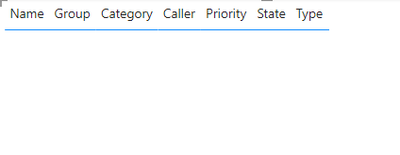
I have a datatable which contains the data with below columns:
Name
Group
Caller
State
Category
Priority
Type
I also have an another table as below which I will be using as an Exclusion list.
NameGroupCallerStateCategoryPriorityType
| A | EBIDDING | Sarath | Incomplete | PM | Request | |
| A | HYPERCARE | Request | ||||
| A | ENHANCEMENT | Request | ||||
| A | LEVERAGED | Request | ||||
| A | TOOLING | Request | ||||
| B | Desktop | Kumar | Request | |||
| B | Sankar | Request | ||||
| B | EPM & SharePoint | Request | ||||
| B | DMS | Request | ||||
| B | Applications | Request | ||||
| B | Linux | Request | ||||
| B | Operational | Request | ||||
| B | IW | Request | ||||
| B | VA | Request | ||||
| B | PM | Request | ||||
| B | OR | Request | ||||
| C | Operational | Request | ||||
| C | IW | Request | ||||
| C | VA | Request | ||||
| C | PM | Request | ||||
| C | OR | Request | ||||
| D | IW | Request | ||||
| D | VA | Request | ||||
| D | PM | Request | ||||
| D | OR | Request | ||||
| H | IW | Request | ||||
| H | PM | Request | ||||
| H | CU | Request | ||||
| H | RA | Request | ||||
| H | OR | Request | ||||
| H | ER | Request | ||||
| H | VA | Request | ||||
| Y | CU | Request | ||||
| Y | IW | Request | ||||
| Y | OR | Request | ||||
| Y | PM | Request | ||||
| Y | RA | Request | ||||
| Y | VA | Request | ||||
| MA | IW | Request | ||||
| MA | OR | Request | ||||
| MA | PM | Request | ||||
| MA | VA | Request | ||||
| S | CU | Request | ||||
| S | IW | Request | ||||
| S | OR | Request | ||||
| S | PM | Request | ||||
| S | RA | Request | ||||
| S | SH | Request | ||||
| S | VA | Request | ||||
| MS | OR | Request | ||||
| MS | IW | Request | ||||
| MS | OR | Request | ||||
| MS | PM | Request | ||||
| MS | RA | Request | ||||
| MS | VA | Request |
I need to match my datatable with the exclusion list and do exclude from the report.
For instance, Name: A with either Group or Caller or State or Category is matching with my datatable, it needs to be excluded.
Tried Solution:
First, I created multiple columns to extract the exclusionlist data to my datatable using below calculated column:
Category = MAXX(FILTER('Exclusionlist', Exclusionlist[Category] = datatable[Category]), Exclusionlist[Category])
And the I am comparing the columns using below calculated column:
CategoryMatch = IF(AND(datatable[category] <> BLANK(), SNOW_Request[SubCategory] = SNOW_Request[request_subcategory]), "Yes", "No")
Finally, I created the below calculated column:
Column = IF(AND(datatable[Name] = "Yes", OR(OR(datatable[Group] = "Yes", datatable[Caller] = "Yes"), datatable[Category] = "Yes")), "Exclude", "Include")
But I didn't get the desired output as there is a possibility of Other Names contain same Category / State / Caller.
I need my exclusion should happen as:
AND(Name = Yes, Group = Yes), "Exclude" or AND(Name = Yes, Caller = Yes), "Exclude" or AND(Name = Yes, Category = Yes), "Exclude" or AND(Name = Yes, Priority = Yes), "Exclude" else "Include"
Can anyone help me with this problem statement?
@amitchandak , @Greg_Deckler @lbendlin , @DesktopOwl @Goodlytics4U @help Ahmedx @Ahmedx @lbendlin : Please help.
Solved! Go to Solution.
Hi @gssarathkumar ,
Your requirement is "AND(Name = Yes, Group = Yes), "Exclude" or AND(Name = Yes, Caller = Yes), "Exclude" or AND(Name = Yes, Category = Yes), "Exclude" or AND(Name = Yes, Priority = Yes), "Exclude" else "Include""?
Is Yes a string or does it mean that the current column is not null? For example, "Group = Yes" means that the Group column is not null? I don't quite understand.
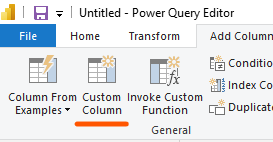
In Power Query, it is convenient to create custom columns to achieve your needs.
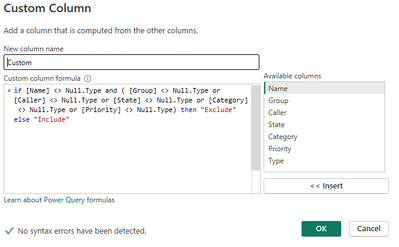
If it means that the current column is not null, the syntax is as follows:
if [Name] <> Null.Type and ( [Group] <> Null.Type or [Caller] <> Null.Type or [State] <> Null.Type or [Category] <> Null.Type or [Priority] <> Null.Type) then "Exclude" else "Include"
The same is true if it is a string, just change <> Null.Type to = "Yes".
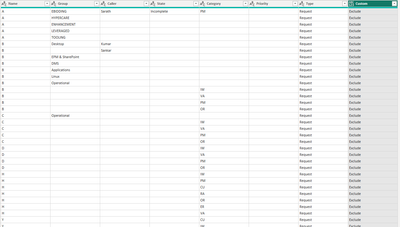
The page effect is as follows:
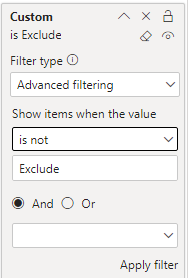
After saving and exiting Power Query, add the newly created custom column to the Filter and set the condition to "is not Exclude".
The final page effect is as follows:
pbix file is attached.
If you have any further questions please feel free to contact me.
Best Regards,
Yang
Community Support Team
If there is any post helps, then please consider Accept it as the solution to help the other members find it more quickly.
If I misunderstand your needs or you still have problems on it, please feel free to let us know. Thanks a lot!
Hi @gssarathkumar ,
Your requirement is "AND(Name = Yes, Group = Yes), "Exclude" or AND(Name = Yes, Caller = Yes), "Exclude" or AND(Name = Yes, Category = Yes), "Exclude" or AND(Name = Yes, Priority = Yes), "Exclude" else "Include""?
Is Yes a string or does it mean that the current column is not null? For example, "Group = Yes" means that the Group column is not null? I don't quite understand.
In Power Query, it is convenient to create custom columns to achieve your needs.
If it means that the current column is not null, the syntax is as follows:
if [Name] <> Null.Type and ( [Group] <> Null.Type or [Caller] <> Null.Type or [State] <> Null.Type or [Category] <> Null.Type or [Priority] <> Null.Type) then "Exclude" else "Include"
The same is true if it is a string, just change <> Null.Type to = "Yes".
The page effect is as follows:
After saving and exiting Power Query, add the newly created custom column to the Filter and set the condition to "is not Exclude".
The final page effect is as follows:
pbix file is attached.
If you have any further questions please feel free to contact me.
Best Regards,
Yang
Community Support Team
If there is any post helps, then please consider Accept it as the solution to help the other members find it more quickly.
If I misunderstand your needs or you still have problems on it, please feel free to let us know. Thanks a lot!
Check out the April 2026 Power BI update to learn about new features.
If you have recently started exploring Fabric, we'd love to hear how it's going. Your feedback can help with product improvements.
A new Power BI DataViz World Championship is coming this June! Don't miss out on submitting your entry.
| User | Count |
|---|---|
| 48 | |
| 46 | |
| 41 | |
| 20 | |
| 17 |
| User | Count |
|---|---|
| 70 | |
| 69 | |
| 32 | |
| 27 | |
| 26 |