FabCon is coming to Atlanta
Join us at FabCon Atlanta from March 16 - 20, 2026, for the ultimate Fabric, Power BI, AI and SQL community-led event. Save $200 with code FABCOMM.
Register now!- Power BI forums
- Get Help with Power BI
- Desktop
- Service
- Report Server
- Power Query
- Mobile Apps
- Developer
- DAX Commands and Tips
- Custom Visuals Development Discussion
- Health and Life Sciences
- Power BI Spanish forums
- Translated Spanish Desktop
- Training and Consulting
- Instructor Led Training
- Dashboard in a Day for Women, by Women
- Galleries
- Data Stories Gallery
- Themes Gallery
- Contests Gallery
- QuickViz Gallery
- Quick Measures Gallery
- Visual Calculations Gallery
- Notebook Gallery
- Translytical Task Flow Gallery
- TMDL Gallery
- R Script Showcase
- Webinars and Video Gallery
- Ideas
- Custom Visuals Ideas (read-only)
- Issues
- Issues
- Events
- Upcoming Events
The Power BI Data Visualization World Championships is back! Get ahead of the game and start preparing now! Learn more
- Power BI forums
- Forums
- Get Help with Power BI
- Desktop
- Column selection based on Filter
- Subscribe to RSS Feed
- Mark Topic as New
- Mark Topic as Read
- Float this Topic for Current User
- Bookmark
- Subscribe
- Printer Friendly Page

- Mark as New
- Bookmark
- Subscribe
- Mute
- Subscribe to RSS Feed
- Permalink
- Report Inappropriate Content
Column selection based on Filter
Dear Power BI community,
I am having a hard time setting a dynamic filter on a report.
I am trying to use a filter in order to set a measure, it is a single selection filter.
Selected = if(HASONEVALUE('Table['Name]);SELECTEDVALUE('Table[Name]);"ALL")
I am getting the selected filter through this and using switch to select a column based on the selection
SWITCH([Selected];"ALL";MAX(Table[Name1]);MAX(Table[Name2]))
I would like to use a column if nothing is selected (Table[Name1]) and the other column (Table[Name2]) for any single selection filter.
I tried as well with the following measures
Selected = COUNTROWS(FILTERS('Table['Name])) this is to get how many filters are selected in the visual
I am then setting this condition using the above measure
IF ([Selected] > 1 ; MAX(Table[Name1]) ; MAX('Table'[Name2]))
Both are always returing the same column regardless of the condition.
Appreciate your help
Solved! Go to Solution.
- Mark as New
- Bookmark
- Subscribe
- Mute
- Subscribe to RSS Feed
- Permalink
- Report Inappropriate Content
Hi @Farwest ,
Please try to complete the following steps to achieve your requirement:
1. Create one dimension table for name field(Group 1,Group 2,Group 3 etc. )
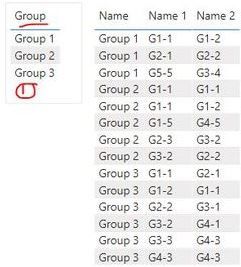
2. Create the relationship between two tables using field "Group" in Groups table and "Name" field in Table

3. Create a measure and drag the related fields onto the visual as below screen shot
Measure = IF(ISFILTERED('Groups'[Group]),MAX('Table'[Name 2]),MAX('Table'[Name 1]))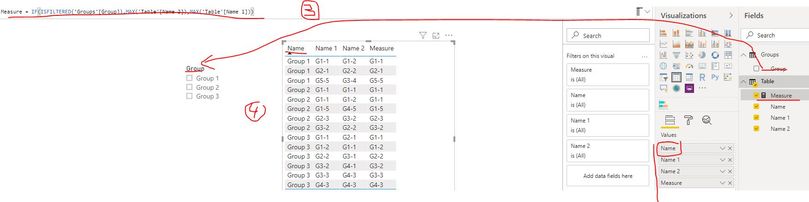
Best Regards
Rena

- Mark as New
- Bookmark
- Subscribe
- Mute
- Subscribe to RSS Feed
- Permalink
- Report Inappropriate Content
Even i'm having a similar requirement ..
Whenver user select single value from slicer in a dynamic table then we should filter out null records but whenever use select more than 1 column then display all values in every columns (no need to filter out.) Any idea how to achieve this ?


- Mark as New
- Bookmark
- Subscribe
- Mute
- Subscribe to RSS Feed
- Permalink
- Report Inappropriate Content
I think measure selection you can do like -https://community.powerbi.com/t5/Desktop/Slicer-MTD-QTD-YTD-to-filter-dates-using-the-slicer/td-p/50...
For axis/column , you might have to use bookmarks as of now
https://radacad.com/bookmarks-and-buttons-making-power-bi-charts-even-more-interactive
- Mark as New
- Bookmark
- Subscribe
- Mute
- Subscribe to RSS Feed
- Permalink
- Report Inappropriate Content
Thanks @amitchandak
This actually works better, but I still have a problem.
This works when I define the selected Filter Value "Selected", but I am trying to:
if only one filter is selected then get 'Table' [Name 1] otherwise (all selected) get 'Table' [Name 2] (this is a single filter selection anyway)
- Mark as New
- Bookmark
- Subscribe
- Mute
- Subscribe to RSS Feed
- Permalink
- Report Inappropriate Content
@Farwest ,
Try like
IF(isfiltered('Table' [Name]) && HASONEFILTER('Table' [Name]);
SWITCH(SELECTEDVALUE('Table' [Name]);
"Selected"; MAXX('Table' [Name 1]);
MAXX('Table' [Name 2])
);
MAXX('Table' [Name 2])
)
- Mark as New
- Bookmark
- Subscribe
- Mute
- Subscribe to RSS Feed
- Permalink
- Report Inappropriate Content
Tried out as well but not really reaching the expected result.
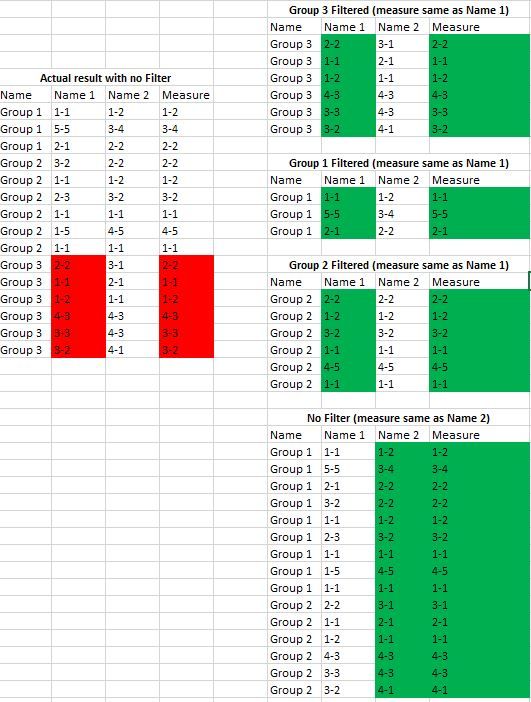
I am adding more details to better exlain the case, the result I have today is a bit different.
When no filter is selected group 3 is still showing Name 1 table where it should be Name 2 as per the DAX on previous post.
Every time one group is filtered I would liket o get Table[Name 1]
Every time no filter is selected I would like to get Table [Name 2]
I have hundreds of groups so I don't want to enter them one by on in the SWITCH like SWITCH(SELECTEDVALUE('Table' [Name]);
"Group 1"; ...."Group 2";...
- Mark as New
- Bookmark
- Subscribe
- Mute
- Subscribe to RSS Feed
- Permalink
- Report Inappropriate Content
Hi @Farwest ,
Please try to complete the following steps to achieve your requirement:
1. Create one dimension table for name field(Group 1,Group 2,Group 3 etc. )
2. Create the relationship between two tables using field "Group" in Groups table and "Name" field in Table
3. Create a measure and drag the related fields onto the visual as below screen shot
Measure = IF(ISFILTERED('Groups'[Group]),MAX('Table'[Name 2]),MAX('Table'[Name 1]))
Best Regards
Rena
Helpful resources

Power BI Dataviz World Championships
The Power BI Data Visualization World Championships is back! Get ahead of the game and start preparing now!

Power BI Monthly Update - December 2025
Check out the December 2025 Power BI Holiday Recap!

FabCon Atlanta 2026
Join us at FabCon Atlanta, March 16-20, for the ultimate Fabric, Power BI, AI and SQL community-led event. Save $200 with code FABCOMM.


| User | Count |
|---|---|
| 159 | |
| 132 | |
| 118 | |
| 79 | |
| 53 |


