Join us at FabCon Atlanta from March 16 - 20, 2026, for the ultimate Fabric, Power BI, AI and SQL community-led event. Save $200 with code FABCOMM.
Register now!Learn from the best! Meet the four finalists headed to the FINALS of the Power BI Dataviz World Championships! Register now
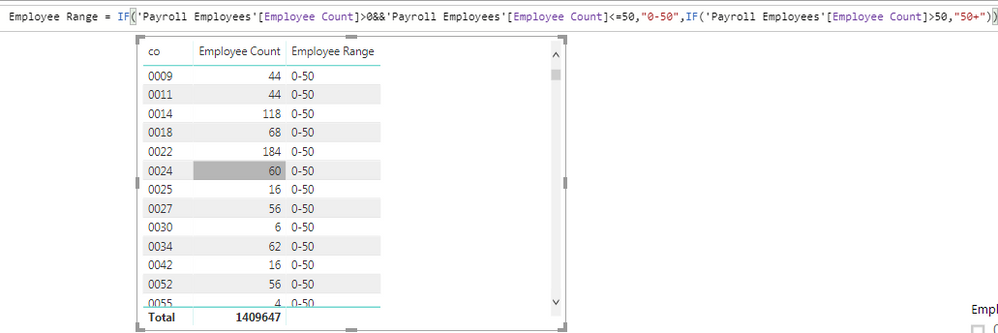
No matter the employee size per company, my calculated column just says everybody has a size of 0-50 even though that's clearly not true. Why is it doing this?
Hi @Anonymous,
Did this measure which used in calculated column calculate dynamic result based on slicer?
If this is a case, current power bi not support to create a dynamic calculate column/table based on slicer, dynamic dax formula will been fixed as static value when you use it in calculated column/table.
Regards,
Xiaoxin Sheng
@Anonymous
can you create a measure with a formula like this:
measure = if ( sum(employee_count) >0 && sum(employee_count) <=50, "0-50" etc
Just curious, do you have data that shows negative numbers? If not maybe you can remove the second IF() and see what happens.
Share feedback directly with Fabric product managers, participate in targeted research studies and influence the Fabric roadmap.
Check out the February 2026 Power BI update to learn about new features.
| User | Count |
|---|---|
| 50 | |
| 47 | |
| 29 | |
| 15 | |
| 14 |
| User | Count |
|---|---|
| 89 | |
| 74 | |
| 40 | |
| 26 | |
| 25 |