cancel
Showing results for 
Search instead for 
Did you mean: 

Level up your Power BI skills this month - build one visual each week and tell better stories with data! Get started

Reply
danielcarreira1
Regular Visitor

Column name to show date of prior month that when report is running

Hi all,

I am very new to PowerBI but i am building a report where one of the columns has to show the date in the format 'yyyy-mm-dd' for the prior month of when it's running, so if in march 2021 should show the first day of February 2021 in the format referred previously.


Appreciate assistance.


Best Regards,

Daniel

1 ACCEPTED SOLUTION
v-alq-msft
Community Support
Community Support

Hi, @danielcarreira1 


Based in your description, I created data to reproduce your scenario. The pbix file is attached in the end. 

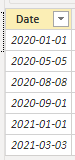
Table:

a1.png


You may create a calculated column or a measure as below.

Calculated column:

Result Column = EOMONTH([Date],-2)+1

Measure:

Result Measure = EOMONTH(SELECTEDVALUE('Table'[Date]),-2)+1


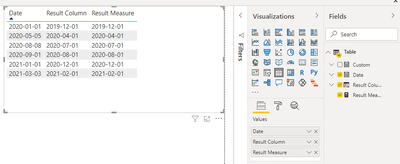
Result(You can modify the format in 'Column tools'):

a3.png

a2.png


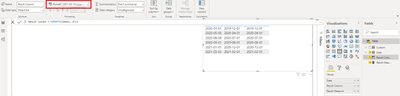
Or you may go to 'Query Editor'm create a custom column with the following m codes.

Date.AddDays( Date.EndOfMonth( Date.AddMonths([Date],-2) ),1)


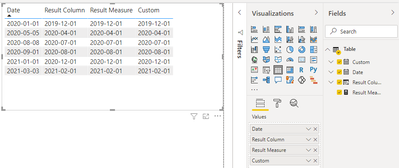
Then you can modify the format as you want in Power BI Desktop. Here is the result.

a5.png


Best Regards

Allan


If this post helps, then please consider Accept it as the solution to help the other members find it more quickly.

View solution in original post

2 REPLIES 2
v-alq-msft
Community Support
Community Support

Hi, @danielcarreira1 


Based in your description, I created data to reproduce your scenario. The pbix file is attached in the end. 

Table:

a1.png


You may create a calculated column or a measure as below.

Calculated column:

Result Column = EOMONTH([Date],-2)+1

Measure:

Result Measure = EOMONTH(SELECTEDVALUE('Table'[Date]),-2)+1


Result(You can modify the format in 'Column tools'):

a3.png

a2.png


Or you may go to 'Query Editor'm create a custom column with the following m codes.

Date.AddDays( Date.EndOfMonth( Date.AddMonths([Date],-2) ),1)


Then you can modify the format as you want in Power BI Desktop. Here is the result.

a5.png


Best Regards

Allan


If this post helps, then please consider Accept it as the solution to help the other members find it more quickly.

amitchandak
Super User
Super User

@danielcarreira1 , You can try measure like

eomonth(max(Date[Date]),-2)+1


or


eomonth(today(),-2)+1

Share with Power BI Enthusiasts: Full Power BI Video (20 Hours) YouTube
Microsoft Fabric Series 60+ Videos YouTube
Microsoft Fabric Hindi End to End YouTube

Helpful resources

Announcements
April Power BI Update Carousel

Power BI Monthly Update - April 2026

Check out the April 2026 Power BI update to learn about new features.

Fabric SQL PBI Data Days

Data Days 2026 coming soon!

Sign up to receive a private message when registration opens and key events begin.

New to Fabric survey Carousel

New to Fabric Survey

If you have recently started exploring Fabric, we'd love to hear how it's going. Your feedback can help with product improvements.

Power BI DataViz World Championships carousel

Power BI DataViz World Championships - June 2026

A new Power BI DataViz World Championship is coming this June! Don't miss out on submitting your entry.