cancel
Showing results for 
Search instead for 
Did you mean: 

Vote for your favorite vizzies from the Power BI Dataviz World Championship submissions. Vote now!

Reply
Syndicate_Admin
Administrator
Administrator

Column matrix filter

Hello:

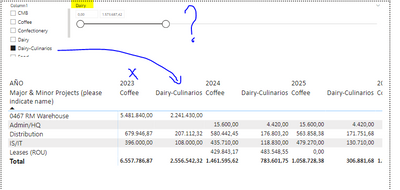
I have the following matrix:

Jprada_0-1679091723358.png

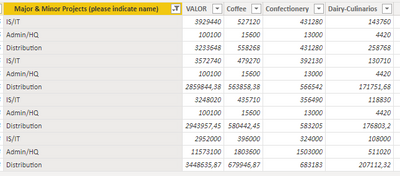
I have the numerical values in the columns of an excel sheet as follows:

Jprada_1-1679092065717.png

What I am looking for is to be able to filter that the matrix only shows me the information in the columns for the categories you select in filter # 1.

Filter # 1 is a list of all categories but has no relation to the matrix, (surely that's why it does not work).

Try to put a filto # 2 by selecting the same field from the matrix but what it shows me are the numerical values and not the name of the category I am looking to filter.

That is, if in filter # 1 or # 2 I select Dairy-Culinary, I would expect that in the matrix I only show the information of Dairy-culinarios.

2 REPLIES 2
Syndicate_Admin
Administrator
Administrator

Thank you very much for the solution, I work as explained.

Anonymous
Not applicable

Hi @Syndicate_Admin ,


According to your description, here are my steps you can follow as a solution.

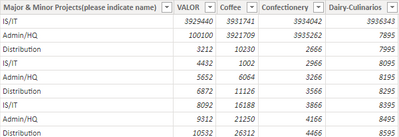
(1) This is my test data.  

vtangjiemsft_0-1679276822006.png

(2) We can create a new table.


SlicerTable = {"VALOR","Coffee","Confectionery","Dairy-Culinarios"}


(3)Then we can create a measure. 


Selected Measure = 
VAR __selected = SELECTEDVALUE ( SlicerTable[Slicer] )
RETURN
SWITCH ( __selected,
  "Coffee", SUM ( 'Table'[Coffee] ),
  "Confectionery", SUM ( 'Table'[Confectionery] ),
  "Dairy-Culinarios", SUM ( 'Table'[Dairy-Culinarios] ),
  "VALOR",SUM('Table'[VALOR])
)


(4) Then the result is as follows.

vtangjiemsft_1-1679277273645.png

Or you can create a field parameter instead of creating a new table and then create a measure, please refer to my pbix.


Best Regards,

Neeko Tang

If this post  helps, then please consider Accept it as the solution  to help the other members find it more quickly. 

Helpful resources

Announcements
Power BI DataViz World Championships

Power BI Dataviz World Championships

Vote for your favorite vizzies from the Power BI World Championship submissions!

Sticker Challenge 2026 Carousel

Join our Community Sticker Challenge 2026

If you love stickers, then you will definitely want to check out our Community Sticker Challenge!

January Power BI Update Carousel

Power BI Monthly Update - January 2026

Check out the January 2026 Power BI update to learn about new features.

FabCon Atlanta 2026 carousel

FabCon Atlanta 2026

Join us at FabCon Atlanta, March 16-20, for the ultimate Fabric, Power BI, AI and SQL community-led event. Save $200 with code FABCOMM.