Join us at FabCon Atlanta from March 16 - 20, 2026, for the ultimate Fabric, Power BI, AI and SQL community-led event. Save $200 with code FABCOMM.
Register now!Learn from the best! Meet the four finalists headed to the FINALS of the Power BI Dataviz World Championships! Register now
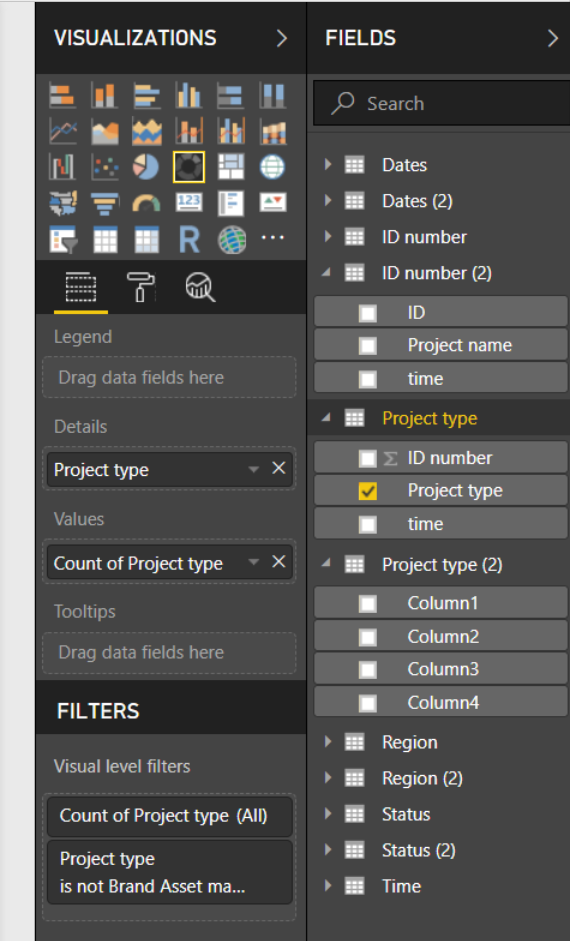
Does anyone have any advice as to why my excel data sheet is no longer loading the column header names? It honestly should've just refreshed and updated info but somehow it didn't happen. I have about 2 days of experience on this software and everything I googled has been really hard for me to understand. I have ensured the column in the excel was made into a table so that the drop down boxes appear and that has not resolved the issue either. Please advise. Project type 2 is the updated file and none of the column headers are showing. its the exact same as the top "project type" excell with the exception that there is less rows. Nothing else was changed.
Solved! Go to Solution.
Hi @frivera
Check the Query Editor and your header may be listed as first row in the data. Click Transform tab, then select "Use first row as headers" option.
Thanks
Raj
Hi @frivera
Check the Query Editor and your header may be listed as first row in the data. Click Transform tab, then select "Use first row as headers" option.
Thanks
Raj
Thanks so much! I had to delete it and re-add the data to be able to get the right results following your steps but it did work.
Share feedback directly with Fabric product managers, participate in targeted research studies and influence the Fabric roadmap.
Check out the February 2026 Power BI update to learn about new features.
| User | Count |
|---|---|
| 53 | |
| 51 | |
| 39 | |
| 15 | |
| 14 |
| User | Count |
|---|---|
| 94 | |
| 81 | |
| 34 | |
| 29 | |
| 25 |