Get Fabric certified for FREE!
Don't miss your chance to take the Fabric Data Engineer (DP-600) exam for FREE! Find out how by watching the DP-600 session on-demand now through April 28th.
Learn more- Power BI forums
- Get Help with Power BI
- Desktop
- Service
- Report Server
- Power Query
- Mobile Apps
- Developer
- DAX Commands and Tips
- Custom Visuals Development Discussion
- Health and Life Sciences
- Power BI Spanish forums
- Translated Spanish Desktop
- Training and Consulting
- Instructor Led Training
- Dashboard in a Day for Women, by Women
- Galleries
- Data Stories Gallery
- Themes Gallery
- Contests Gallery
- QuickViz Gallery
- Quick Measures Gallery
- Visual Calculations Gallery
- Notebook Gallery
- Translytical Task Flow Gallery
- TMDL Gallery
- R Script Showcase
- Webinars and Video Gallery
- Ideas
- Custom Visuals Ideas (read-only)
- Issues
- Issues
- Events
- Upcoming Events
Join the FabCon + SQLCon recap series. Up next: Power BI, Real-Time Intelligence, IQ and AI, and Data Factory take center stage. All sessions are available on-demand after the live show. Register now
- Power BI forums
- Forums
- Get Help with Power BI
- Desktop
- Column filtering
- Subscribe to RSS Feed
- Mark Topic as New
- Mark Topic as Read
- Float this Topic for Current User
- Bookmark
- Subscribe
- Printer Friendly Page


- Mark as New
- Bookmark
- Subscribe
- Mute
- Subscribe to RSS Feed
- Permalink
- Report Inappropriate Content
Column filtering
Hello, I have a problem with filtering columns. In my report I would like to count the number of tickets created based on the month and year to later create a rolling sum. What I have tried to do is to categorize all the dates into a month and date column, like this:
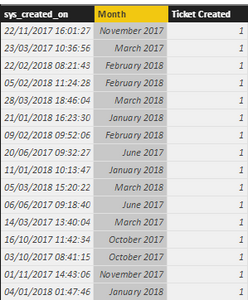
[sys_created_on] are the original dates from the source-file. Month picks out the month and year in a date format.
What I tried to do is create another table (find below), with the same months and years as the [Month] column and then count the number of times the date-value appeared in the first table. I tried sorting the dates using the [Month] column, shown below, like this:
Tickets Created = CALCULATE(COUNT(
'SNOW(sn_sm_finance_request)'[Tickets created]),
'SNOW(sn_sm_finance_request)'[sys_created_on] = 'Dynamic Filter'[Month])
But it just tells me you can't have two columns in a true/false filter.
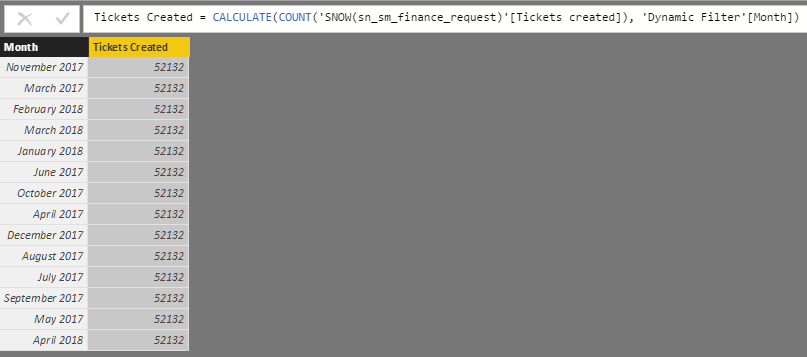
Any suggestions on how I could do this another way?
Thanks!
Solved! Go to Solution.


- Mark as New
- Bookmark
- Subscribe
- Mute
- Subscribe to RSS Feed
- Permalink
- Report Inappropriate Content
Without data, can't recreate but your measure should be something like:
Total Count =
VAR maxDate = MAX(sys_created_on)
RETURN SUMX(FILTER(ALL(Table),[sys_created_on]<maxDate),[Ticket Created])
Basically, get the max date in the current context (last ticket in the current month). Grab all of the entries and filter out so that you get everything less than that date and sum up the tickets.
You could also use COUNTROWS instead of SUMX as @Floriankx suggested.
Follow on LinkedIn
@ me in replies or I'll lose your thread!!!
Instead of a Kudo, please vote for this idea
Become an expert!: Enterprise DNA
External Tools: MSHGQM
YouTube Channel!: Microsoft Hates Greg
Latest book!: DAX For Humans
DAX is easy, CALCULATE makes DAX hard...
- Mark as New
- Bookmark
- Subscribe
- Mute
- Subscribe to RSS Feed
- Permalink
- Report Inappropriate Content
I understood why I got the wrong numbers, I had some essential filters on the report that got removed by the ALL function.
Thanks for the help! 


- Mark as New
- Bookmark
- Subscribe
- Mute
- Subscribe to RSS Feed
- Permalink
- Report Inappropriate Content
Hello,
Why don't you just create a sum. If you create a Pivot and add Month to rows it should give you the expected result.
Are the month columsn related?
- Mark as New
- Bookmark
- Subscribe
- Mute
- Subscribe to RSS Feed
- Permalink
- Report Inappropriate Content
Hello @Floriankx
Maybe it wasn't clear in my post, to get the amount of tickets I need to count the amount of rows, because one row = one ticket.
I don't think SUM is the function to use here..
I have tried adding a relationship between the month columns but that doesn't help me, unfortunatly..
- Mark as New
- Bookmark
- Subscribe
- Mute
- Subscribe to RSS Feed
- Permalink
- Report Inappropriate Content
I would create a measure for your rolling sum rather than a column. There are Quick Measures for this.
Follow on LinkedIn
@ me in replies or I'll lose your thread!!!
Instead of a Kudo, please vote for this idea
Become an expert!: Enterprise DNA
External Tools: MSHGQM
YouTube Channel!: Microsoft Hates Greg
Latest book!: DAX For Humans
DAX is easy, CALCULATE makes DAX hard...
- Mark as New
- Bookmark
- Subscribe
- Mute
- Subscribe to RSS Feed
- Permalink
- Report Inappropriate Content
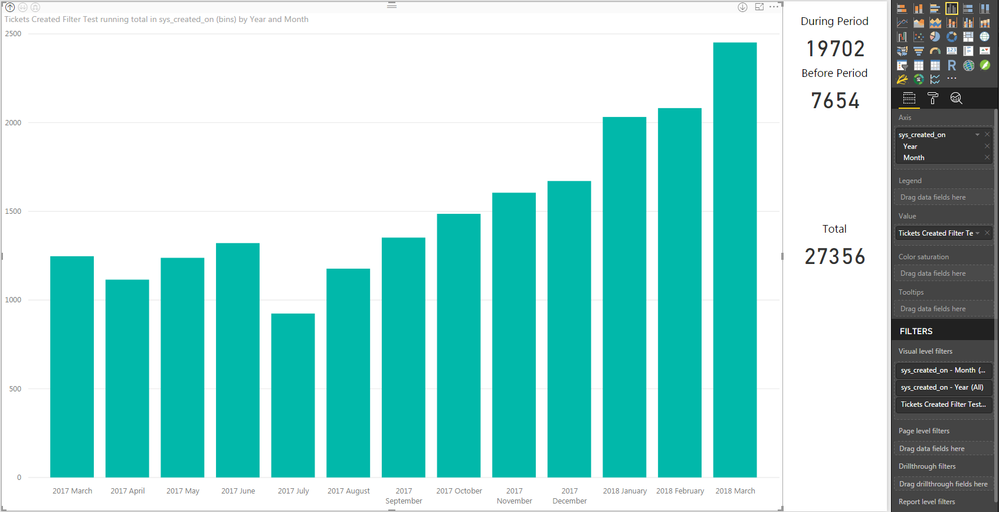
I tried with the quickmeasure but it doesn't work. I don't get the rolling total, I just get the periodic values like before.
- Mark as New
- Bookmark
- Subscribe
- Mute
- Subscribe to RSS Feed
- Permalink
- Report Inappropriate Content
Without data, can't recreate but your measure should be something like:
Total Count =
VAR maxDate = MAX(sys_created_on)
RETURN SUMX(FILTER(ALL(Table),[sys_created_on]<maxDate),[Ticket Created])
Basically, get the max date in the current context (last ticket in the current month). Grab all of the entries and filter out so that you get everything less than that date and sum up the tickets.
You could also use COUNTROWS instead of SUMX as @Floriankx suggested.
Follow on LinkedIn
@ me in replies or I'll lose your thread!!!
Instead of a Kudo, please vote for this idea
Become an expert!: Enterprise DNA
External Tools: MSHGQM
YouTube Channel!: Microsoft Hates Greg
Latest book!: DAX For Humans
DAX is easy, CALCULATE makes DAX hard...
- Mark as New
- Bookmark
- Subscribe
- Mute
- Subscribe to RSS Feed
- Permalink
- Report Inappropriate Content
I understood why I got the wrong numbers, I had some essential filters on the report that got removed by the ALL function.
Thanks for the help!
- Mark as New
- Bookmark
- Subscribe
- Mute
- Subscribe to RSS Feed
- Permalink
- Report Inappropriate Content
It look something like what I'm looking for, only the numbers aren't matching. The differences are twice as large as they should be, do you know what could cause this?
Thanks for all the help, it feels like we're close
- Mark as New
- Bookmark
- Subscribe
- Mute
- Subscribe to RSS Feed
- Permalink
- Report Inappropriate Content
What do you exactly mean by Rolling Sum?
Something like DATEISINPERIOD?
CALCULATE(SUM([Tickets Created],DATEISINPERIOD(dateTable[Dates],Max(SelectedDate),-12,months))
This would give you the sum for the last 12 months.
- Mark as New
- Bookmark
- Subscribe
- Mute
- Subscribe to RSS Feed
- Permalink
- Report Inappropriate Content
Didn't work unfortunatly 
What I mean is that the bar for ex. June 2017 should show the amount of tickets created in June 2017 plus the tickets created before. So for every month the value should grow with the amount of tickets created that month, do you follow?
Instead of showing the amount of tickets created per month, as it does now, it should show the total amount of tickets created, up until that month, including the ones created that month, of course.
And thanks for the help, by the way

Helpful resources

Power BI Monthly Update - April 2026
Check out the April 2026 Power BI update to learn about new features.

New to Fabric Survey
If you have recently started exploring Fabric, we'd love to hear how it's going. Your feedback can help with product improvements.

Power BI DataViz World Championships - June 2026
A new Power BI DataViz World Championship is coming this June! Don't miss out on submitting your entry.

FabCon &SQLCon Highlights
Experience the highlights from FabCon & SQLCon, available live and on-demand starting April 14th.

| User | Count |
|---|---|
| 42 | |
| 37 | |
| 34 | |
| 21 | |
| 16 |


| User | Count |
|---|---|
| 65 | |
| 62 | |
| 31 | |
| 26 | |
| 25 |


