This time we’re going bigger than ever. Fabric, Power BI, SQL, AI and more. We're covering it all. You won't want to miss it.
Learn moreDid you hear? There's a new SQL AI Developer certification (DP-800). Start preparing now and be one of the first to get certified. Register now
Hi all,
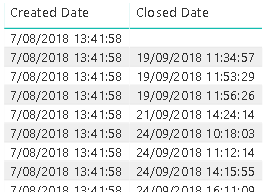
I have a table with multiple dates. We want to show per month, in a column chart, how many items were created and closed. Not all items already have a closing date. What's the best way to achive this in Power BI?
Solved! Go to Solution.
Hi,
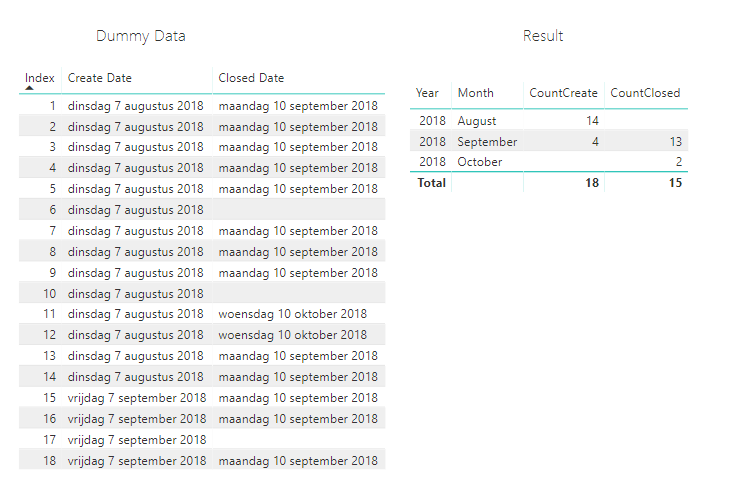
I've replicated your problem with some dummy data.
What you can do is create a date table with:
Calender = CALENDARAUTO()
Then you have to setup the relationships Calendar[date] with table[create date] and an relatoinship on [date] and [closed date].
You can then use the following measures:
CountCreate = COUNT(Table1[Create Date])
CountClosed = CALCULATE(COUNT(Table1[Closed Date]),USERELATIONSHIP(Calender[Date],Table1[Closed Date]))
That should work
Hi,
I've replicated your problem with some dummy data.
What you can do is create a date table with:
Calender = CALENDARAUTO()
Then you have to setup the relationships Calendar[date] with table[create date] and an relatoinship on [date] and [closed date].
You can then use the following measures:
CountCreate = COUNT(Table1[Create Date])
CountClosed = CALCULATE(COUNT(Table1[Closed Date]),USERELATIONSHIP(Calender[Date],Table1[Closed Date]))
That should work
@Anonymous: thanks; just what I needed.
Check out the April 2026 Power BI update to learn about new features.
Sign up to receive a private message when registration opens and key events begin.
If you have recently started exploring Fabric, we'd love to hear how it's going. Your feedback can help with product improvements.
| User | Count |
|---|---|
| 36 | |
| 32 | |
| 27 | |
| 23 | |
| 16 |
| User | Count |
|---|---|
| 65 | |
| 50 | |
| 30 | |
| 25 | |
| 24 |