Get certified for free when you join Fabric Data Days 2026 and dive into Fabric, Power BI, SQL, AI, and other essential data skills.
Join nowTry your skills in the Power BI Dataviz World Championship! Round one ends June 26. Join now
Hello,
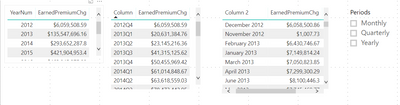
I am having trouble with creating some sort of selector that will display each different type of date period and their corresponding sums in a single table. I am not too sure whether that is possible through the use of a disconnected table or if I must display the values in seperate tables.
I have been trying to use some sort of Switch statement to display the date periods and the premium values but am unable to get it to work.
Any help with or guidance would be much appreciated.
Thanks in advance.
Solved! Go to Solution.
Hi @LAndris,
Nope, I think you need to use a table with relationship to achieve this.
Please take a look at following blog about how to create a dynamic attribute slicer:
Dynamic Attributes In A Power BI Report
Regards,
Xiaoxin Sheng
Hi @LAndris,
Nope, I think you need to use a table with relationship to achieve this.
Please take a look at following blog about how to create a dynamic attribute slicer:
Dynamic Attributes In A Power BI Report
Regards,
Xiaoxin Sheng
Hi,
Is there any alternate way of doing it?
Regards,
Prakash
| User | Count |
|---|---|
| 23 | |
| 20 | |
| 18 | |
| 18 | |
| 10 |
| User | Count |
|---|---|
| 53 | |
| 53 | |
| 40 | |
| 37 | |
| 32 |