Join us at FabCon Atlanta from March 16 - 20, 2026, for the ultimate Fabric, Power BI, AI and SQL community-led event. Save $200 with code FABCOMM.
Register now!The Power BI Data Visualization World Championships is back! Get ahead of the game and start preparing now! Learn more
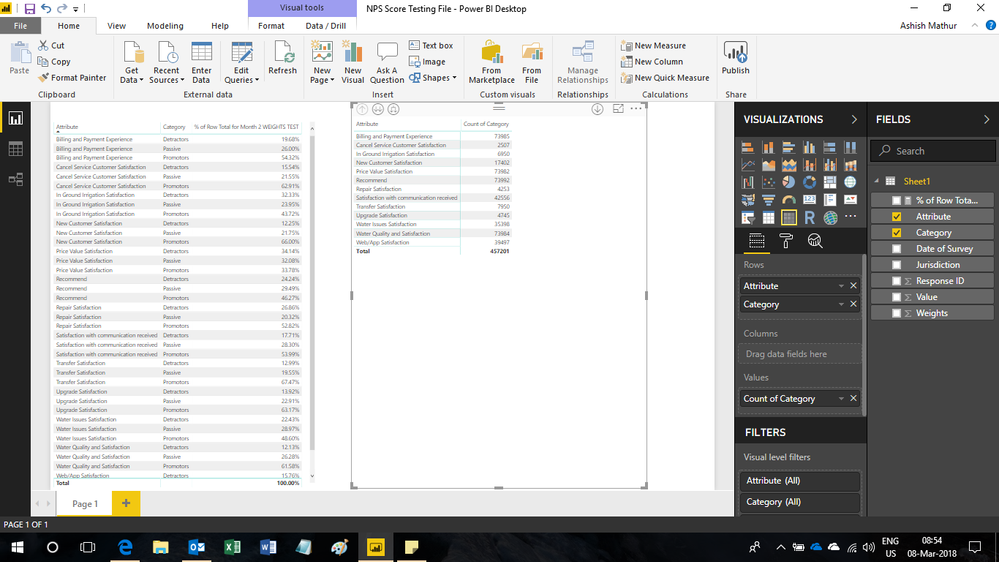
Below there is a file that I would love to build a hiearchy off of. It would be based on the Attribute field. Really for an example you can build a hieararchy between Repair Satisfaction and maybe 5 of the other categories.. However, I would like for me to be able to start my visual off with just showing Repair Satisfaction and then drilling down into the 5 sub categories and the details related to those... any ideas on that?
https://drive.google.com/open?id=14S4YG2X80ueSp3tMl0wqnBVUXfvIfJ0P
Solved! Go to Solution.
Or maybe instead of drilling down, you want to use a dynamic category such that when you click an item in the slicer, the column items in the table change. If that is the case, you might want to check out this: https://community.powerbi.com/t5/Desktop/Dynamic-Category-Using-a-Slicer/m-p/318119
Hi,
Change the visual to a matrix and show Attribute and Category in the Row labels itself. Look at the second table.
Hi,
That is exactly what the matrix visual achieves. When you click on the drill down button in the visual, you will see the second attribute.
The Power BI Data Visualization World Championships is back! Get ahead of the game and start preparing now!
Check out the November 2025 Power BI update to learn about new features.
| User | Count |
|---|---|
| 59 | |
| 46 | |
| 42 | |
| 23 | |
| 17 |
| User | Count |
|---|---|
| 190 | |
| 122 | |
| 96 | |
| 66 | |
| 47 |