cancel
Showing results for 
Search instead for 
Did you mean: 

The FabCon + SQLCon recap series starts April 14th at 8am Pacific. If you’re tracking where AI is going inside Fabric, this first session is a can't miss. Register now

Reply
meiki
Frequent Visitor

Column Heading Names in Matrix Table

Hello Power BI Community!


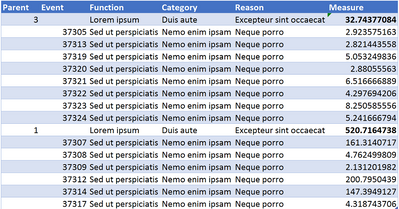
Power BI newbie here and I'm requesting a little help to create this table mockup as a visualisation in Power BI Desktop:

table.png

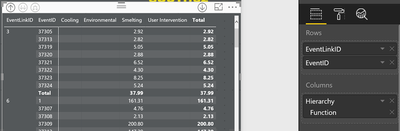
It displays a parent and child grouping of data in the rows, events (EventID) groups by their parent (EventLinkID). The first three columns are from a classification hierarchy of function, category and reason and the last ne owould be used for a measure. The names of the column headers the must be function, category and reason, which is my current problem:

 matrix.png

Please can someone explain why the names of the column headings in this matrix table are actual column values and not the actual column name?


Any help is greatly appreciated,


Ian


The data model is:

model.png

1 ACCEPTED SOLUTION
v-chuncz-msft
Community Support
Community Support

@meiki,


It behaves just like a Pivot Table. You need to drag them to Values.

Community Support Team _ Sam Zha
If this post helps, then please consider Accept it as the solution to help the other members find it more quickly.

View solution in original post

3 REPLIES 3
v-chuncz-msft
Community Support
Community Support

@meiki,


It behaves just like a Pivot Table. You need to drag them to Values.

Community Support Team _ Sam Zha
If this post helps, then please consider Accept it as the solution to help the other members find it more quickly.

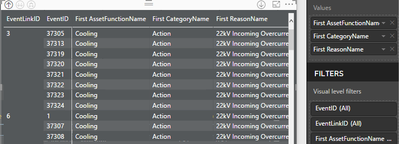
Thanks for responding. This correct the column naming, but introduced only showing the first, last or count as a value limitation: 


table2.png


Are you able to offer help for this? You can see that I'm a newbie to Power BI.


Thanks, Ian

@meiki,


Just drag to Rows.

Community Support Team _ Sam Zha
If this post helps, then please consider Accept it as the solution to help the other members find it more quickly.

Helpful resources

Announcements
New to Fabric survey Carousel

New to Fabric Survey

If you have recently started exploring Fabric, we'd love to hear how it's going. Your feedback can help with product improvements.

Power BI DataViz World Championships carousel

Power BI DataViz World Championships - June 2026

A new Power BI DataViz World Championship is coming this June! Don't miss out on submitting your entry.

Join our Fabric User Panel

Join our Fabric User Panel

Share feedback directly with Fabric product managers, participate in targeted research studies and influence the Fabric roadmap.

March Power BI Update Carousel

Power BI Community Update - March 2026

Check out the March 2026 Power BI update to learn about new features.