cancel
Showing results for 
Search instead for 
Did you mean: 

Learn from the best! Meet the four finalists headed to the FINALS of the Power BI Dataviz World Championships! Register now

Reply
Anya_T
Frequent Visitor

Column Creation

Hi,


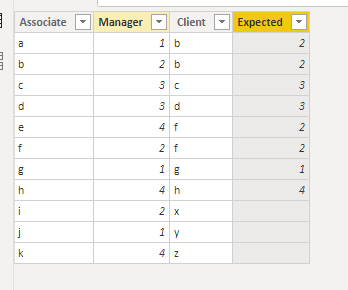
I want to create a new column, which should show the manager value. Sharing my expected column,


AssociateManager ClientExpected column
a1b2
b2b2
c3c3
d3d3
e4f2
f2f2
g1g1
h4h4
i2xNA/Null
j1yNA/Null
k4zNA/Null


As per above result in 1st row the new client is 'b' who is under manager '2'. So as per this the value of new column should become '2' but is showing the same value of manger as '1'.

The other condition should be if there is new value in client column then it should not print any value(NA/Null) in new column.


But what i am getting is,


AssociateManager ClientResul column
a1b1
b2b2
c3c3
d3d3
e4f4
f2f2
g1g1
h4h4
i2x2
j1y1
k4z4


Please help and advice what to do in such cases?


1 ACCEPTED SOLUTION

@Anya_T 

you can try this

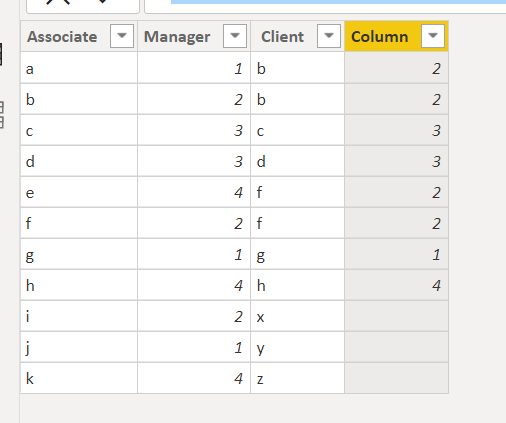
Column = maxx(FILTER('Table','Table'[Associate]=EARLIER('Table'[ Client])),'Table'[Manager])

1.PNG


Did I answer your question? Mark my post as a solution!

Proud to be a Super User!


View solution in original post

4 REPLIES 4
Fowmy
Super User
Super User

@Anya_T 

You can use LOOKUPVALUE function:

Expected = LOOKUPVALUE(Table1[Manager],Table1[Associate],Table1[ Client])

Fowmy_0-1629037729174.png


Did I answer your question? Mark my post as a solution! and hit thumbs up


Subscribe and learn Power BI from these videos

Website LinkedIn PBI User Group

Anya_T
Frequent Visitor

Hi, thank you for replying.

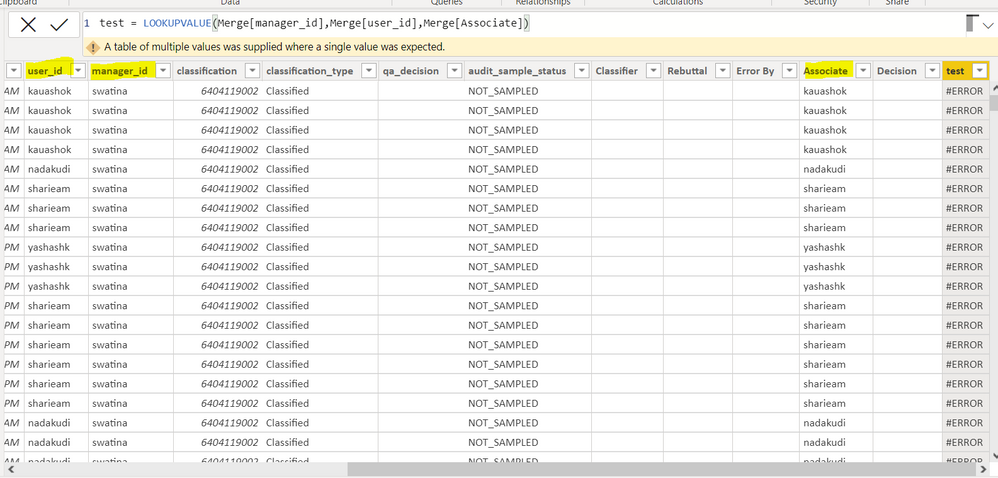
I tried but getting an error. How can i rectify it?

Sharing screenshot.

user_id= Associate

manager_id= Manager

Associate= ClientCreate ColumnCreate Column


@Anya_T 


There are  multiple values for one or more results, I assumed you had one record per match. 

it's your call. 

you can have a separate table for the combination without duplicates 

Did I answer your question? Mark my post as a solution! and hit thumbs up


Subscribe and learn Power BI from these videos

Website LinkedIn PBI User Group

@Anya_T 

you can try this

Column = maxx(FILTER('Table','Table'[Associate]=EARLIER('Table'[ Client])),'Table'[Manager])

1.PNG


Did I answer your question? Mark my post as a solution!

Proud to be a Super User!


Helpful resources

Announcements
Join our Fabric User Panel

Join our Fabric User Panel

Share feedback directly with Fabric product managers, participate in targeted research studies and influence the Fabric roadmap.

February Power BI Update Carousel

Power BI Monthly Update - February 2026

Check out the February 2026 Power BI update to learn about new features.

FabCon Atlanta 2026 carousel

FabCon Atlanta 2026

Join us at FabCon Atlanta, March 16-20, for the ultimate Fabric, Power BI, AI and SQL community-led event. Save $200 with code FABCOMM.