This time we’re going bigger than ever. Fabric, Power BI, SQL, AI and more. We're covering it all. You won't want to miss it.
Learn moreDid you hear? There's a new SQL AI Developer certification (DP-800). Start preparing now and be one of the first to get certified. Register now
Hi,
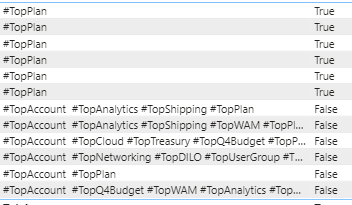
I'm trying to create something that will get me let's say #TopPlan in a column that contains multiple other values. For example
The first column is where all the values are and the second column is a measure I created using dax contains and I wanted anything that says #TopPlan but as you can see it only shows true when it is just only #TopPlan is in it
Any idea I can get the rest of #TopPlan with other values as well?
Thanks
Solved! Go to Solution.
Hi @powerbiwork
Download PBIX file with these examples.
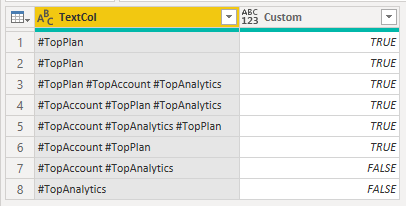
In Power Query you can add a Custom Column
Table.AddColumn(Source, "Custom", each if Text.Contains([TextCol], "#TopPlan") then true else false)
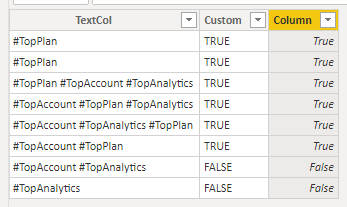
Or in DAX create a Calculated Column
Column = IF(SEARCH("#TopPlan", 'TextTable'[TextCol],,0)>0, True , False)
Regards
Phil
If I answered your question please mark my post as the solution.
If my answer helped solve your problem, give it a kudos by clicking on the Thumbs Up.
Proud to be a Super User!
Thanks so much!
Hi @powerbiwork
Download PBIX file with these examples.
In Power Query you can add a Custom Column
Table.AddColumn(Source, "Custom", each if Text.Contains([TextCol], "#TopPlan") then true else false)
Or in DAX create a Calculated Column
Column = IF(SEARCH("#TopPlan", 'TextTable'[TextCol],,0)>0, True , False)
Regards
Phil
If I answered your question please mark my post as the solution.
If my answer helped solve your problem, give it a kudos by clicking on the Thumbs Up.
Proud to be a Super User!
Hi,
I suggest you use the SEARCH() function as a calculated column. Please read more here - SEARCH function (DAX) - DAX | Microsoft Docs
Check out the April 2026 Power BI update to learn about new features.
Sign up to receive a private message when registration opens and key events begin.
If you have recently started exploring Fabric, we'd love to hear how it's going. Your feedback can help with product improvements.
| User | Count |
|---|---|
| 34 | |
| 31 | |
| 25 | |
| 20 | |
| 16 |
| User | Count |
|---|---|
| 61 | |
| 49 | |
| 28 | |
| 23 | |
| 23 |