cancel
Showing results for 
Search instead for 
Did you mean: 

July 7 - July 17 | Round 2 of the Power BI Dataviz World Championships. Don't miss your chance! Learn more

Reply
AfonsoDiTazem
Regular Visitor

Column Chart Title Conditional Formatting with DAX Expression

Hello,


I have a table with Country Names then I have a line and stacked column chart. When I select a country name from the table (is not a slicer) I want the chart name to change accordingly.


I came up with this 2 DAX expression

IsCountrySelected = IF(HASONEVALUE(CountryTable[CountryName]), "Country Selected", "No Country Selected1")
 
SelectedCountryString = IF([IsCountrySelected] = "Country Selected", "The selected country is " & VALUES(CountryTable[CountryName]), "No country is selected2")
 
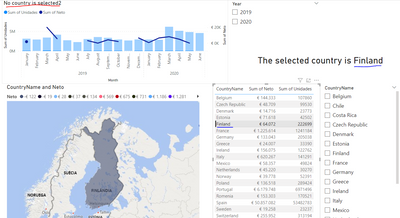
For trial and error I inserted a card with the SelectedCountryString the card updates and works properly however the chart name doesn't.
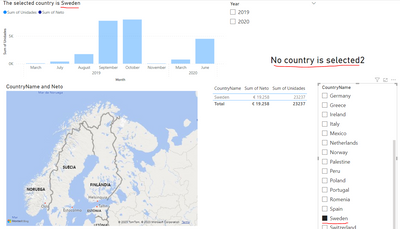
If I use a slicer with the country names the chart name updates but the card doesn't.
In both cases I'm using the same measure for the chart name and for the card (SelectedCountryString)
 
Thanks!
AfonsoDiTazem_0-1685542757847.pngAfonsoDiTazem_1-1685542840235.png


3 REPLIES 3
v-jingzhang
Community Support
Community Support

Hi @AfonsoDiTazem 


You may try a single measure as below. It doesn't have this problem. 

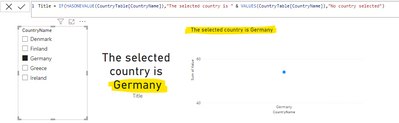
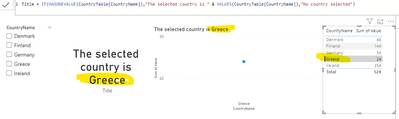
Title = IF(HASONEVALUE(CountryTable[CountryName]),"The selected country is " & VALUES(CountryTable[CountryName]),"No country selected")

vjingzhang_0-1685956088091.png


vjingzhang_1-1685956122637.png

Notice that the data in my sample is from the same table. If your data are from different tables, please check the relationship between tables. This may lead to different results.  


Best Regards,
Community Support Team _ Jing
If this post helps, please Accept it as Solution to help other members find it.

Hello,

Thanks for the reply.

I had already tried that measure and still doesn't work.
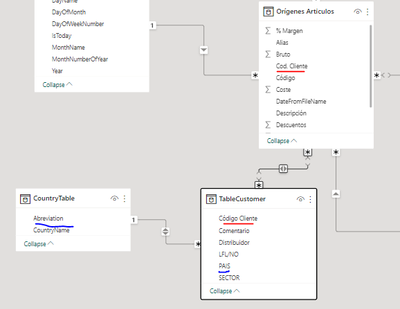
Yes, the data is in different tables without a direct connection between them. There a table in the midle connecting the other two

AfonsoDiTazem_0-1685962419032.png


Hi @AfonsoDiTazem 


Did you use CountryTable's CountryName column in both the slicer and the table visual? Currently, the cross-filter direction of relationship between CountryTable and the middle table is Both, try changing it into Single. In addition, if possible, change the relationship between the middle table and the "Origenes Articulos" table to Single direction too (the middle table filters "Origenes Articulos"). 


Best Regards,
Community Support Team _ Jing
If this post helps, please Accept it as Solution to help other members find it.

Helpful resources

Announcements
FabCon and SQLCon Barcelona 2026

FabCon & SQLCon – Barcelona 2026

Join us in Barcelona for FabCon and SQLCon, the Fabric, Power BI, SQL, and AI community event. Save €200 with code FABCMTY200.

60 days of Data Days Carousel

Data Days 2026

Join Fabric Data Days 2026: 60 days of free live/on-demand sessions, challenges, study groups, and certification opportunities.

Power BI DataViz World Championships carousel

Power BI DataViz World Championships - June 2026

A new Power BI DataViz World Championship is coming this June! Don't miss out on submitting your entry.