Get Fabric or SQL Certified for Free.
Get certified for free when you join Fabric Data Days 2026 and dive into Fabric, Power BI, SQL, AI, and other essential data skills.
Join now- Power BI forums
- Get Help with Power BI
- Desktop
- Service
- Report Server
- Power Query
- Mobile Apps
- Developer
- DAX Commands and Tips
- Custom Visuals Development Discussion
- Health and Life Sciences
- Power BI Spanish forums
- Translated Spanish Desktop
- Training and Consulting
- Instructor Led Training
- Dashboard in a Day for Women, by Women
- Galleries
- Data Stories Gallery
- Themes Gallery
- Contests Gallery
- QuickViz Gallery
- Quick Measures Gallery
- Visual Calculations Gallery
- Fabric Apps Gallery
- Notebook Gallery
- Translytical Task Flow Gallery
- TMDL Gallery
- R Script Showcase
- Webinars and Video Gallery
- Ideas
- Custom Visuals Ideas (read-only)
- Issues
- Issues
- Events
- Upcoming Events
July 28 - August 9 | Final Round of the Power BI Dataviz World Championships. This is your chance. Learn more
- Power BI forums
- Forums
- Get Help with Power BI
- Desktop
- Re: Column Chart Help
- Subscribe to RSS Feed
- Mark Topic as New
- Mark Topic as Read
- Float this Topic for Current User
- Bookmark
- Subscribe
- Printer Friendly Page


- Mark as New
- Bookmark
- Subscribe
- Mute
- Subscribe to RSS Feed
- Permalink
- Report Inappropriate Content
Column Chart Help
Hi There,
I currently have 2 years worth of data that i have on a stacked column chart visual.
The issue i have is that when i try to represent the column chart by months, it groups the 2 months together.
i.e-If my data contains Jan-15,feb-15....Dec-17
Jan-16 & Jan-17 are grouped together as January on the column chart.
How can i change this to represent every month on the chart-Jan-16,Feb-16.....Dec-17
Thanks in advance
Solved! Go to Solution.

- Mark as New
- Bookmark
- Subscribe
- Mute
- Subscribe to RSS Feed
- Permalink
- Report Inappropriate Content
@lord_kaiser,
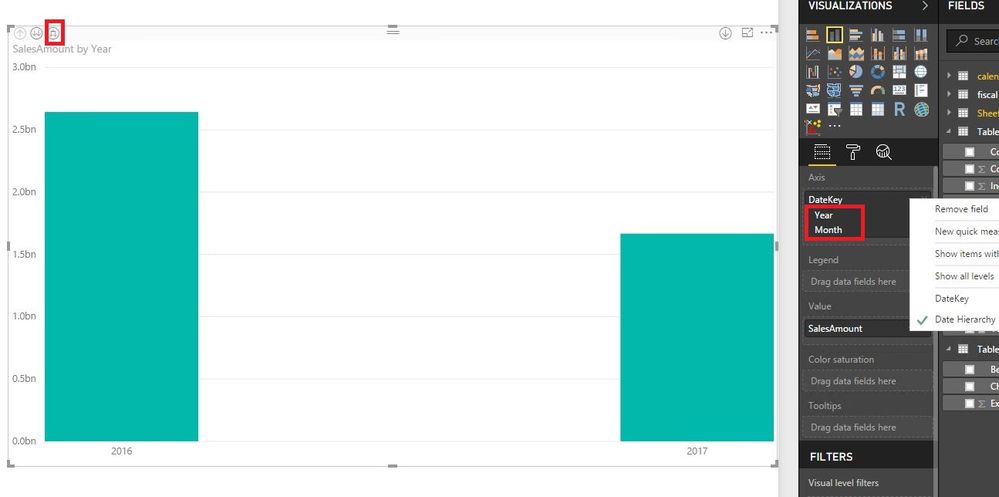
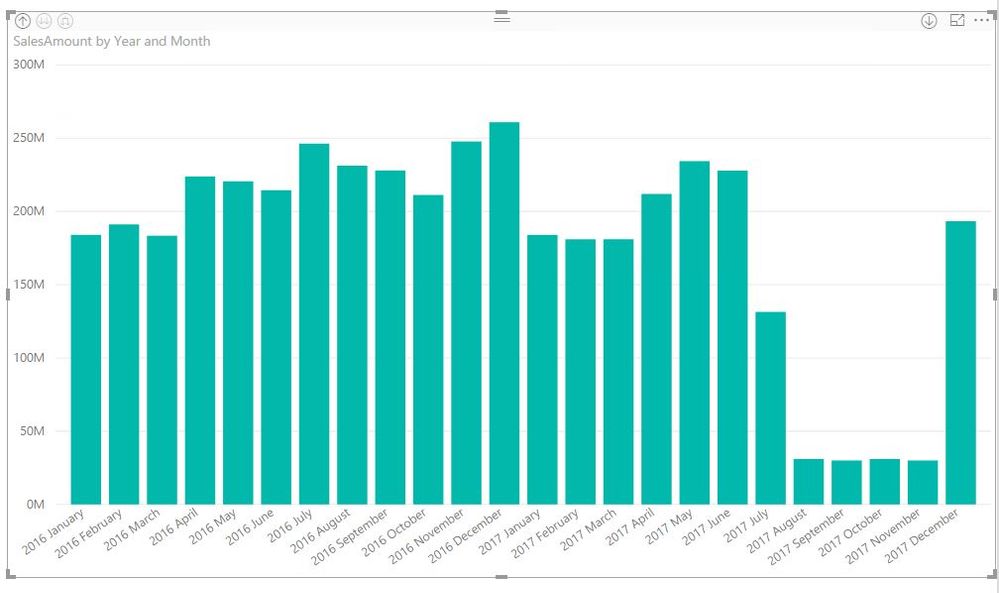
Do you have a date type field in your table and drag the field to X-AXIS of the column chart? If so, display the date field as Date Hierarchy in the column chart, then click the third button to expand the column chart. For more details, please review the following screenshots.
Regards,
Lydia
- Mark as New
- Bookmark
- Subscribe
- Mute
- Subscribe to RSS Feed
- Permalink
- Report Inappropriate Content
@lord_kaiser,
You can create YearMonth calculated column in your table and drag it to X-axis of the chart.
Year= Year(Table[Date])
MonthName= SWITCH(MONTH(Table[Date]),1,"Jan",2,"Feb",3,"Mar",4,"Apr",5,"May",6,"Jun",7,"Jul",8,"Aug",9,"Sep",10,"Oct",11,"Nov",12,"Dec")
YearMonth = Table[MonthName] &"-" &Table[Year]
Regards,
Lydia
- Mark as New
- Bookmark
- Subscribe
- Mute
- Subscribe to RSS Feed
- Permalink
- Report Inappropriate Content
@lord_kaiser,
Do you have a date type field in your table and drag the field to X-AXIS of the column chart? If so, display the date field as Date Hierarchy in the column chart, then click the third button to expand the column chart. For more details, please review the following screenshots.
Regards,
Lydia
- Mark as New
- Bookmark
- Subscribe
- Mute
- Subscribe to RSS Feed
- Permalink
- Report Inappropriate Content
Thanks for this Lydia.
Just another question whilst we are on the same topic, if i wanted to abbreviate the month and year to just Aug-15 and in order by month & year, how woul di go about doing this?
When i attempt to do this,, it gives me Aug-15,Aug-16,Aug-17 as opposed Aug-15,Sep-15,Oct-15
I have a suspicion that this may be because it has converted it to text?
Thanks
- Mark as New
- Bookmark
- Subscribe
- Mute
- Subscribe to RSS Feed
- Permalink
- Report Inappropriate Content
@lord_kaiser,
You can create YearMonth calculated column in your table and drag it to X-axis of the chart.
Year= Year(Table[Date])
MonthName= SWITCH(MONTH(Table[Date]),1,"Jan",2,"Feb",3,"Mar",4,"Apr",5,"May",6,"Jun",7,"Jul",8,"Aug",9,"Sep",10,"Oct",11,"Nov",12,"Dec")
YearMonth = Table[MonthName] &"-" &Table[Year]
Regards,
Lydia
- Mark as New
- Bookmark
- Subscribe
- Mute
- Subscribe to RSS Feed
- Permalink
- Report Inappropriate Content
Hi Lydia,
Thanks for your help thus far.
I tried to replicate the steps and I'm still not having any luck.
Still not able to sort in mobth-yr order
- Mark as New
- Bookmark
- Subscribe
- Mute
- Subscribe to RSS Feed
- Permalink
- Report Inappropriate Content
- Mark as New
- Bookmark
- Subscribe
- Mute
- Subscribe to RSS Feed
- Permalink
- Report Inappropriate Content
Hi Lydia,
Apologies for getting back to you late as i was away.
After playing around with your suggestion earlier, i managed to get it to work.
Thanks
Helpful resources

FabCon & SQLCon – Barcelona 2026
Join us in Barcelona for FabCon and SQLCon, the Fabric, Power BI, SQL, and AI community event. Save €200 with code FABCMTY200.

Fabric Community Sticker Challenge - Barcelona 2026
If you love stickers, then you will definitely want to check out our community sticker challenge, Barcelona edition!

Power BI Monthly Update - July 2026
Check out the July 2026 Power BI update to learn about new features.

Power BI DataViz World Championships - June 2026
A new Power BI DataViz World Championship is coming this June! Don't miss out on submitting your entry.

| User | Count |
|---|---|
| 30 | |
| 28 | |
| 24 | |
| 23 | |
| 18 |


| User | Count |
|---|---|
| 44 | |
| 32 | |
| 18 | |
| 17 | |
| 16 |


