cancel
Showing results for 
Search instead for 
Did you mean: 

View all the Fabric Data Days sessions on demand. View schedule

Reply
Anonymous
Not applicable

Column Chart Axis

narmadhavijay3_0-1672226959108.png

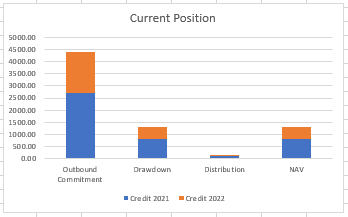
Im having a column chart like the above.

I want my column chart's four values as a separate bar like in the below image.

narmadhavijay3_1-1672227033545.png

I tried by interchange the values from section to values,values to section.

Need a solution to get this.


1 ACCEPTED SOLUTION
Migasuke
Memorable Member
Memorable Member

Hi @Anonymous ,

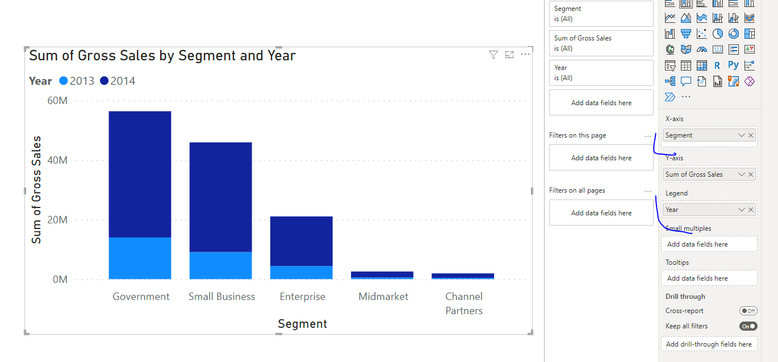
You just need to change axis and legend. I have some sample solution here, please try to apply for your data:

Migasuke_0-1672228462938.png


If my answer was helpful please give me a Kudos or even accept as a Solution.

Let's connect on LinkedIn!

View solution in original post

1 REPLY 1
Migasuke
Memorable Member
Memorable Member

Hi @Anonymous ,

You just need to change axis and legend. I have some sample solution here, please try to apply for your data:

Migasuke_0-1672228462938.png


If my answer was helpful please give me a Kudos or even accept as a Solution.

Let's connect on LinkedIn!

Helpful resources

Announcements
November Power BI Update Carousel

Power BI Monthly Update - November 2025

Check out the November 2025 Power BI update to learn about new features.

Fabric Data Days Carousel

Fabric Data Days

Advance your Data & AI career with 50 days of live learning, contests, hands-on challenges, study groups & certifications and more!

FabCon Atlanta 2026 carousel

FabCon Atlanta 2026

Join us at FabCon Atlanta, March 16-20, for the ultimate Fabric, Power BI, AI and SQL community-led event. Save $200 with code FABCOMM.

Top Solution Authors
Top Kudoed Authors