cancel
Showing results for 
Search instead for 
Did you mean: 

The Power BI Data Visualization World Championships is back! Get ahead of the game and start preparing now! Learn more

Reply
Kolumam2810
New Member

Column Calculation

I want to calculate Percentage 2 column from the percentage columns based on the Group A. For example the Percentage 2 first row (1.97) is fetched from the Percentage second row (1.97). How to achieve the same?


GroupStart DateEnd DatePercentagePercentage 2
A31/12/202029/06/20211.361.97
A30/06/202130/12/20211.974.05
A31/12/202129/06/20224.054.02
A30/06/202230/12/20224.024.2
A31/12/202229/06/20234.24.17
A30/06/202330/12/20234.174.36
A31/12/202329/06/20244.364.36
A30/06/202430/12/20244.364.53
A31/12/202402/06/20254.5366.98
A03/06/202503/06/202566.980


1 ACCEPTED SOLUTION
Jihwan_Kim
Super User
Super User

Hi, @Kolumam2810 

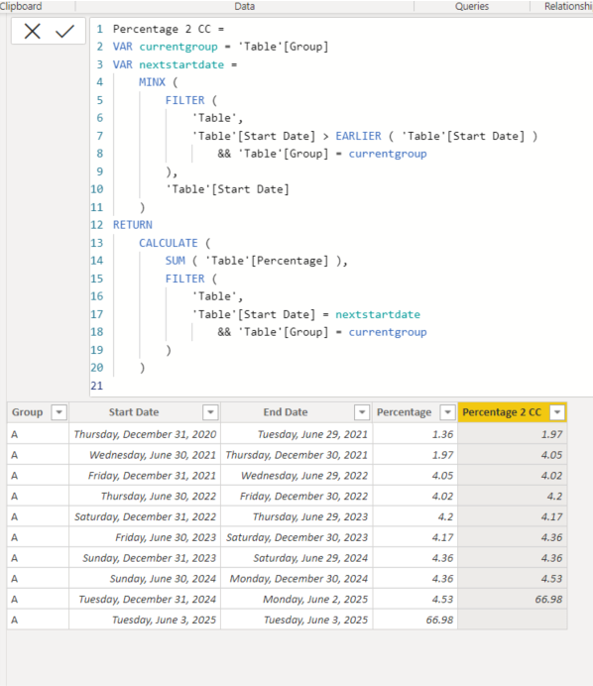
Please check the below for creating a new column.


Picture2.png


Percentage 2 CC =
VAR currentgroup = 'Table'[Group]
VAR nextstartdate =
MINX (
FILTER (
'Table',
'Table'[Start Date] > EARLIER ( 'Table'[Start Date] )
&& 'Table'[Group] = currentgroup
),
'Table'[Start Date]
)
RETURN
CALCULATE (
SUM ( 'Table'[Percentage] ),
FILTER (
'Table',
'Table'[Start Date] = nextstartdate
&& 'Table'[Group] = currentgroup
)
)


Hi, My name is Jihwan Kim.


If this post helps, then please consider accept it as the solution to help other members find it faster, and give a big thumbs up.


Linkedin: linkedin.com/in/jihwankim1975/

Twitter: twitter.com/Jihwan_JHKIM


If this post helps, then please consider accepting it as the solution to help other members find it faster, and give a big thumbs up.


Click here to visit my LinkedIn page

Click here to schedule a short Teams meeting to discuss your question.

View solution in original post

1 REPLY 1
Jihwan_Kim
Super User
Super User

Hi, @Kolumam2810 

Please check the below for creating a new column.


Picture2.png


Percentage 2 CC =
VAR currentgroup = 'Table'[Group]
VAR nextstartdate =
MINX (
FILTER (
'Table',
'Table'[Start Date] > EARLIER ( 'Table'[Start Date] )
&& 'Table'[Group] = currentgroup
),
'Table'[Start Date]
)
RETURN
CALCULATE (
SUM ( 'Table'[Percentage] ),
FILTER (
'Table',
'Table'[Start Date] = nextstartdate
&& 'Table'[Group] = currentgroup
)
)


Hi, My name is Jihwan Kim.


If this post helps, then please consider accept it as the solution to help other members find it faster, and give a big thumbs up.


Linkedin: linkedin.com/in/jihwankim1975/

Twitter: twitter.com/Jihwan_JHKIM


If this post helps, then please consider accepting it as the solution to help other members find it faster, and give a big thumbs up.


Click here to visit my LinkedIn page

Click here to schedule a short Teams meeting to discuss your question.

Helpful resources

Announcements
November Power BI Update Carousel

Power BI Monthly Update - November 2025

Check out the November 2025 Power BI update to learn about new features.

Fabric Data Days Carousel

Fabric Data Days

Advance your Data & AI career with 50 days of live learning, contests, hands-on challenges, study groups & certifications and more!

FabCon Atlanta 2026 carousel

FabCon Atlanta 2026

Join us at FabCon Atlanta, March 16-20, for the ultimate Fabric, Power BI, AI and SQL community-led event. Save $200 with code FABCOMM.