Share feedback directly with Fabric product managers, participate in targeted research studies and influence the Fabric roadmap.
Sign up nowGet Fabric certified for FREE! Don't miss your chance! Learn more
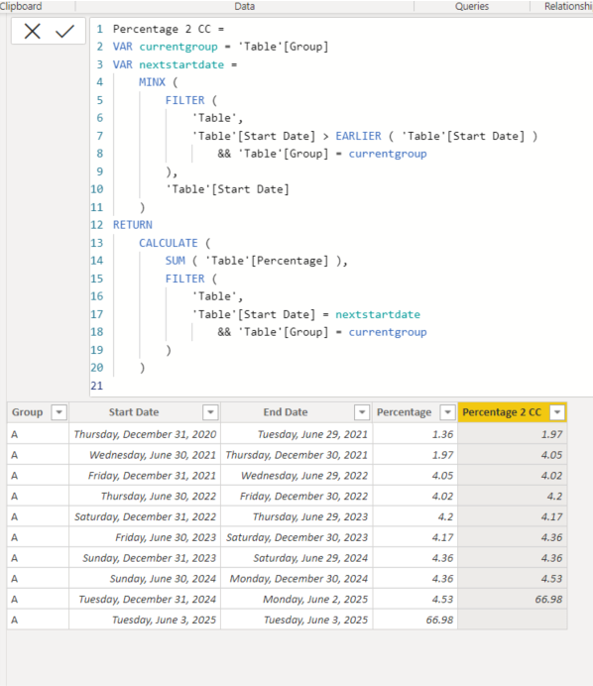
I want to calculate Percentage 2 column from the percentage columns based on the Group A. For example the Percentage 2 first row (1.97) is fetched from the Percentage second row (1.97). How to achieve the same?
| Group | Start Date | End Date | Percentage | Percentage 2 |
| A | 31/12/2020 | 29/06/2021 | 1.36 | 1.97 |
| A | 30/06/2021 | 30/12/2021 | 1.97 | 4.05 |
| A | 31/12/2021 | 29/06/2022 | 4.05 | 4.02 |
| A | 30/06/2022 | 30/12/2022 | 4.02 | 4.2 |
| A | 31/12/2022 | 29/06/2023 | 4.2 | 4.17 |
| A | 30/06/2023 | 30/12/2023 | 4.17 | 4.36 |
| A | 31/12/2023 | 29/06/2024 | 4.36 | 4.36 |
| A | 30/06/2024 | 30/12/2024 | 4.36 | 4.53 |
| A | 31/12/2024 | 02/06/2025 | 4.53 | 66.98 |
| A | 03/06/2025 | 03/06/2025 | 66.98 | 0 |
Solved! Go to Solution.
Hi, @Kolumam2810
Please check the below for creating a new column.
Hi, My name is Jihwan Kim.
If this post helps, then please consider accept it as the solution to help other members find it faster, and give a big thumbs up.
Linkedin: linkedin.com/in/jihwankim1975/
Twitter: twitter.com/Jihwan_JHKIM
Hi, @Kolumam2810
Please check the below for creating a new column.
Hi, My name is Jihwan Kim.
If this post helps, then please consider accept it as the solution to help other members find it faster, and give a big thumbs up.
Linkedin: linkedin.com/in/jihwankim1975/
Twitter: twitter.com/Jihwan_JHKIM
Share feedback directly with Fabric product managers, participate in targeted research studies and influence the Fabric roadmap.
If you love stickers, then you will definitely want to check out our Community Sticker Challenge!
Check out the January 2026 Power BI update to learn about new features.
| User | Count |
|---|---|
| 62 | |
| 62 | |
| 42 | |
| 21 | |
| 18 |