Get Fabric or SQL Certified for Free.
Get certified for free when you join Fabric Data Days 2026 and dive into Fabric, Power BI, SQL, AI, and other essential data skills.
Join now- Power BI forums
- Get Help with Power BI
- Desktop
- Service
- Report Server
- Power Query
- Mobile Apps
- Developer
- DAX Commands and Tips
- Custom Visuals Development Discussion
- Health and Life Sciences
- Power BI Spanish forums
- Translated Spanish Desktop
- Training and Consulting
- Instructor Led Training
- Dashboard in a Day for Women, by Women
- Galleries
- Data Stories Gallery
- Themes Gallery
- Contests Gallery
- QuickViz Gallery
- Quick Measures Gallery
- Visual Calculations Gallery
- Notebook Gallery
- Translytical Task Flow Gallery
- TMDL Gallery
- R Script Showcase
- Webinars and Video Gallery
- Ideas
- Custom Visuals Ideas (read-only)
- Issues
- Issues
- Events
- Upcoming Events
Try your skills in the Power BI Dataviz World Championship! Round one ends June 26. Join now
- Power BI forums
- Forums
- Get Help with Power BI
- Desktop
- Column Bar Chart Split from the same data?
- Subscribe to RSS Feed
- Mark Topic as New
- Mark Topic as Read
- Float this Topic for Current User
- Bookmark
- Subscribe
- Printer Friendly Page

- Mark as New
- Bookmark
- Subscribe
- Mute
- Subscribe to RSS Feed
- Permalink
- Report Inappropriate Content
Column Bar Chart Split from the same data?
Good morning. I am working on a chart with some crime data. My boss would like a column chart showing crime data for the previous day and the current day, but he would also like to see a comparison of week over week or day over day for a week’s period. My data comes from an SQL query to an external DB and is from 2015 to present. Hence when I place the crime type into the Axis/Value I am unsure how to then split that data into two separate time frames to meet the request for day over day and week over week view.
I am a beginner on this tool so I do not know DAX or other more sophisticated mechanisms to deal with the data, but am willing to explore and learn.
Hopefully this makes sense. Thank you.
Solved! Go to Solution.


- Mark as New
- Bookmark
- Subscribe
- Mute
- Subscribe to RSS Feed
- Permalink
- Report Inappropriate Content
Hi @Anonymous ,
First, create an unrelated calendar table as slicer.
DimDate = ADDCOLUMNS(CALENDAR("20/04/2020","28/05/2020"),"week", WEEKNUM([Date]))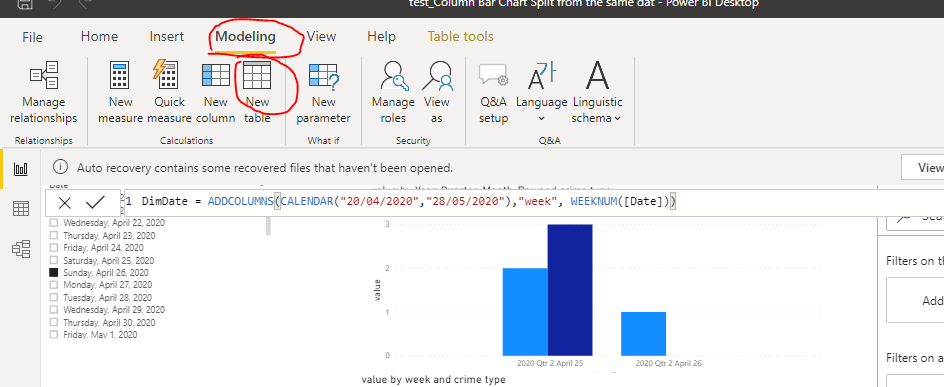
Create measures to filter data from previous week and previous day.
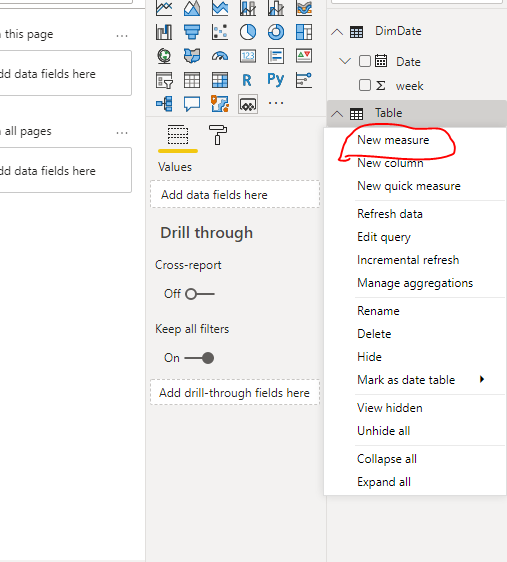
last_day = IF(MAX('Table'[date])<=SELECTEDVALUE(DimDate[Date])&&MAX('Table'[date])>=SELECTEDVALUE(DimDate[Date])-1,1,0)Last Week =
VAR CURRENT_WEEK = SELECTEDVALUE(DimDate[week])
VAR CURRENT_YEAR = YEAR(SELECTEDVALUE(DimDate[Date]))
RETURN
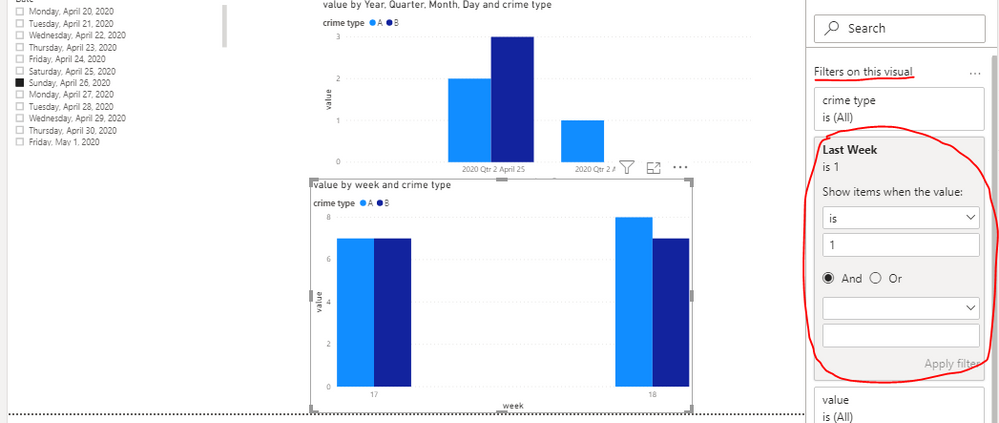
IF(MAX('Table'[week])<=CURRENT_WEEK&&MAX('Table'[week])>=CURRENT_WEEK-1&&YEAR(MAX('Table'[date]))=CURRENT_YEAR,1,0
)
Best Regards,
Liang
If this post helps, then please consider Accept it as the solution to help the other members find it more quickly.
- Mark as New
- Bookmark
- Subscribe
- Mute
- Subscribe to RSS Feed
- Permalink
- Report Inappropriate Content
Hi @Anonymous ,
First, create an unrelated calendar table as slicer.
DimDate = ADDCOLUMNS(CALENDAR("20/04/2020","28/05/2020"),"week", WEEKNUM([Date]))Create measures to filter data from previous week and previous day.
last_day = IF(MAX('Table'[date])<=SELECTEDVALUE(DimDate[Date])&&MAX('Table'[date])>=SELECTEDVALUE(DimDate[Date])-1,1,0)

Last Week =
VAR CURRENT_WEEK = SELECTEDVALUE(DimDate[week])
VAR CURRENT_YEAR = YEAR(SELECTEDVALUE(DimDate[Date]))
RETURN
IF(MAX('Table'[week])<=CURRENT_WEEK&&MAX('Table'[week])>=CURRENT_WEEK-1&&YEAR(MAX('Table'[date]))=CURRENT_YEAR,1,0)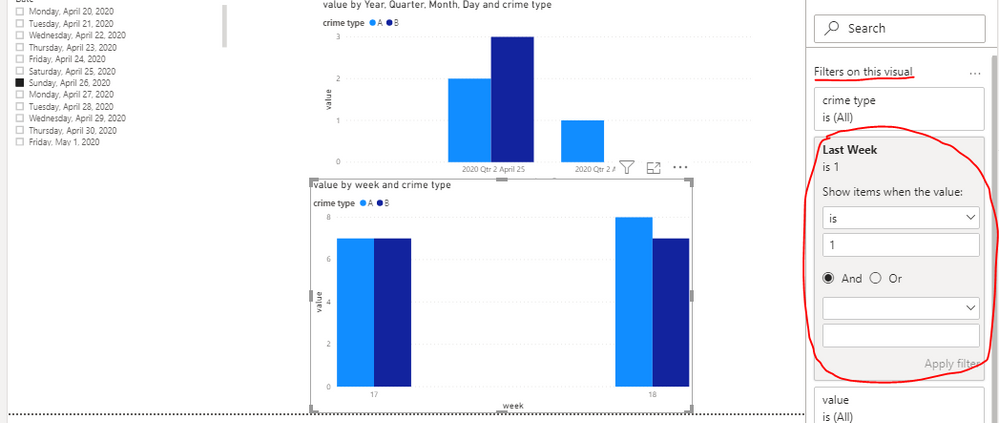
Best Regards,
Liang
If this post helps, then please consider Accept it as the solution to help the other members find it more quickly.
- Mark as New
- Bookmark
- Subscribe
- Mute
- Subscribe to RSS Feed
- Permalink
- Report Inappropriate Content
thank you. As a newbie though...is that coding something I need to enter? or is that the logic behind the slicer?
- Mark as New
- Bookmark
- Subscribe
- Mute
- Subscribe to RSS Feed
- Permalink
- Report Inappropriate Content
Hi @Anonymous ,
First, create an unrelated calendar table as slicer.
DimDate = ADDCOLUMNS(CALENDAR("20/04/2020","28/05/2020"),"week", WEEKNUM([Date]))Create measures to filter data from previous week and previous day.
last_day = IF(MAX('Table'[date])<=SELECTEDVALUE(DimDate[Date])&&MAX('Table'[date])>=SELECTEDVALUE(DimDate[Date])-1,1,0)Last Week =
VAR CURRENT_WEEK = SELECTEDVALUE(DimDate[week])
VAR CURRENT_YEAR = YEAR(SELECTEDVALUE(DimDate[Date]))
RETURN
IF(MAX('Table'[week])<=CURRENT_WEEK&&MAX('Table'[week])>=CURRENT_WEEK-1&&YEAR(MAX('Table'[date]))=CURRENT_YEAR,1,0
)
Best Regards,
Liang
If this post helps, then please consider Accept it as the solution to help the other members find it more quickly.
- Mark as New
- Bookmark
- Subscribe
- Mute
- Subscribe to RSS Feed
- Permalink
- Report Inappropriate Content
Hi @Anonymous ,
Yes, you need to create a measure and apply it to the visual level filter as the picture show.
You can refer to .pbix for more details.
Best Regards,
Liang
If this post helps, then please consider Accept it as the solution to help the other members find it more quickly.
- Mark as New
- Bookmark
- Subscribe
- Mute
- Subscribe to RSS Feed
- Permalink
- Report Inappropriate Content
Hi there. I did open the sample file...but still do not know where I would be adding those formulas your provided.


- Mark as New
- Bookmark
- Subscribe
- Mute
- Subscribe to RSS Feed
- Permalink
- Report Inappropriate Content
@Anonymous , you need to use date table for that So you can have a measure, which can be summarized based on date or week you selected
example
sales =SUM(Sales[Sales Amount])
//Day behind for yesterday
Day behind Sales = CALCULATE(SUM(Sales[Sales Amount]),dateadd('Date'[Date],-1,Day))
//7 Day behind for same week day
Day behind Sales = CALCULATE(SUM(Sales[Sales Amount]),dateadd('Date'[Date],-7,Day))
You can take a diff for change
Diff = [sales]-[Day behind Sales ]
For Week refer my blog : https://community.powerbi.com/t5/Community-Blog/Week-Is-Not-So-Weak-WTD-Last-WTD-and-This-Week-vs-La...
To get the best of the time intelligence function. Make sure you have a date calendar and it has been marked as the date in model view. Also, join it with the date column of your fact/s. Refer :
https://radacad.com/creating-calendar-table-in-power-bi-using-dax-functions
https://www.archerpoint.com/blog/Posts/creating-date-table-power-bi
https://www.sqlbi.com/articles/creating-a-simple-date-table-in-dax/
See if my webinar on Time Intelligence can help: https://community.powerbi.com/t5/Webinars-and-Video-Gallery/PowerBI-Time-Intelligence-Calendar-WTD-Y...
Appreciate your Kudos.
Helpful resources

Data Days 2026
Don't miss out on Data Days, June 15 through August 7. Learn Fabric, Power BI, SQL, AI and more.

Power BI DataViz World Championships - June 2026
A new Power BI DataViz World Championship is coming this June! Don't miss out on submitting your entry.

| User | Count |
|---|---|
| 22 | |
| 22 | |
| 20 | |
| 19 | |
| 11 |


| User | Count |
|---|---|
| 66 | |
| 56 | |
| 46 | |
| 44 | |
| 31 |


