Join us at FabCon Atlanta from March 16 - 20, 2026, for the ultimate Fabric, Power BI, AI and SQL community-led event. Save $200 with code FABCOMM.
Register now!The Power BI Data Visualization World Championships is back! Get ahead of the game and start preparing now! Learn more
Hi,
What if i want to colour green if the value is more than 100% otherwise RED in Start actual progress and finish actual progress?
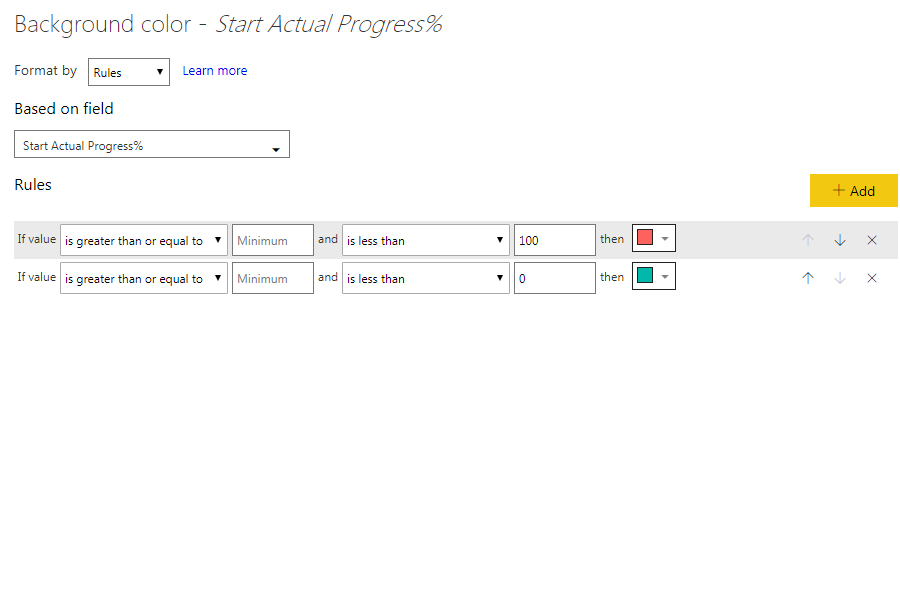
it's a talbe made of measure. i tried to use background color fomat by rules.. like the pic below.
but it doesn't work.! anyone can let me know what i am missing?
thanks,
Solved! Go to Solution.
Hi @Anonymous ,
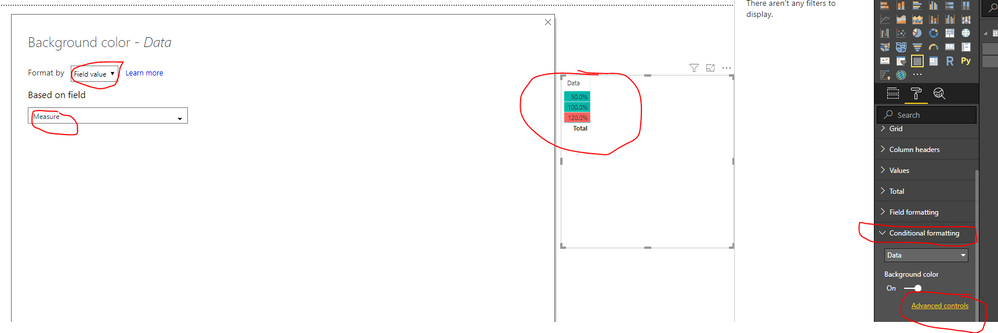
Based on my test, you could use the "Advanced controls" function to set your color:
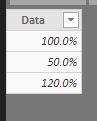
Sample data:
Create a conditional rule:
Measure = IF(CALCULATE(SUM(Table1[Data]))>1,"#FD625E","#01B8AA")
Use the "Advanced controls" function:
You could also download the pbix file to have a view.
Regards,
Daniel He
Hi @Anonymous ,
Could you please tell me if your problem has been solved? If it is, could you please mark the helpful replies as Answered to close this topic?
Regards,
Daniel He
Hi @Anonymous ,
Based on my test, you could use the "Advanced controls" function to set your color:
Sample data:
Create a conditional rule:
Measure = IF(CALCULATE(SUM(Table1[Data]))>1,"#FD625E","#01B8AA")
Use the "Advanced controls" function:
You could also download the pbix file to have a view.
Regards,
Daniel He
Your rules do not look correct, I think it should just be if greater than 1, green, otherwise red but that is not what your rules say.
The Power BI Data Visualization World Championships is back! Get ahead of the game and start preparing now!
Check out the November 2025 Power BI update to learn about new features.
| User | Count |
|---|---|
| 59 | |
| 43 | |
| 42 | |
| 23 | |
| 17 |
| User | Count |
|---|---|
| 190 | |
| 122 | |
| 96 | |
| 66 | |
| 47 |