Don't miss your chance to take the Fabric Data Engineer (DP-700) exam on us!
Learn moreWe've captured the moments from FabCon & SQLCon that everyone is talking about, and we are bringing them to the community, live and on-demand. Starts on April 14th. Register now
Hi
Is it possible to colour whole columns in a matrix and not the actual values. I have items being sorted into buckets, 0-2, 3-10 and 11-25. There is a count of items in the values but I don't want to colour code based ont he value. I want the entire 0-2 column to be green, 3-10 column to be Amber and 11-25 column to be red
Thanks
Yes you can. When setting up the conditional formatting, simply select a different field under the option "Based on Field". If you do not see this option, make sure you are using an up to date Power BI Desktop.
The Power BI service should show this option.
Hi
Thanks for your response. I only see one field that I can select the Count and not the "Bucket" field which I need.
i'm using RS Version: 2.61.5192.641 64-bit (August 2018)
Is that an old version?
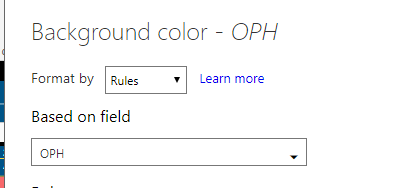
It is yes, although the feature should exist in your version. What you need to do is find the value column that you want the colour to exist in. Click its drop arrow and select Conditional Formatting. Inside that window will be the "Based on Field" option that will allow you to specify what the conditions are to colour your results in the matrix. In my example below, OPH is in my matrix and i've specified rules around OPH, however you could select with the dropdown, any other field in your model
If you have recently started exploring Fabric, we'd love to hear how it's going. Your feedback can help with product improvements.
A new Power BI DataViz World Championship is coming this June! Don't miss out on submitting your entry.
Share feedback directly with Fabric product managers, participate in targeted research studies and influence the Fabric roadmap.
| User | Count |
|---|---|
| 53 | |
| 35 | |
| 31 | |
| 19 | |
| 17 |
| User | Count |
|---|---|
| 75 | |
| 72 | |
| 39 | |
| 35 | |
| 23 |