Join us at FabCon Atlanta from March 16 - 20, 2026, for the ultimate Fabric, Power BI, AI and SQL community-led event. Save $200 with code FABCOMM.
Register now!The Power BI Data Visualization World Championships is back! Get ahead of the game and start preparing now! Learn more
Hi,
I hope, I have mannaged to post this in the right part of the community.
I have created af Power Bi report with a matrix visual.
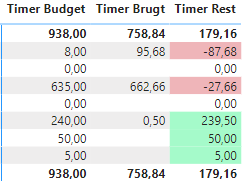
In this matrix, I have used conditional formatting on the values in my difference column to highlight negative values in red and positive values in green:
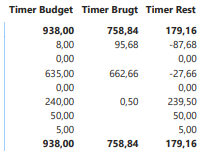
however, if I want to print the report page, the colors disappear and all cells get a white background in the print preview and on the page that comes out of the printer:
If I export to PDF, the colors stay.
How do I print directly from Power Bi desktop and/or Power Bi online without losing the colors..?
Hi @celu23 ,
When you print a Power BI report with conditional formatting (like colors in your matrix visual), sometimes the colors disappear if the printer settings or browser options are not configured properly. Here are some steps to help you print your report while keeping the colors:
Use the Print Dialog’s “Background Graphics” Option:
Export as PDF (Recommended):
Check How You’re Printing:
Limitations:
If you still have issues, let us know which method you use to print (Power BI built-in option or browser print), and the browser name. That way, we can provide more tailored help.
Let me know if this solves your problem or if you need further assistance!
translation and formatting supported by AI
in the print dialog expand More Settings and enable Background Graphics and the colors on a table or matrix with conditional formatting should show now when you print.
The Power BI Data Visualization World Championships is back! Get ahead of the game and start preparing now!
| User | Count |
|---|---|
| 38 | |
| 38 | |
| 37 | |
| 28 | |
| 27 |
| User | Count |
|---|---|
| 124 | |
| 89 | |
| 73 | |
| 66 | |
| 65 |