cancel
Showing results for 
Search instead for 
Did you mean: 

The Power BI Data Visualization World Championships is back! Get ahead of the game and start preparing now! Learn more

Reply
Anonymous
Not applicable

Color of a multiline chart that depends on a table

Hola,

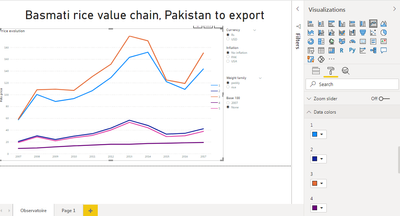
I'm new on powerBI desktop. I have a multiline chart. I would like that the color of each line depends on a filed that come from my postgresql database. Do you know how can I do this ?


Thanks a lot for you help,

Theo

1 ACCEPTED SOLUTION
Anonymous
Not applicable

Hi @Anonymous 

You may want to use conditional formatting in Line Charts for multiple lines.

Your demand is a good idea, while it is not supported to implement in Power BI currently.
You can vote up this idea for this function:Cluster column and line chart

Or you can submit a new idea to improve the Power BI.
It is a place for customers provide feedback about Microsoft Office products . What’s more, if a feedback is high voted there by other customers, it will be promising that Microsoft Product Team will take it into consideration when designing the next version in the future.


Best Regards,

Rico Zhou


If this post helps, then please consider Accept it as the solution to help the other members find it more quickly. 

View solution in original post

4 REPLIES 4
Fowmy
Super User
Super User

@Anonymous 

You can use the legend section of the chart to show the color of each line differently.

If this answer doesn't work, please your sample data and the expected

________________________

If my answer was helpful, please click Accept it as the solution to help other members find it useful

Click on the Thumbs-Up icon if you like this reply 🙂


Website YouTube  LinkedIn results.


Did I answer your question? Mark my post as a solution! and hit thumbs up


Subscribe and learn Power BI from these videos

Website LinkedIn PBI User Group

Anonymous
Not applicable

@Fowmy  thanks a lot for your help !


OK but I have to manualy choose the color of each line  ! What I would like is that the color is determined by a field of the table. That's a kind of conditonnal format I think, but when I do a line chart, I don't achieve to see the conditionnal format ellipsis (tree dots).

theofech_0-1607510480441.png


Anonymous
Not applicable

Hi @Anonymous 

Could you tell me if your problem has been solved? If it is, kindly Accept it as the solution. More people will benefit from it. Or you are still confused about it, please provide me with more details about your problem.


Best Regards,

Rico Zhou

Anonymous
Not applicable

Hi @Anonymous 

You may want to use conditional formatting in Line Charts for multiple lines.

Your demand is a good idea, while it is not supported to implement in Power BI currently.
You can vote up this idea for this function:Cluster column and line chart

Or you can submit a new idea to improve the Power BI.
It is a place for customers provide feedback about Microsoft Office products . What’s more, if a feedback is high voted there by other customers, it will be promising that Microsoft Product Team will take it into consideration when designing the next version in the future.


Best Regards,

Rico Zhou


If this post helps, then please consider Accept it as the solution to help the other members find it more quickly. 

Helpful resources

Announcements
Power BI DataViz World Championships

Power BI Dataviz World Championships

The Power BI Data Visualization World Championships is back! Get ahead of the game and start preparing now!

November Power BI Update Carousel

Power BI Monthly Update - November 2025

Check out the November 2025 Power BI update to learn about new features.

FabCon Atlanta 2026 carousel

FabCon Atlanta 2026

Join us at FabCon Atlanta, March 16-20, for the ultimate Fabric, Power BI, AI and SQL community-led event. Save $200 with code FABCOMM.