Join us at FabCon Atlanta from March 16 - 20, 2026, for the ultimate Fabric, Power BI, AI and SQL community-led event. Save $200 with code FABCOMM.
Register now!Vote for your favorite vizzies from the Power BI Dataviz World Championship submissions. Vote now!
Hi all,
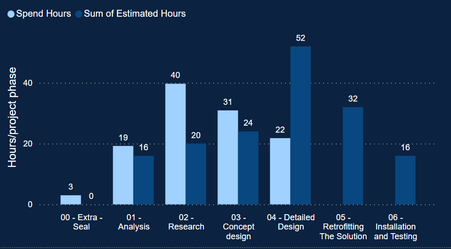
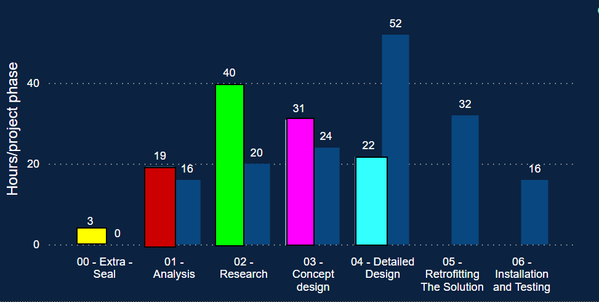
I want to color these different graphs:
The light blue graphs I want to give a different color.
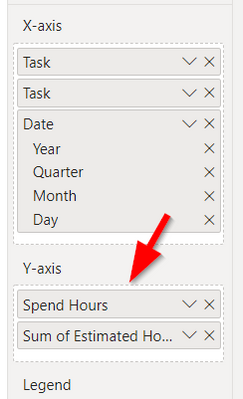
I think the problem is that the data comes from 2 different sources:
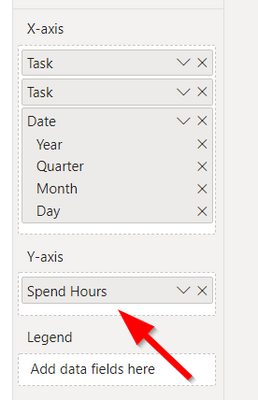
If i remove the sum of estimated hours, It is possible:
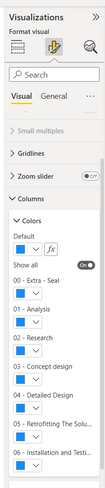
Like this:
Is there a work around? Can this be solved with a different solution?
Thanks a lot!
Kind regards,
Jakster
@Anonymous I took two numeric columns under Y-Axis and able to color both of them.
Hi Tahreem24,
Yes, that's now also the case (light blue and dark blue).
But I want to assign different colors to the light blue graphs.
I made an example sketch:
Hopes this clarifies the issue.
Hi @Anonymous
To my knowledge, this is not supported currently. When there is a legend field or there are multiple Y-axis fields, it only enables you to set different colors for legend values or Y-axis fields. It is not able to let you set different colors for values in one Y-axis field. This is by design.
Best Regards,
Community Support Team _ Jing
If this post helps, please Accept it as Solution to help other members find it.
If you love stickers, then you will definitely want to check out our Community Sticker Challenge!
Check out the January 2026 Power BI update to learn about new features.
| User | Count |
|---|---|
| 70 | |
| 51 | |
| 42 | |
| 29 | |
| 22 |
| User | Count |
|---|---|
| 142 | |
| 121 | |
| 56 | |
| 37 | |
| 32 |