cancel
Showing results for 
Search instead for 
Did you mean: 

The Power BI Data Visualization World Championships is back! Get ahead of the game and start preparing now! Learn more

Reply
amirabedhiafi
Impactful Individual

Color min and max value in a bar chart

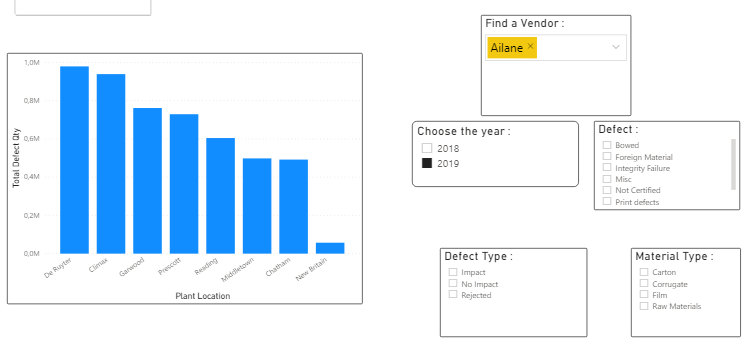
I have the following bar chart : 


Captur.PNG


I want to color the max and the min bar chart with red and green respectively  when choosing any filter.

So De Ruyter will be in red and New Britain in green.

Amira Bedhiafi
Full Stack Business Intelligence Consultant @Capgemini
1 ACCEPTED SOLUTION

Hey @amirabedhiafi ,

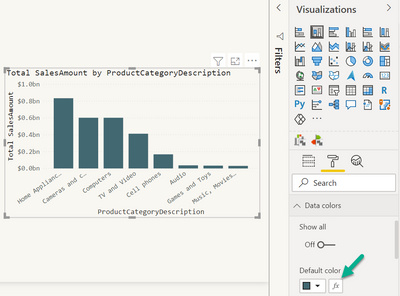
the conditional formatting has moved :-), I'm sorr for the inconvenience. Here you can add the measure that colors the min and the max value:

TomMartens_0-1607371782173.png

Hopefully, this is what you are looking for.


Regards,

Tom


Did I answer your question? Mark my post as a solution, this will help others!

Proud to be a Super User!
I accept Kudos 😉
Hamburg, Germany

View solution in original post

5 REPLIES 5
Johanno
Continued Contributor

To set color by value depending on the filtered value, create a measure like:


Color coding = 
SWITCH (SELECTEDVALUE('Table'[Country]),
        "New Britian", "#00ff00",
        "De Ruyter", "#ff3300"
)


Then set color by using fx - format by "Field value" - Based on field Color coding (or the name of the measure)


Is that answer to the question?

How do you do this using a maximum and minimum variable? Suppose "New Britian" is the minimum, and vice versa.

TomMartens
Super User
Super User

Hey @amirabedhiafi ,


I assume the answer in this article contains what you are looking for: Solved: Re: Highlight max value in column chart - Microsoft Power BI Community


Regards,

Tom


Did I answer your question? Mark my post as a solution, this will help others!

Proud to be a Super User!
I accept Kudos 😉
Hamburg, Germany

Hey @TomMartens  I can't find the Advanced Controls in Data Color with the latest update of PowerBI.

Amira Bedhiafi
Full Stack Business Intelligence Consultant @Capgemini

Hey @amirabedhiafi ,

the conditional formatting has moved :-), I'm sorr for the inconvenience. Here you can add the measure that colors the min and the max value:

TomMartens_0-1607371782173.png

Hopefully, this is what you are looking for.


Regards,

Tom


Did I answer your question? Mark my post as a solution, this will help others!

Proud to be a Super User!
I accept Kudos 😉
Hamburg, Germany

Helpful resources

Announcements
Power BI DataViz World Championships

Power BI Dataviz World Championships

The Power BI Data Visualization World Championships is back! Get ahead of the game and start preparing now!

December 2025 Power BI Update Carousel

Power BI Monthly Update - December 2025

Check out the December 2025 Power BI Holiday Recap!

FabCon Atlanta 2026 carousel

FabCon Atlanta 2026

Join us at FabCon Atlanta, March 16-20, for the ultimate Fabric, Power BI, AI and SQL community-led event. Save $200 with code FABCOMM.