Join us at FabCon Atlanta from March 16 - 20, 2026, for the ultimate Fabric, Power BI, AI and SQL community-led event. Save $200 with code FABCOMM.
Register now!The Power BI Data Visualization World Championships is back! Get ahead of the game and start preparing now! Learn more
Dear Team,
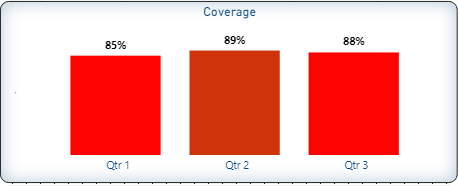
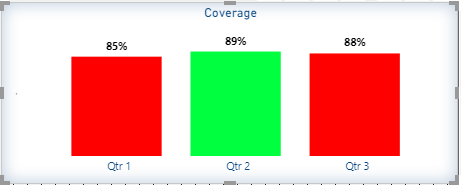
i i need to set a target that below 90% is Red color and Green if it's equal 90% or above, it's working but in different same colors grades.
I need to be only one color grade and screenshots are atteached, please advise.
Regards,
Mohsen
Solved! Go to Solution.
It is bcoz you are trying color code based on the average summarization. If you are using a measure for the chart, you can set formatting based on Field Value in the dropdown based on the measure, you need to create a new measure to set the condition for Green and Red
Refer 3.2: https://www.burningsuit.co.uk/blog/2020/03/power-bi-conditional-formatting/
________________________
If my answer was helpful, please consider Accept it as the solution to help the other members find it
Click on the Thumbs-Up icon if you like this reply 🙂
⭕ Subscribe and learn Power BI from these videos
⚪ Website ⚪ LinkedIn ⚪ PBI User Group
It's working on month level but not on the quarter level, please advise.
It is bcoz you are trying color code based on the average summarization. If you are using a measure for the chart, you can set formatting based on Field Value in the dropdown based on the measure, you need to create a new measure to set the condition for Green and Red
Refer 3.2: https://www.burningsuit.co.uk/blog/2020/03/power-bi-conditional-formatting/
________________________
If my answer was helpful, please consider Accept it as the solution to help the other members find it
Click on the Thumbs-Up icon if you like this reply 🙂
⭕ Subscribe and learn Power BI from these videos
⚪ Website ⚪ LinkedIn ⚪ PBI User Group
@Mohsen_2020
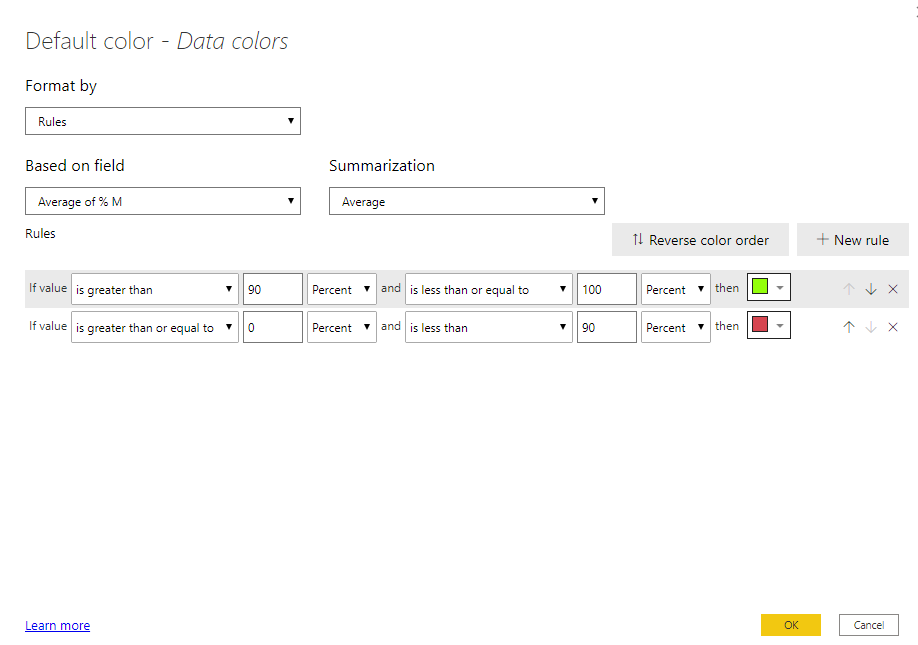
Choose Rule from the Format By Dowpdown and apply follows
________________________
If my answer was helpful, please consider Accept it as the solution to help the other members find it
Click on the Thumbs-Up icon if you like this reply 🙂
⭕ Subscribe and learn Power BI from these videos
⚪ Website ⚪ LinkedIn ⚪ PBI User Group
The Power BI Data Visualization World Championships is back! Get ahead of the game and start preparing now!
| User | Count |
|---|---|
| 39 | |
| 37 | |
| 33 | |
| 33 | |
| 29 |
| User | Count |
|---|---|
| 132 | |
| 90 | |
| 78 | |
| 66 | |
| 65 |