Join us at FabCon Atlanta from March 16 - 20, 2026, for the ultimate Fabric, Power BI, AI and SQL community-led event. Save $200 with code FABCOMM.
Register now!Get Fabric certified for FREE! Don't miss your chance! Learn more
Dears,
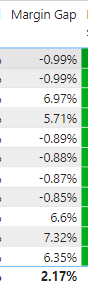
i have this DAX formula and it shows as text because it contains % and Value in the same column
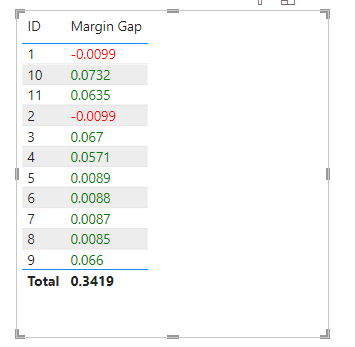
I need to color in read the text in negative
Solved! Go to Solution.
You can create a measure to format.
Format = IF(CONTAINSSTRING([Margin Gap],"-"),"red","green")
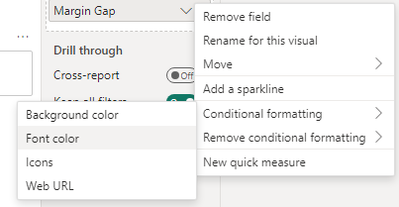
Then put it to the conditional formatting of the [Margin Gap] measure, select font color.
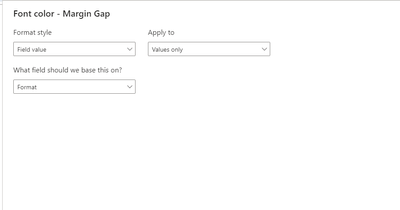
Then set the condition.
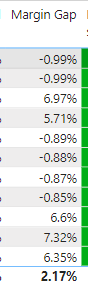
Output
Best Regards!
Yolo Zhu
If this post helps, then please consider Accept it as the solution to help the other members find it more quickly.
Thanks
You can create a measure to format.
Format = IF(CONTAINSSTRING([Margin Gap],"-"),"red","green")
Then put it to the conditional formatting of the [Margin Gap] measure, select font color.
Then set the condition.
Output
Best Regards!
Yolo Zhu
If this post helps, then please consider Accept it as the solution to help the other members find it more quickly.
Share feedback directly with Fabric product managers, participate in targeted research studies and influence the Fabric roadmap.
Check out the January 2026 Power BI update to learn about new features.
| User | Count |
|---|---|
| 69 | |
| 59 | |
| 47 | |
| 20 | |
| 15 |
| User | Count |
|---|---|
| 106 | |
| 102 | |
| 38 | |
| 27 | |
| 27 |