Join us at FabCon Atlanta from March 16 - 20, 2026, for the ultimate Fabric, Power BI, AI and SQL community-led event. Save $200 with code FABCOMM.
Register now!Vote for your favorite vizzies from the Power BI Dataviz World Championship submissions. Vote now!
Hi Everyone,
I started using Power BI from 2-3days. I am trying to create a report with Matrix.
I have taken date(as weeks in columns) and Names in Rows and field1(a dimension basically) and field2(Measure) in Values.
Now i want to color the report based on field1.
Field1 is having values like this:: a,b,c,d, general etc.,
If a then 'Green'
else if b then 'Light Green'
else if c then 'Red'
else if d then 'Blue'
else 'yellow'
But so far i have seen field1 is taking to summarization and so if i go for conditional formatting i couldn't take as a proper dimension rather it is giving me first/last/count/countd. I couldnt de summarize it and apply color here.
Is there any way that i can apply color to my cells based on the dimension values in a matrix format.
Solved! Go to Solution.
Hi @lprabhal
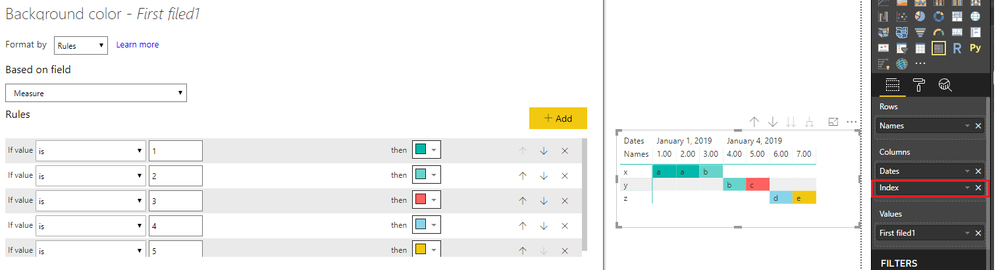
I would suggest you add an index column in query editor and drag it in matrix.Then create a measure and use it in conditional formatting.
Measure = SWITCH(MAX(Table1[filed1]),"a",1,"b",2,"c",3,"d",4,5)
Regards,
Hi @lprabhal
I would suggest you add an index column in query editor and drag it in matrix.Then create a measure and use it in conditional formatting.
Measure = SWITCH(MAX(Table1[filed1]),"a",1,"b",2,"c",3,"d",4,5)
Regards,
Vote for your favorite vizzies from the Power BI World Championship submissions!
If you love stickers, then you will definitely want to check out our Community Sticker Challenge!
Check out the January 2026 Power BI update to learn about new features.
| User | Count |
|---|---|
| 64 | |
| 56 | |
| 43 | |
| 20 | |
| 17 |
| User | Count |
|---|---|
| 123 | |
| 108 | |
| 44 | |
| 32 | |
| 26 |