This time we’re going bigger than ever. Fabric, Power BI, SQL, AI and more. We're covering it all. You won't want to miss it.
Learn moreLevel up your Power BI skills this month - build one visual each week and tell better stories with data! Get started
Hi All,
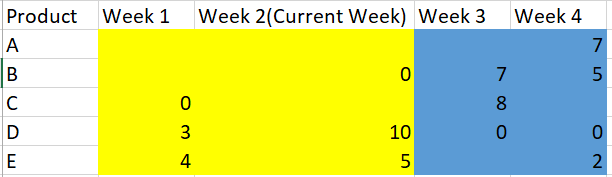
I am facing an issue while applying conditional formatting. Please find below requirement with expected output and current output.
Note: 1) The values are sum of sales.
2) Blank means product was not available for a particular week hence blank
3) Blank can't be replaced with 0. That's the business requirement
Expected : The requirement is when week number<= current week, then color code yellow else blue.
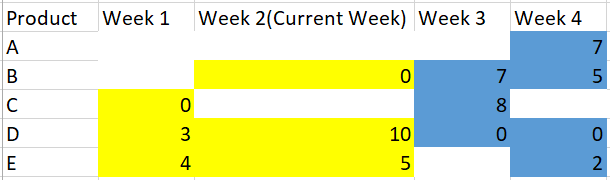
But instead of the above, I get this:
Issue: The DAX is not taking blank values into consideration. I have applied 3-4 methods. But none of them are working on blank values.
I have tried: if( week number<= current week && Sum(Sales)) = BLANK(), then color code yellow else blue.
Can anybody please let me know the solution of this problem?
Thanks,
Himanshu
Solved! Go to Solution.
Hi @himanshu56 ,
We can create a measure as value field after create a spreated calculated table as the column header:
Calculated table:
Week = ADDCOLUMNS(DISTINCT('Table'[WeekNumber]),"Week Name","Week "&[WeekNumber])
Measure:
total = IF(COUNTROWS('Table')=0,BLANK(),CALCULATE(SUM('Table'[Value]),FILTER('Table','Table'[WeekNumber] in DISTINCT('Week'[WeekNumber])))) & ""
Color Field Measure:
Color = IF(SELECTEDVALUE('Week'[WeekNumber])<=[Current Week],"#FFFF00","#0000FF")
Best regards,
Hi @himanshu56 ,
How about the result after you follow the suggestions mentioned in my original post?Could you please provide more details about it If it doesn't meet your requirement?
Best regards,
Hi @himanshu56 ,
We can create a measure as value field after create a spreated calculated table as the column header:
Calculated table:
Week = ADDCOLUMNS(DISTINCT('Table'[WeekNumber]),"Week Name","Week "&[WeekNumber])
Measure:
total = IF(COUNTROWS('Table')=0,BLANK(),CALCULATE(SUM('Table'[Value]),FILTER('Table','Table'[WeekNumber] in DISTINCT('Week'[WeekNumber])))) & ""
Color Field Measure:
Color = IF(SELECTEDVALUE('Week'[WeekNumber])<=[Current Week],"#FFFF00","#0000FF")
Best regards,
Check out the April 2026 Power BI update to learn about new features.
Sign up to receive a private message when registration opens and key events begin.
If you have recently started exploring Fabric, we'd love to hear how it's going. Your feedback can help with product improvements.
| User | Count |
|---|---|
| 39 | |
| 28 | |
| 28 | |
| 22 | |
| 18 |
| User | Count |
|---|---|
| 67 | |
| 37 | |
| 32 | |
| 26 | |
| 25 |