Learn from the best! Meet the four finalists headed to the FINALS of the Power BI Dataviz World Championships! Register now
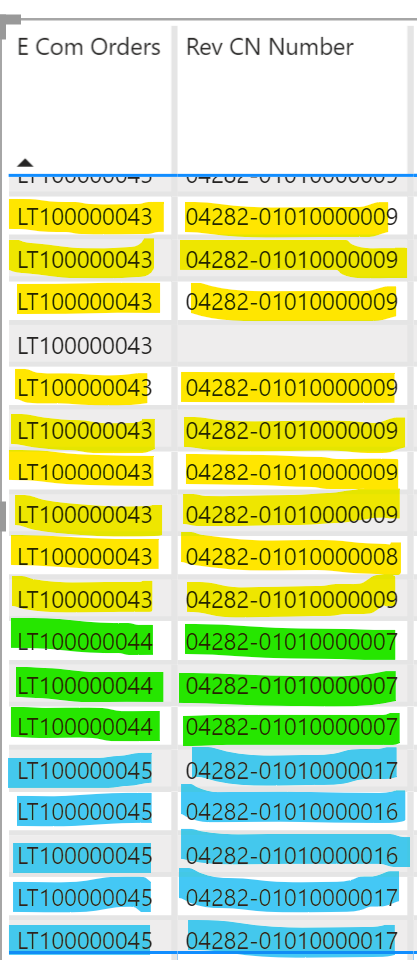
The two columns belongs to the same table:
1. Web Order
2. Web Order Shipment No. (shipment number can be more than 1, due to bigger order)
is there any way to colour code (for example) them to quickly identify which Order belong to which Shipments.
Thanks.
Solved! Go to Solution.
Hi @shakirkhanani ,
There is a way to solve your question.
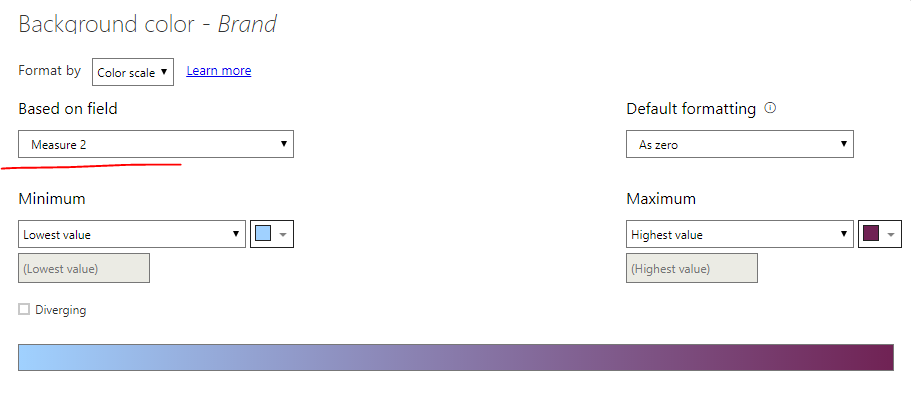
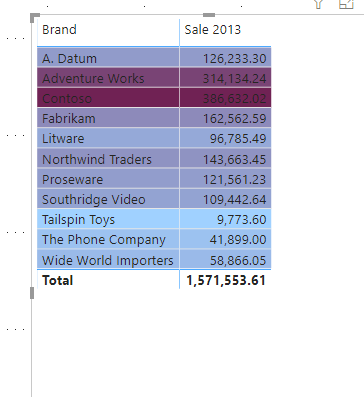
As you can see, I create a measure, which is used to distinguish and mark my dataDistinguish and mark my data. This step is very import.
Here is my measure:
Measure 2 =
CALCULATE(
SUM([Sale 2013]),
ALLEXCEPT(
Sales,
Sales[Brand]
)
)
And here's related articel:
https://docs.microsoft.com/en-us/power-bi/desktop-conditional-table-formatting
Best regards,
Lionel Chen
If this post helps, then please consider Accept it as the solution to help the other members find it more quickly.
Awesome! worked like a charm... Thank you so much.
Hi @shakirkhanani ,
There is a way to solve your question.
As you can see, I create a measure, which is used to distinguish and mark my dataDistinguish and mark my data. This step is very import.
Here is my measure:
Measure 2 =
CALCULATE(
SUM([Sale 2013]),
ALLEXCEPT(
Sales,
Sales[Brand]
)
)
And here's related articel:
https://docs.microsoft.com/en-us/power-bi/desktop-conditional-table-formatting
Best regards,
Lionel Chen
If this post helps, then please consider Accept it as the solution to help the other members find it more quickly.
| User | Count |
|---|---|
| 56 | |
| 42 | |
| 30 | |
| 18 | |
| 16 |
| User | Count |
|---|---|
| 70 | |
| 58 | |
| 38 | |
| 22 | |
| 22 |