This is best Fabric, Power BI, SQL and AI community event. How do we know? The last event sold out! Save €200 with code FABCMTY200.
Register nowThe Fabric community is upgrading! Read all of the details including the timeline and what you can expect. Learn more
Hi,
I have a matrix with categories on rows (blacked out) week num (1..52) and day (mon to sun) on columns and some dates as values when a submission was made..
I want to give background color to these values based on the day they are submitted on...
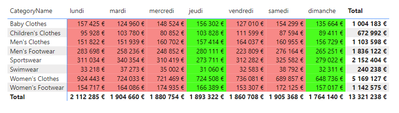
Thursday and Sunday: Green
Rest of the days: Red
How to do this?
Thanks in advance.
Solved! Go to Solution.
Hi @Anonymous ,
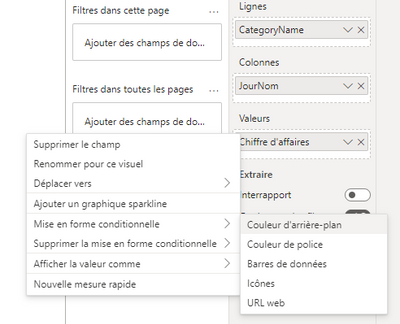
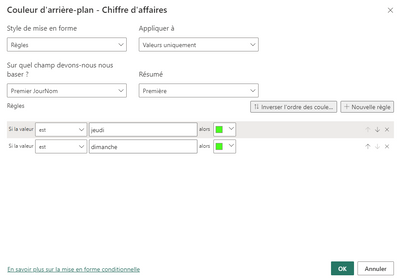
First change the default background of your lines to red. Then add a conditionnal formatting to your dates used as values.
You have to use the day field ("JourNom" in my report) in your conditionnal formatting.
Finally:
If I answered to your question, please mark my post as a solution.
Best,
Hi @Anonymous ,
First change the default background of your lines to red. Then add a conditionnal formatting to your dates used as values.
You have to use the day field ("JourNom" in my report) in your conditionnal formatting.
Finally:
If I answered to your question, please mark my post as a solution.
Best,
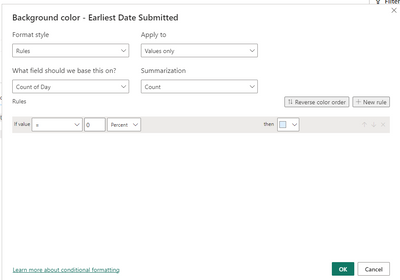
I'm not able to enter a text value for the condition.. its only accepting a numeric value
This option has been available since (I think) the beginning of 2023. If your version of PBI Desktop is older, you can either update your application, or try using a field like "DayNumber" (1 for Monday, 2 for Tuesday, ..., 7 for Sunday). Then create a rule that says "green background when the minimum of my day number equals 4" (for Thursday) and the same for 7 (for Sunday).
Join us in Barcelona for FabCon and SQLCon, the Fabric, Power BI, SQL, and AI community event. Save €200 with code FABCMTY200.
| User | Count |
|---|---|
| 27 | |
| 22 | |
| 20 | |
| 18 | |
| 14 |
| User | Count |
|---|---|
| 25 | |
| 20 | |
| 20 | |
| 20 | |
| 20 |