cancel
Showing results for 
Search instead for 
Did you mean: 

Get Fabric Certified for FREE during Fabric Data Days. Don't miss your chance! Request now

Reply
Anonymous
Not applicable

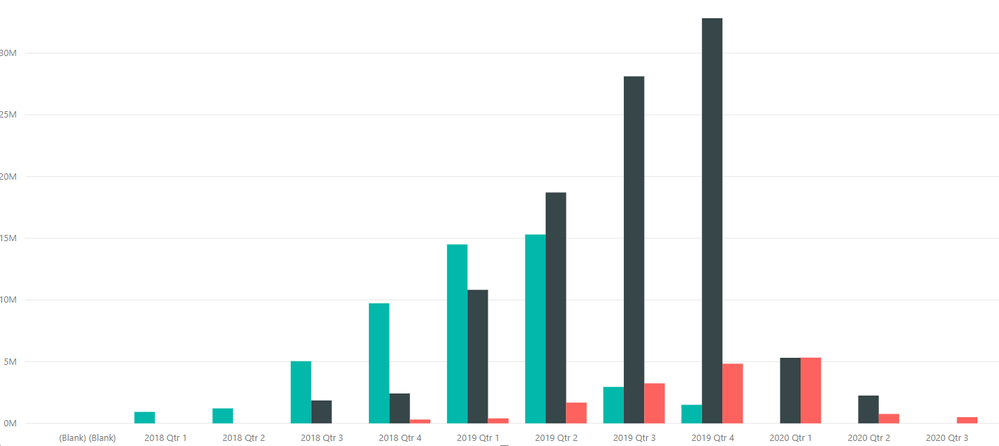
Clustered column chart stack on Top

Hi,


I have created the attached visualization.But I would like to stack the values on top of each other rather than side by side-depicting the relative position-which is the highest total value and so on.I tried the 100% stached column chart but it just shows 100% on Y axis and not the relative comparison among the values!

Is it possible-any suggestions what can be done?

d1.PNG


1 ACCEPTED SOLUTION
PattemManohar
Community Champion
Community Champion

@Anonymous  Please use "Stacked Column Chart" instead of "Clustered Column Chart"


Did I answer your question? Mark my post as a solution!

Proud to be a PBI Community Champion


View solution in original post

1 REPLY 1
PattemManohar
Community Champion
Community Champion

@Anonymous  Please use "Stacked Column Chart" instead of "Clustered Column Chart"


Did I answer your question? Mark my post as a solution!

Proud to be a PBI Community Champion


Helpful resources

Announcements
November Power BI Update Carousel

Power BI Monthly Update - November 2025

Check out the November 2025 Power BI update to learn about new features.

Fabric Data Days Carousel

Fabric Data Days

Advance your Data & AI career with 50 days of live learning, contests, hands-on challenges, study groups & certifications and more!

FabCon Atlanta 2026 carousel

FabCon Atlanta 2026

Join us at FabCon Atlanta, March 16-20, for the ultimate Fabric, Power BI, AI and SQL community-led event. Save $200 with code FABCOMM.

Top Solution Authors
Top Kudoed Authors