Join us at FabCon Atlanta from March 16 - 20, 2026, for the ultimate Fabric, Power BI, AI and SQL community-led event. Save $200 with code FABCOMM.
Register now!The Power BI Data Visualization World Championships is back! Get ahead of the game and start preparing now! Learn more
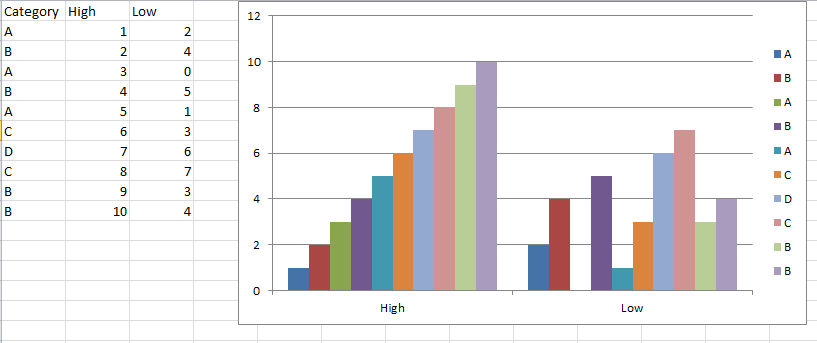
Can anyone please guide me on how to create a similar clustered column chart from data as shown below in Power BI? Looks like fairly straightforward in Excel but not so in Power BI.
Thanks.
Solved! Go to Solution.
@sree85 , You might have to unpivot high and low to get data in this manner
https://radacad.com/pivot-and-unpivot-with-power-bi
@sree85 - I guess you need to unpivot the data to get the expected result.
Step 1: GO to Transform query editor
Step 2: Select High and Low Column and under Transform Menu click on Unpivot Columns.
Step 3: Then Save and close the editor.
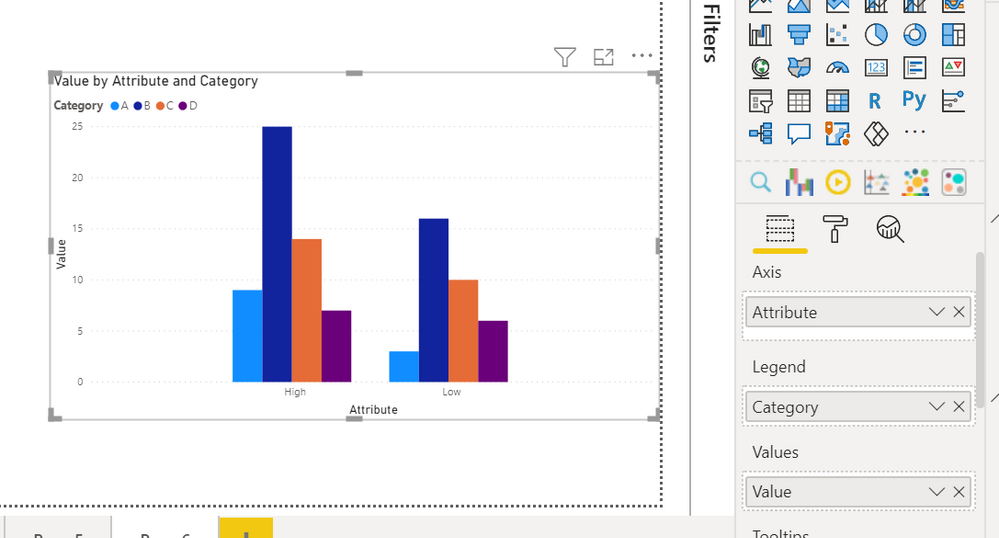
Step 4: Take Clustered column chart from visualization pane and put Attribute Column on Axis, Category column on Lengend, and Value column on Values option.
so, you'll get something like below:
@sree85 - I guess you need to unpivot the data to get the expected result.
Step 1: GO to Transform query editor
Step 2: Select High and Low Column and under Transform Menu click on Unpivot Columns.
Step 3: Then Save and close the editor.
Step 4: Take Clustered column chart from visualization pane and put Attribute Column on Axis, Category column on Lengend, and Value column on Values option.
so, you'll get something like below:
Check out the November 2025 Power BI update to learn about new features.
Advance your Data & AI career with 50 days of live learning, contests, hands-on challenges, study groups & certifications and more!
| User | Count |
|---|---|
| 58 | |
| 45 | |
| 42 | |
| 21 | |
| 18 |