cancel
Showing results for 
Search instead for 
Did you mean: 

View all the Fabric Data Days sessions on demand. View schedule

Reply
Scott_J
Regular Visitor

Clustered Stacked Chart with Subcounts on one table

I have a single table that I want to graph on a clustered stacked chart.  The table looks something like the following:

Owners          Location           SuperGroup     OtherGroup

Joe                 Atlanta                     Y

Joe                 Atlanta                                             Y

Joe                 Atlanta

Joe                 New York                 Y

Joe                 Pittsburgh

Mary              Kansas City               Y

Mary              Kansas City

Mary              Denver                      Y


I would like to have Owners on the X axis.  Each Location would be a column within each owner.  The column stack would represent the total amount of records for a giving Owner/Location combo, while the a portion of that stack would represent a count of all records for a given Owner/Location combo where either SuperGroup OR OtherGroup = Y.


I have been playing around with measures with distinct but can't figure it out.


Thanks in advance.

-Scott_J

1 ACCEPTED SOLUTION
TomMartens
Super User
Super User

Hey,


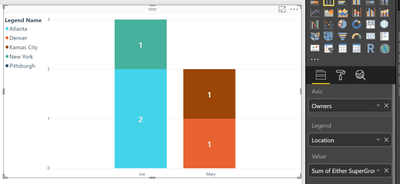
first I would create a calculated column like so


Either SuperGroup or OtherGroup = 
IF(OR('Table1'[SuperGroup] = "Y", 'Table1'[OtherGroup] = "Y"),1,0)

then a measure like so


Sum of Either SuperGroup or OtherGroup = 
SUM('Table1'[Either SuperGroup or OtherGroup]) 

this leads to chart like this

image.png


Hopefully this is what you are looking for


Regards

Tom


Did I answer your question? Mark my post as a solution, this will help others!

Proud to be a Super User!
I accept Kudos 😉
Hamburg, Germany

View solution in original post

2 REPLIES 2
Ashish_Mathur
Super User
Super User

Hi,


I'd suggest you select the first 2 columns and "Unpivot the other columns" to convert your dataset into a 4 column one (the third and fouth columns being Groups and Response) using the Query Editor.  Then create your chart.


Regards,
Ashish Mathur
http://www.ashishmathur.com
https://www.linkedin.com/in/excelenthusiasts/
TomMartens
Super User
Super User

Hey,


first I would create a calculated column like so


Either SuperGroup or OtherGroup = 
IF(OR('Table1'[SuperGroup] = "Y", 'Table1'[OtherGroup] = "Y"),1,0)

then a measure like so


Sum of Either SuperGroup or OtherGroup = 
SUM('Table1'[Either SuperGroup or OtherGroup]) 

this leads to chart like this

image.png


Hopefully this is what you are looking for


Regards

Tom


Did I answer your question? Mark my post as a solution, this will help others!

Proud to be a Super User!
I accept Kudos 😉
Hamburg, Germany

Helpful resources

Announcements
November Power BI Update Carousel

Power BI Monthly Update - November 2025

Check out the November 2025 Power BI update to learn about new features.

Fabric Data Days Carousel

Fabric Data Days

Advance your Data & AI career with 50 days of live learning, contests, hands-on challenges, study groups & certifications and more!

FabCon Atlanta 2026 carousel

FabCon Atlanta 2026

Join us at FabCon Atlanta, March 16-20, for the ultimate Fabric, Power BI, AI and SQL community-led event. Save $200 with code FABCOMM.

Top Solution Authors
Top Kudoed Authors