Don't miss your chance to take the Fabric Data Engineer (DP-600) exam for FREE! Find out how by attending the DP-600 session on April 23rd (pacific time), live or on-demand.
Learn moreNext up in the FabCon + SQLCon recap series: The roadmap for Microsoft SQL and Maximizing Developer experiences in Fabric. All sessions are available on-demand after the live show. Register now
How do I get the column chart to show the Same period last year values? It currently only shows the value from the selected date range.
I want it to have the ability to be filtered by the date, but also show the compared count from the samePeriodlastYear.
Solved! Go to Solution.
@Anonymous
I'm not very clear about your table structure and visuals used. I'd like to give a simple sample and you can adjust the DAX formula according to your tables and columns.
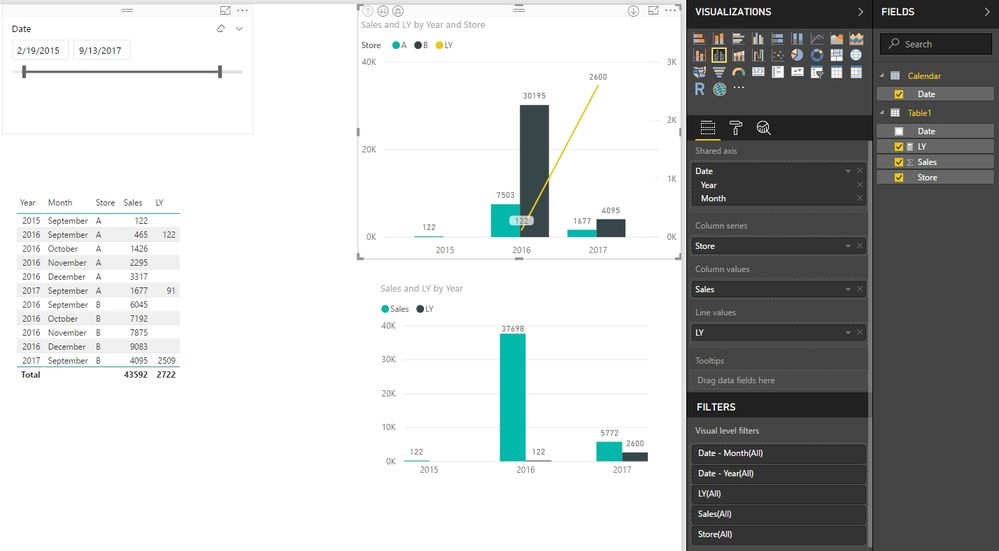
Please refer to the attached PBIX file, there are three columns (Date, Sales, Store) in Table1 and I create a Calendar table to make relationship between them. In such way, we can show the values for selected period. With following measure, we can show the same period last year values.
LY =
CALCULATE (
SUM ( Table1[Sales] ),
SAMEPERIODLASTYEAR ( 'Calendar'[Date] ),
VALUES ( Table1[Store] )
)
Best Regards,
Herbert
@Anonymous
Please let me know if you still have problem on it.
Best Regards,
Herbert
@Anonymous
Does above solution help?
Best Regards,
Herbert
@Anonymous
I'm not very clear about your table structure and visuals used. I'd like to give a simple sample and you can adjust the DAX formula according to your tables and columns.
Please refer to the attached PBIX file, there are three columns (Date, Sales, Store) in Table1 and I create a Calendar table to make relationship between them. In such way, we can show the values for selected period. With following measure, we can show the same period last year values.
LY =
CALCULATE (
SUM ( Table1[Sales] ),
SAMEPERIODLASTYEAR ( 'Calendar'[Date] ),
VALUES ( Table1[Store] )
)
Best Regards,
Herbert
If you have recently started exploring Fabric, we'd love to hear how it's going. Your feedback can help with product improvements.
A new Power BI DataViz World Championship is coming this June! Don't miss out on submitting your entry.
Experience the highlights from FabCon & SQLCon, available live and on-demand starting April 14th.
| User | Count |
|---|---|
| 48 | |
| 40 | |
| 40 | |
| 20 | |
| 16 |
| User | Count |
|---|---|
| 70 | |
| 67 | |
| 32 | |
| 27 | |
| 26 |