cancel
Showing results for 
Search instead for 
Did you mean: 

The Power BI Data Visualization World Championships is back! It's time to submit your entry. Live now!

Reply
kurumy
Frequent Visitor

Client Activity evolution between two years

Hello everyone 🙂

i've been asked to find a way to compare customers activity between two years.

I don't need to have the exact values of their purchases but i have to show if between one time interval to an another they have been working with us. ( From 2016 to 2017).


Three answer can  be possible :

  • New customer
  • A steady customer
  • A customer who stopped working with us.

I'm a beginner with DAX language but i would like to find a way to exprim my request. 


If you need more information about my request you can ask me futher details.

Best regards

Kurumy


5 REPLIES 5
v-chuncz-msft
Community Support
Community Support

@kurumy,


You may add measures as shown below.

new =
COUNTROWS (
    DISTINCT (
        EXCEPT (
            SELECTCOLUMNS ( Table1, "customerId", Table1[customerId] ),
            SELECTCOLUMNS (
                FILTER ( ALL ( Table1 ), Table1[year] = MAX ( Table1[year] ) - 1 ),
                "customerId", Table1[customerId]
            )
        )
    )
)
steady =
COUNTROWS (
    DISTINCT (
        INTERSECT (
            SELECTCOLUMNS ( Table1, "customerId", Table1[customerId] ),
            SELECTCOLUMNS (
                FILTER ( ALL ( Table1 ), Table1[year] = MAX ( Table1[year] ) - 1 ),
                "customerId", Table1[customerId]
            )
        )
    )
)
stopped =
COUNTROWS (
    DISTINCT (
        EXCEPT (
            SELECTCOLUMNS (
                FILTER ( ALL ( Table1 ), Table1[year] = MAX ( Table1[year] ) - 1 ),
                "customerId", Table1[customerId]
            ),
            SELECTCOLUMNS ( Table1, "customerId", Table1[customerId] )
        )
    )
)
Community Support Team _ Sam Zha
If this post helps, then please consider Accept it as the solution to help the other members find it more quickly.

Hi Smiley Happy


Thanks that what i wanted !


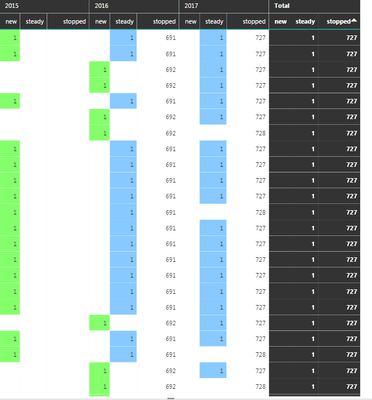
But i have a problem the measure "Stopped" is not working. It only show me "ALL" and don't integrate the filter.

Do you have a solution for that ?


ThanksCapture.PNG

@kurumy,


Please take a closer look at measures new and stopped. The only difference is the order of the two expressions for EXCEPT Function.

Community Support Team _ Sam Zha
If this post helps, then please consider Accept it as the solution to help the other members find it more quickly.

I saw that.


As long as  i understand  in the "New" measure you used the function EXCEPT because you compared the orginal table with a filtred table ( with a precise year).  If there is a difference between theses two tables inside the customers ID colonn, the functions count as 1. Am i Right ?


In your formula when you use "-1", is that for choose a filtrer with a the previous year ( year n-1) ?


The data i use is the aggregation of data from 2015,2016,2017. is it possible to use the function except by compare a filtred table from a precise year  (2015 ;2016 or 2017) with the original one ?


thanks

kurumy
Frequent Visitor

Does someone have a solution ?

Helpful resources

Announcements
December 2025 Power BI Update Carousel

Power BI Monthly Update - December 2025

Check out the December 2025 Power BI Holiday Recap!

FabCon Atlanta 2026 carousel

FabCon Atlanta 2026

Join us at FabCon Atlanta, March 16-20, for the ultimate Fabric, Power BI, AI and SQL community-led event. Save $200 with code FABCOMM.