Join us at FabCon Atlanta from March 16 - 20, 2026, for the ultimate Fabric, Power BI, AI and SQL community-led event. Save $200 with code FABCOMM.
Register now!The Power BI Data Visualization World Championships is back! Get ahead of the game and start preparing now! Learn more
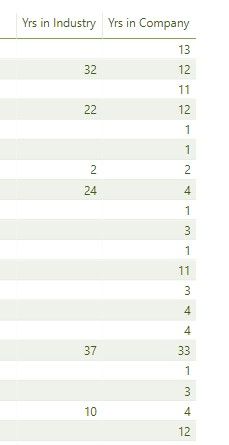
I have two calculated columns in my report - years at company and years in industry. I can't work out why when I select both in a report one of the columns is returning blank values? When I remove one of the colums the blank disappear.
Solved! Go to Solution.
@Anonymous
You may Use performance analyzer in Power BI Desktop to check query and take a look at Show items with no data.
Table visuals only displays rows where the measure returns data so if you only select the [Yrs in Industry] it will not show the blank rows. When you add in [Yrs in Company] it has data in that measure for all those rows so it shows blank under [Yrs in Industry] where it has no data.
@Anonymous
You may Use performance analyzer in Power BI Desktop to check query and take a look at Show items with no data.
Check out the November 2025 Power BI update to learn about new features.
Advance your Data & AI career with 50 days of live learning, contests, hands-on challenges, study groups & certifications and more!
| User | Count |
|---|---|
| 58 | |
| 45 | |
| 42 | |
| 21 | |
| 18 |