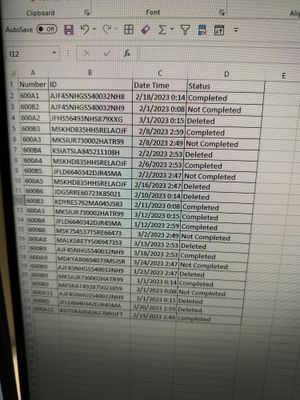
You need to sort your table by the Participant ID and then by the Date Time of the status to make sure that the rank is applied in the correct order.
Then you need to add a custom column that assigns a starting rank based on the status.
You will group your data by Participant ID and then apply the ranking logic within each group. This is where you will also reset the rank for each new 'Completed' ID.
Inside the for exampleGroup Byfor example operation, you'll need to create a custom column that applies the ranking logic based on the category rank you've defined.
For 'Completed', you'll increment numerically.
For 'Not Completed' and 'Deleted', you might need to handle these as special cases, depending on how you want to increment them ('A', 'B', 'C', ... for 'Not Completed' and numeric for 'Deleted').
Since M-query doesn't have a direct function for ranking with such specific conditions, you'll often need to use a combination of for exampleTable.AddIndexColumnfor example (to add a numeric index) and custom logic to reset and apply ranks based on your rule.
let
    Source = TableSource, // put your source table here
    SortedTable = Table.Sort(Source, {{"Participant ID", Order.Ascending}, {"Date Time", Order.Ascending}}),
    AddCategoryRank = Table.AddColumn(SortedTable, "Category Rank", each if [Status] = "Completed" then 1 else if [Status] = "Not Completed" then "A" else 1001),

    Grouped = Table.Group(AddCategoryRank, "Participant ID", {"Data", each _, type table}),

    Ranked = Table.TransformColumns(Grouped, {"Data", each Table.AddIndexColumn(_, "Rank", 1, 1, Int64.Type)})
in
    Ranked
Proud to be a Power BI Super User !
Microsoft Community : https://docs.microsoft.com/en-us/users/AmiraBedhiafi
Linkedin : https://www.linkedin.com/in/amira-bedhiafi/
StackOverflow : https://stackoverflow.com/users/9517769/amira-bedhiafi
C-Sharp Corner : https://www.c-sharpcorner.com/members/amira-bedhiafi
Power BI Community :https://community.powerbi.com/t5/user/viewprofilepage/user-id/332696