Join us at FabCon Atlanta from March 16 - 20, 2026, for the ultimate Fabric, Power BI, AI and SQL community-led event. Save $200 with code FABCOMM.
Register now!The Power BI Data Visualization World Championships is back! Get ahead of the game and start preparing now! Learn more
Hi all,
I'd like to create two new columns, but I get an error "circular dependency was detected: DailyEntry[Intensity (%)], DailyEntry[Volume (%)], DailyEntry[Intensity (%)]"
The first column I want it to be:
Solved! Go to Solution.
Hi @vaz19 ,
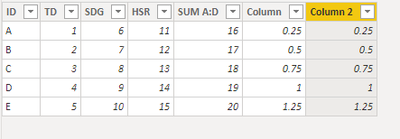
If there is only one data table in the report, you need to set a key column for the table and then use removefilters() in the two calculated columns:
Column =
VAR TD = [TD_Game%]
VAR RESULT = TD / 4
RETURN
CALCULATE ( RESULT, REMOVEFILTERS ( 'Table'[Column 2] ) )
Column 2 =
VAR td = [TD_Game%]
VAR result = td / 4
RETURN
CALCULATE ( result, REMOVEFILTERS ( 'Table'[Column] ) )
Please refer this blog: Avoiding-circular-dependency-errors-in-dax
Best Regards,
Community Support Team _ Yingjie Li
If this post helps, then please consider Accept it as the solution to help the other members find it more quickly.
Hi @vaz19 ,
If there is only one data table in the report, you need to set a key column for the table and then use removefilters() in the two calculated columns:
Column =
VAR TD = [TD_Game%]
VAR RESULT = TD / 4
RETURN
CALCULATE ( RESULT, REMOVEFILTERS ( 'Table'[Column 2] ) )
Column 2 =
VAR td = [TD_Game%]
VAR result = td / 4
RETURN
CALCULATE ( result, REMOVEFILTERS ( 'Table'[Column] ) )
Please refer this blog: Avoiding-circular-dependency-errors-in-dax
Best Regards,
Community Support Team _ Yingjie Li
If this post helps, then please consider Accept it as the solution to help the other members find it more quickly.
The main problem I think is that these look like columns based on measures. Is that right? e.g. [Sprint Distance_Game%]
If so, you need to rewrite the columns to not use measures.
It is based on your model how you make the relations
Did I answer your question? If so, please mark my post as a solution!
Proud to be a Super User!
The Power BI Data Visualization World Championships is back! Get ahead of the game and start preparing now!
| User | Count |
|---|---|
| 39 | |
| 37 | |
| 33 | |
| 32 | |
| 29 |
| User | Count |
|---|---|
| 133 | |
| 88 | |
| 85 | |
| 68 | |
| 64 |