cancel
Showing results for 
Search instead for 
Did you mean: 

The Power BI Data Visualization World Championships is back! Get ahead of the game and start preparing now! Learn more

Reply
Anonymous
Not applicable

Circular DEPENDENCY Relationship

Hi Good People PBI,

I needed to create a new table based on calculation from Table 1 My table looked like this

Table 1:

IDNOStore_NumberSlow 
AA1S1y
AA1S2n
AA1S3y
AA1S4y
AA1S5n
AA1S6y


Because of slow offloading at stores other stores get affected and hence a new coulmn needs to be created as below showing the problem causing stores .For example : S4 is affected because of slow offloading at s1 and s3 as both these storesd are marked as "y"

Table 2:

IDNOStore_NumberAffected by
AA1S2S1
AA1S3S1
AA1S4S1
AA1S4S3
AA1S5S1
AA1S5S3
AA1S5S4
AA1S6S1
AA1S6S3
AA1S6S4


with the help of PBI community the table 2 was created with the code :
Table2 =
GENERATE (Table1,SELECTCOLUMNS (CALCULATETABLE (DISTINCT ( Table1[Store_Number] ),Table1[Index] < EARLIER(Table1[Index] ),Table1[Slow] = "y",ALLEXCEPT ( Table1, Table1[IDNO] )),"Affected by", Table1[Store_Number]))


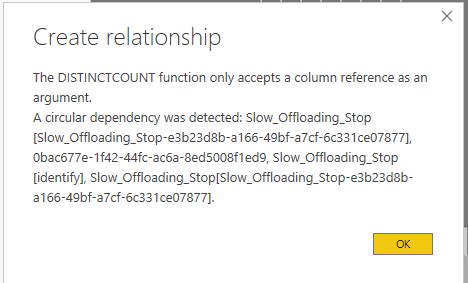
But i am unable to establish a one to many connection from Table 1 to Table2 as the message reads a circular depenecy was detected . I have information in table 1 (such as row count for each store etc.,)that is missing in table 2 and i need to find it only by establishing this relationship. Any work around it that you guys know off? Thanks a lot


5 REPLIES 5
v-lili6-msft
Community Support
Community Support

hi @Anonymous 

Just try to adjust the formula as below:

Table2 = 
GENERATE (
    Table1,
    SELECTCOLUMNS (
        CALCULATETABLE (
            DISTINCT ( Table1[Store_Number] ),
            FILTER(Table1,[Index] < EARLIER ( Table1[Index] )&&
            Table1[Slow ] = "y"&&Table1[IDNO]=EARLIER(Table1[IDNO]))
        ),
        "Affected by", Table1[Store_Number]
    )
)


Regards,

Lin

Community Support Team _ Lin
If this post helps, then please consider Accept it as the solution to help the other members find it more quickly.
Anonymous
Not applicable


Screenshot 2020-09-28 103004.png


Im still facing the same issue when trying to establish the relation ship 😞


P.S: slow_offloading_Stops is nothing but table 2 and [identify] is a unique ID for each record in Table 1 to be mapped as one to many relationship

hi @Anonymous 

2.JPG


this work in my side, and here is my sample pbix file, please try it,

and if you still have the problem, please share your sample pbix file and your expected output.


Regards,

Lin

Community Support Team _ Lin
If this post helps, then please consider Accept it as the solution to help the other members find it more quickly.
AntrikshSharma
Super User
Super User

@Anonymous  Can you include index column as well in Table1?

MFelix
Super User
Super User

Hi @Anonymous ,


Don't know what is the calculation you are trying to achieve but if you use this code as variable in a measure maybe you can calculate other values.


Has you can see below using this measure:

Measure =
VAR temp_table =
    GENERATE (
        'Table';
        SELECTCOLUMNS (
            CALCULATETABLE (
                DISTINCT ( 'Table'[Store_Number] );
                'Table'[Index] < EARLIER ( 'Table'[Index] );
                'Table'[Slow ] = "y";
                ALLEXCEPT ( 'Table'; 'Table'[IDNO] )
            );
            "Affected by"; 'Table'[Store_Number]
        )
    )
RETURN
    COUNTX ( temp_table; 'Table'[Slow ] )

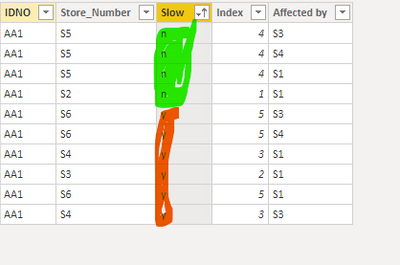
I'm abble to count the Y and no of the second table altough the initial code only has  4 y and 2 no:

MFelix_0-1601048871571.png


MFelix_1-1601048957280.png


Regards

Miguel Félix


Did I answer your question? Mark my post as a solution!

Proud to be a Super User!

Check out my blog: Power BI em Português


Helpful resources

Announcements
Power BI DataViz World Championships

Power BI Dataviz World Championships

The Power BI Data Visualization World Championships is back! Get ahead of the game and start preparing now!

December 2025 Power BI Update Carousel

Power BI Monthly Update - December 2025

Check out the December 2025 Power BI Holiday Recap!

FabCon Atlanta 2026 carousel

FabCon Atlanta 2026

Join us at FabCon Atlanta, March 16-20, for the ultimate Fabric, Power BI, AI and SQL community-led event. Save $200 with code FABCOMM.