Join us at FabCon Atlanta from March 16 - 20, 2026, for the ultimate Fabric, Power BI, AI and SQL community-led event. Save $200 with code FABCOMM.
Register now!The Power BI Data Visualization World Championships is back! Get ahead of the game and start preparing now! Learn more
I want to compare "Base Price" to any number of different Prices that are in the same table. I want the user to select which price is used.
Table
| Record | Year | Base Price | Alt Price 1 | Alt Price 2 | Alt Price 3 |
| 1 | 2020 | 50 | 55 | 45 | 65 |
| 2 | 2021 | 51 | 56 | 46 | 66 |
The slicer will list Alt Price 1, Alt Price 2, Alt Price 3
I need to be able to compare Base Price vs. selected Alt Price. I want to use time-series charts and create calculated measures off of whatever Alt Price is chosen.
Suggestions on where to look are most appreciated.
Solved! Go to Solution.
Hi @paulmorgan ,
Here are the steps you can follow:
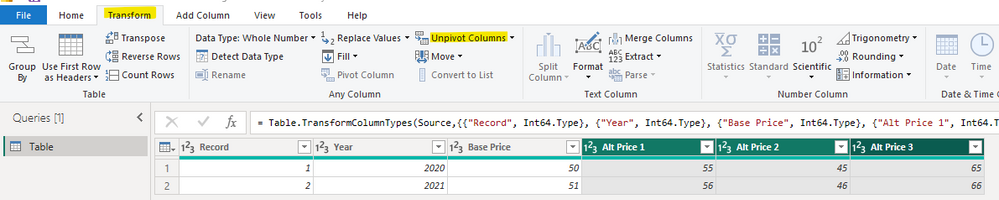
1. Transform – [Alt Price1], [Alt Price2], [Alt Price3] – Unpivot Columns.
2. Create measure.
Measure =
var _select=SELECTCOLUMNS('Table',"1",[Attribute])
return
SUMX(FILTER(ALL('Table'),'Table'[Attribute] in _select),[Value])
3. Result:
Best Regards,
Liu Yang
If this post helps, then please consider Accept it as the solution to help the other members find it more quickly
Thank you so much!
Hi @paulmorgan ,
Here are the steps you can follow:
1. Transform – [Alt Price1], [Alt Price2], [Alt Price3] – Unpivot Columns.
2. Create measure.
Measure =
var _select=SELECTCOLUMNS('Table',"1",[Attribute])
return
SUMX(FILTER(ALL('Table'),'Table'[Attribute] in _select),[Value])
3. Result:
Best Regards,
Liu Yang
If this post helps, then please consider Accept it as the solution to help the other members find it more quickly
The Power BI Data Visualization World Championships is back! Get ahead of the game and start preparing now!
| User | Count |
|---|---|
| 41 | |
| 38 | |
| 36 | |
| 30 | |
| 28 |
| User | Count |
|---|---|
| 128 | |
| 88 | |
| 79 | |
| 67 | |
| 62 |