cancel
Showing results for 
Search instead for 
Did you mean: 

The Power BI Data Visualization World Championships is back! Get ahead of the game and start preparing now! Learn more

Reply
Anonymous
Not applicable

Checking boolean column value with custom column

Hi,


I have a problem when creating custom column and need help on how to check boolean column value. I am trying to create following InvFilter custom column where are checked values of Type__c and At_bookkeeping__c columns and based on these InvFilter value sould be set to TRUE or FALSE.


Custom column.PNG

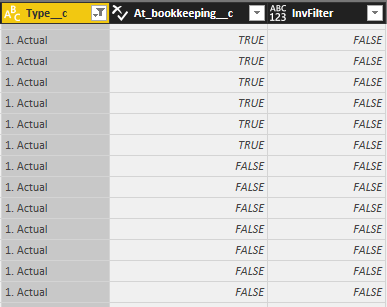
However InvFilter is set to FALSE on all rows no matter what is the value of At_bookkeeping__c.


Columns.PNG


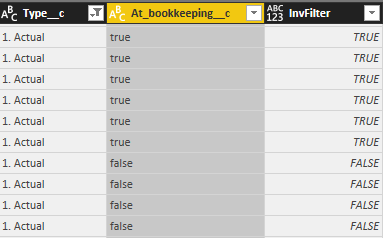
If I change At_bookkeeping__c column type to Text and change formula to [Type__c] = "1. Actual" and [At_bookkeeping__c] = "true") then InvFilter column gets correct values.


Columns2.PNG


This formula is only part of the final formula, there are several boolean type columns which should be checked in final formula and because of this I wouldn't like to change those to Text type columns.

So can anyone help, what is the correct format to check boolean type column values?

1 ACCEPTED SOLUTION
ImkeF
Community Champion
Community Champion

In your formula: Instead of writing "TRUE" you have to write true


"TRUE" is a text expression and true is one of the boolean expressions.


M is also case sensitive, so just true or false allowed here 🙂


Imke Feldmann

www.TheBIccountant.com -- How to integrate M-code into your solution  -- Check out more PBI- learning resources here

Imke Feldmann (The BIccountant)

If you liked my solution, please give it a thumbs up. And if I did answer your question, please mark this post as a solution. Thanks!

How to integrate M-code into your solution -- How to get your questions answered quickly -- How to provide sample data -- Check out more PBI- learning resources here -- Performance Tipps for M-queries

View solution in original post

2 REPLIES 2
ImkeF
Community Champion
Community Champion

In your formula: Instead of writing "TRUE" you have to write true


"TRUE" is a text expression and true is one of the boolean expressions.


M is also case sensitive, so just true or false allowed here 🙂


Imke Feldmann

www.TheBIccountant.com -- How to integrate M-code into your solution  -- Check out more PBI- learning resources here

Imke Feldmann (The BIccountant)

If you liked my solution, please give it a thumbs up. And if I did answer your question, please mark this post as a solution. Thanks!

How to integrate M-code into your solution -- How to get your questions answered quickly -- How to provide sample data -- Check out more PBI- learning resources here -- Performance Tipps for M-queries

Anonymous
Not applicable

Thanks a lot Imke,


That solved the problem and now I got the correct results in custom column.


BR

Aksa

Helpful resources

Announcements
Power BI DataViz World Championships

Power BI Dataviz World Championships

The Power BI Data Visualization World Championships is back! Get ahead of the game and start preparing now!

December 2025 Power BI Update Carousel

Power BI Monthly Update - December 2025

Check out the December 2025 Power BI Holiday Recap!

FabCon Atlanta 2026 carousel

FabCon Atlanta 2026

Join us at FabCon Atlanta, March 16-20, for the ultimate Fabric, Power BI, AI and SQL community-led event. Save $200 with code FABCOMM.